

Latest Version
4.2.0
January 02, 2026
SimonsVoss Technologies
Tools
Android
0
Free
com.simonsvoss.mobilekey.adminapp
Report a Problem
More About SimonsVoss MobileKey
Comprehensive Guide to MobileKey Door Management and Security Features
In today's fast-paced world, effective door management and security are paramount. The MobileKey system offers a robust solution for managing door statuses, remote openings, and user access. This article delves into the essential features of the MobileKey web application, ensuring you maximize its potential for enhanced security and convenience.
Understanding Door Statuses with DM Cylinder
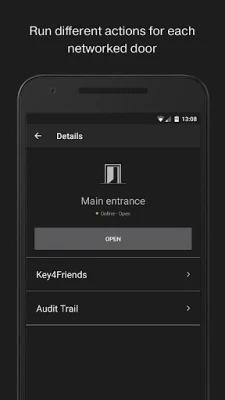
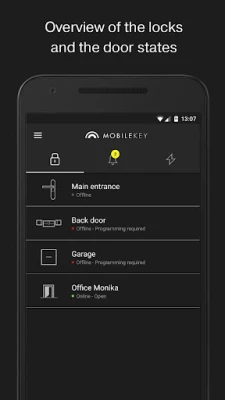
The MobileKey system provides a detailed overview of door statuses, particularly when utilizing a DM cylinder. This feature allows users to monitor the current state of each door, ensuring that you are always informed about access points within your premises. Whether a door is locked, unlocked, or in need of maintenance, the MobileKey application keeps you updated in real-time.
Remote Openings for Enhanced Accessibility
One of the standout features of the MobileKey system is its ability to facilitate remote openings. This functionality allows authorized users to unlock doors from a distance, providing unparalleled convenience. Whether you are at home or on the go, you can grant access to visitors or service personnel without being physically present. This feature is particularly beneficial for businesses that require flexible access management.
Key4Friends Authorizations Made Easy
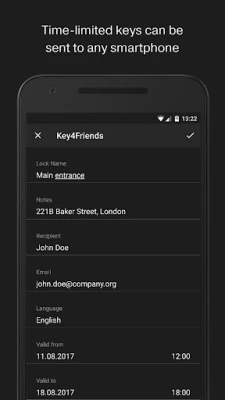
With the MobileKey application, sending Key4Friends authorizations is a seamless process. This feature enables users to share temporary access with friends or family members, ensuring that they can enter your premises when needed. The application allows you to set specific time frames for access, enhancing security while providing flexibility for your guests.
Access List Management
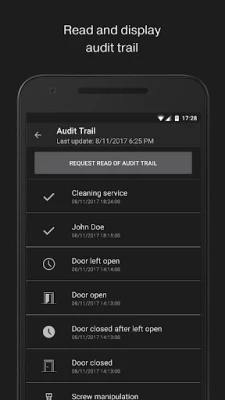
Managing who has access to your property is crucial for security. The MobileKey application allows users to read and display an access list, providing a comprehensive overview of who can enter specific areas. This feature not only enhances security but also allows for easy management of access rights, ensuring that only authorized individuals can enter restricted zones.
Real-Time Push Notifications from Event Management
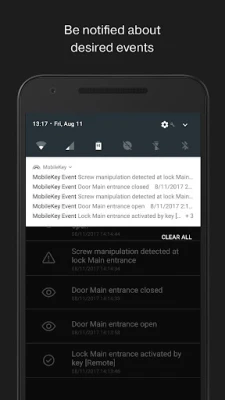
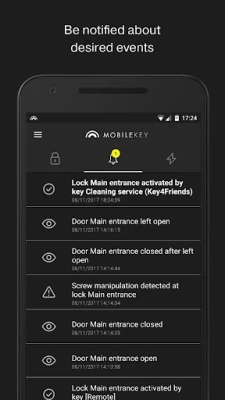
Stay informed with real-time push messages from the MobileKey event management system. This feature alerts you to important events, such as unauthorized access attempts or door status changes. By receiving instant notifications, you can take immediate action to address any security concerns, ensuring the safety of your property.
Enhanced Security with Touch ID
Security is a top priority for MobileKey, and the integration of Touch ID for security-related actions adds an extra layer of protection. Users can disable remote openings, manage Key4Friends authorizations, and control push notifications with a simple touch of their finger. This biometric security feature ensures that only authorized users can make critical changes to the system, safeguarding your access management.
Programming Keys and Locks with USB Config Device
Programming keys and locks is a straightforward process with the MobileKey system, utilizing a USB config device. This device connects to your smartphone via an optional OTG cable, allowing you to program your MobileKey components efficiently. Ensure that your smartphone supports this function to take full advantage of the programming capabilities.
Accessing the MobileKey Web Application
The MobileKey locking plan is exclusively managed through the MobileKey web application, accessible at www.my-mobilekey.com. To utilize the application, you must have valid login credentials for your MobileKey account. If you do not have an account, you can register for free on the website, enabling you to access all the features of the MobileKey system.
Requirements for Optimal Functionality
To ensure smooth operation of the MobileKey application, your mobile device must maintain a stable internet connection, whether through wireless LAN or 3G/4G networks. Additionally, many advanced functions are available only with the online add-on, SmartBridge, which enhances the capabilities of your MobileKey system.
Data Security and Backup Assurance
Your data security is paramount. The MobileKey system stores your information on an audited SimonsVoss server located in Munich, ensuring high standards of data protection and backup. Users can rest assured that their sensitive information is secure and managed with the utmost care.
Getting Started with MobileKey
To begin using the MobileKey system, follow these simple steps:
- Create a free MobileKey account for your use.
- Obtain all necessary MobileKey components, including keys and locks.
- Set up the MobileKey components in the web application, following the precise procedures outlined in the MobileKey manual.
- Program the components using the USB config device.
- Test the components to ensure they function correctly.
- Fit the components as needed, with additional guidance available in the enclosed manuals.
By following these steps, you can effectively manage your door security and access with the MobileKey system, ensuring peace of mind and convenience in your daily operations.
Conclusion
The MobileKey system revolutionizes door management and security, offering a comprehensive suite of features designed to enhance accessibility and protect your property. By leveraging the capabilities of the MobileKey web application, you can ensure that your access management is efficient, secure, and user-friendly. Embrace the future of door security with MobileKey and experience the difference it can make in your life.
Rate the App
User Reviews















Popular Apps










Editor's Choice









