
Latest Version
March 24, 2026
Broadband Savvy
Tools
Android
0
Free
com.signal.signaltest
Report a Problem
More About Signal Test - 5G, 4G, WiFi
Maximize Your Connectivity: A Comprehensive Guide to Using Signal Test for Optimal Signal Strength
In today's fast-paced digital world, maintaining a strong and reliable internet connection is essential. Whether you're streaming your favorite show, working from home, or simply browsing the web, understanding your signal strength can significantly enhance your online experience. The Signal Test app is a powerful tool designed to help you monitor and improve your mobile and WiFi signal strength in real time. This article will guide you through the app's features, metrics, and practical applications to ensure you get the most out of your connectivity.
Understanding Signal Strength Metrics
The Signal Test app provides a comprehensive analysis of your signal quality through various metrics. These metrics are crucial for diagnosing connectivity issues and optimizing your signal strength.
Mobile Signal Metrics: 5G & 4G
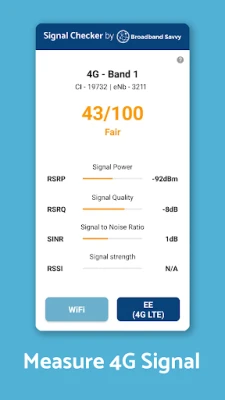
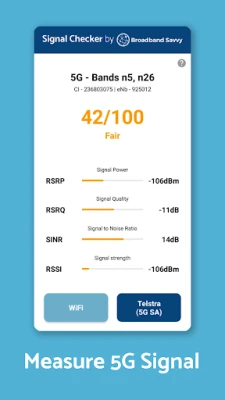
- Reference Signal Received Power (RSRP): This metric measures the strength of the usable signal, providing insight into how well your device can connect to the network.
- Reference Signal Received Quality (RSRQ): This ratio compares the quality of the signal to the overall signal strength, helping you understand the level of congestion and radio interference in your area.
- Signal to Interference + Noise Ratio (SINR): This metric evaluates the total signal against interference and noise, giving you a clear picture of environmental factors affecting your connection.
- Received Signal Strength Indicator (RSSI): While less critical for 4G and 5G, this metric measures the total received signal strength.
WiFi Signal Metrics
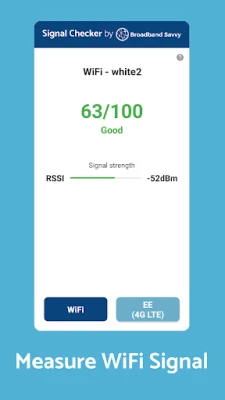
- Received Signal Strength Indicator (RSSI): Similar to mobile metrics, this measures WiFi signal strength and converts it into a score out of 100, allowing for easy assessment of overall quality.
Practical Applications of Signal Test
The Signal Test app is versatile, offering numerous use cases to enhance your connectivity experience:
- Optimal Router Placement: Use the app to identify the best location for your 4G/5G router, ensuring maximum coverage for your home broadband.
- Antenna Orientation: Determine the ideal position and orientation for a 4G/5G antenna to boost your home broadband signal.
- Camping and Caravanning: Find the best spots for camping or setting up a caravan with reliable mobile or WiFi signal.
- Troubleshooting Signal Issues: Diagnose and improve mobile signal strength at home or work.
- Network Comparison: Identify the best mobile network in your area by testing multiple phones or SIM plans.
- WiFi Access Point Location: Locate WiFi access points, including routers and mesh WiFi nodes, to enhance your connectivity.
- WiFi Access Point Optimization: Discover the best placement for a WiFi access point to ensure optimal coverage.
How to Use Signal Test Effectively
Getting started with the Signal Test app is straightforward. Follow these steps to maximize your signal strength:
- Install the App: Download and install the Signal Test app from your device's app store.
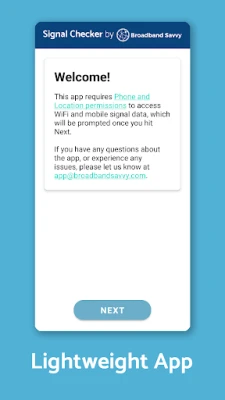
- Grant Permissions: Upon opening the app, grant the necessary permissions for Location and Phone access. This data is essential for accurate WiFi and mobile signal information, and rest assured, it is not stored or used for any other purposes.
- Access WiFi Signal Testing: You will land on the WiFi signal testing page. If WiFi is enabled, the app will display your signal strength measured by RSSI along with a score out of 100.
- Measure Mobile Signal: Tap the button in the bottom right corner to assess your 4G or 5G signal. The app will evaluate the performance of the active SIM based on the current network connection mode.
If you encounter any issues, ensure that your WiFi and mobile data are enabled. You may also try toggling airplane mode on and off to refresh your connection. Note that some devices may take longer to update signal data, so patience is key—wait up to 5-10 seconds for new information to appear.
For troubleshooting, generate a debug log by clicking the question mark icon on the top right of the WiFi or mobile signal page. Scroll to the bottom to find the debug log link, and email it along with a description of your issue to app@broadbandsavvy.com.
Limitations of Signal Test
Currently, the Signal Test app does not support 2G and 3G mobile connections. However, it excels in providing detailed insights for 4G and 5G networks, making it an invaluable tool for modern connectivity needs.
Conclusion
In conclusion, the Signal Test app is an essential tool for anyone looking to optimize their mobile and WiFi signal strength. By understanding the various metrics and utilizing the app's features, you can troubleshoot connectivity issues, enhance your online experience, and ensure that you are always connected when it matters most. Download the app today and take the first step towards maximizing your connectivity!
Rate the App
User Reviews















Popular Apps










Editor's Choice









