
Latest Version
January 25, 2026
Ahmet Can Arslan
Tools
Android
1
$0.99
com.arslan.shizuwall
Report a Problem
More About ShizuWall No Root/VPN Firewall
ShizuWall: The Ultimate Lightweight Android Firewall for Enhanced Privacy
In an era where digital privacy is paramount, having control over your mobile applications' network access is essential. Enter ShizuWall, a cutting-edge Android firewall application designed to block Wi-Fi and mobile network connections for selected apps without the need for root access or a VPN. This innovative tool leverages the power of Shizuku to deliver robust network control capabilities, ensuring your data remains secure and private.
Why Choose ShizuWall for Your Android Device?
ShizuWall stands out in the crowded market of Android firewall applications due to its unique features and user-friendly interface. Here are some compelling reasons to consider this app:
- Lightweight Design: ShizuWall is designed to be resource-efficient, ensuring it won’t slow down your device while providing top-notch security.
- Privacy Focused: With increasing concerns about data privacy, ShizuWall empowers users to control which apps can access the internet, safeguarding personal information.
- No Root Required: Unlike many firewall applications, ShizuWall does not require root access, making it accessible to a broader range of users.
- Seamless Integration with Shizuku: By utilizing Shizuku, ShizuWall enhances its functionality, allowing for advanced network control without compromising ease of use.
How ShizuWall Works
ShizuWall operates by creating a barrier between your applications and the internet. Here’s how it functions:
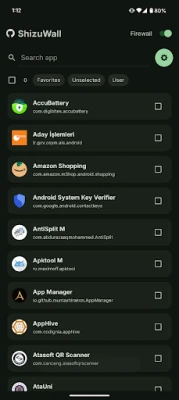
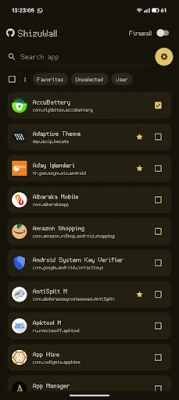
- App Selection: Users can easily select which applications they want to restrict from accessing Wi-Fi or mobile data.
- Network Blocking: Once an app is selected, ShizuWall effectively blocks its network connections, preventing any data transmission.
- Real-Time Monitoring: The application provides real-time updates on network activity, allowing users to monitor which apps are attempting to connect to the internet.
Key Features of ShizuWall
ShizuWall is packed with features that enhance its usability and effectiveness:
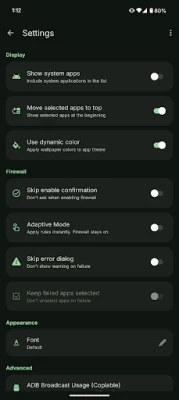
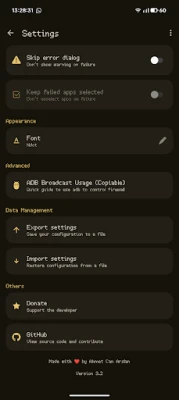
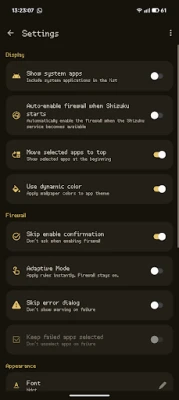
- Customizable Settings: Users can tailor the app’s settings to fit their specific needs, including notifications and connection rules.
- Data Usage Tracking: Keep an eye on your data consumption with built-in tracking tools that help you manage your mobile data effectively.
- User-Friendly Interface: The intuitive design makes it easy for anyone to navigate and configure their firewall settings without technical expertise.
- Regular Updates: The developers frequently update ShizuWall to enhance performance and security, ensuring users benefit from the latest features.
Setting Up ShizuWall: A Step-by-Step Guide
Getting started with ShizuWall is straightforward. Follow these steps to set up the application on your Android device:
- Download and Install: Visit the Google Play Store, search for ShizuWall, and download the application.
- Grant Permissions: Upon installation, grant the necessary permissions for the app to function correctly.
- Select Apps: Open ShizuWall and navigate to the app selection menu. Choose the applications you wish to block from accessing the internet.
- Configure Settings: Adjust the settings according to your preferences, including notifications and data tracking options.
- Activate the Firewall: Once everything is set, activate the firewall to start protecting your privacy.
Benefits of Using ShizuWall
Utilizing ShizuWall offers numerous advantages for Android users:
- Enhanced Privacy: By blocking unwanted network access, ShizuWall helps protect sensitive information from prying eyes.
- Improved Battery Life: Limiting background data usage can lead to better battery performance, as apps won’t be constantly searching for a connection.
- Reduced Data Costs: By controlling which apps can access mobile data, users can avoid unexpected charges and manage their data plans more effectively.
- Peace of Mind: Knowing that you have control over your apps’ internet access provides a sense of security in today’s digital landscape.
Conclusion: Take Control of Your Android Privacy with ShizuWall
In conclusion, ShizuWall is an essential tool for anyone looking to enhance their privacy and control over their Android device. Its lightweight design, ease of use, and powerful features make it a standout choice in the realm of mobile security. By blocking unwanted network access for selected applications, ShizuWall empowers users to take charge of their digital lives. Don’t compromise on your privacy—download ShizuWall today and experience the peace of mind that comes with knowing your data is secure.
Rate the App
User Reviews















Popular Apps










Editor's Choice









