
Latest Version
2.94
July 19, 2026
C. Ghisler
Tools
Android
0
Free
com.ghisler.tcplugins.SFTP
Report a Problem
More About SFTPplugin for Total Commander
Essential Guide to Using the SFTP Plugin with Total Commander
If you're looking to enhance your file transfer capabilities, particularly with SFTP (Secure File Transfer Protocol), it's crucial to understand the requirements and functionalities of the SFTP plugin designed for Total Commander. This article will provide a comprehensive overview of the plugin, its dependencies, and how to effectively utilize it for secure file transfers.
Understanding the SFTP Plugin for Total Commander
The SFTP plugin is a powerful tool that allows users to connect to SFTP servers, enabling secure file transfers over SSH (Secure Shell). However, it is important to note that this plugin is not a standalone application. It is specifically designed to work in conjunction with Total Commander, a popular file management software.
Installation Requirements
Before you proceed with the installation of the SFTP plugin, ensure that you have Total Commander installed on your device. Without Total Commander, the plugin will not function. If you are looking for FTPS (FTP over SSL) capabilities, you will need to download a separate FTP plugin available on the Play Store. You can find it here: FTP Plugin for Total Commander.
Why is the SFTP Plugin Size Considerable?
One common question users have is why the SFTP plugin is relatively large in size. The answer lies in its functionality. The plugin incorporates the free sshj library, which is essential for establishing SSH connections. Additionally, to support authentication via client certificates, the plugin also includes libraries from the BouncyCastle project. These libraries are necessary for ensuring secure and reliable connections, which is why the overall size of the plugin may seem substantial.
How to Use the SFTP Plugin Effectively
Once you have installed Total Commander and the SFTP plugin, follow these steps to connect to an SFTP server:
- Open Total Commander: Launch the Total Commander application on your device.
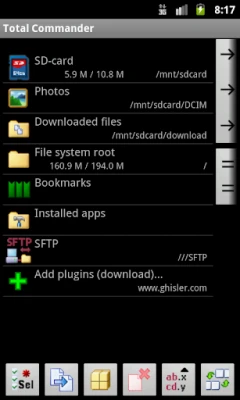
- Access the Plugin: Navigate to the “Net” menu and select “FTP Connect.” From there, choose the option to connect via SFTP.
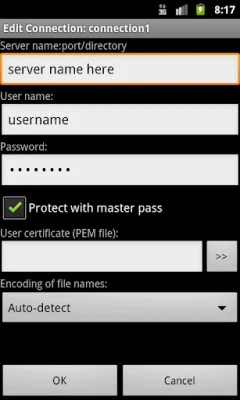
- Enter Connection Details: Input the necessary details such as the server address, username, and password. If you are using client certificates for authentication, ensure that you have the required files ready.
- Establish Connection: Click on the connect button to initiate the connection. If all details are correct, you will successfully connect to the SFTP server.
Benefits of Using SFTP for File Transfers
Utilizing SFTP for file transfers offers several advantages:
- Enhanced Security: SFTP encrypts both commands and data, providing a secure channel for file transfers.
- Data Integrity: The protocol ensures that files are not altered during transmission, maintaining data integrity.
- Authentication Options: SFTP supports various authentication methods, including password and public key authentication, allowing for flexible security configurations.
Troubleshooting Common Issues
While using the SFTP plugin, you may encounter some common issues. Here are a few troubleshooting tips:
- Connection Failures: Double-check your server address, username, and password. Ensure that your firewall settings allow SFTP connections.
- Authentication Errors: If you are using client certificates, verify that they are correctly configured and accessible by the plugin.
- Slow Transfer Speeds: Network issues can affect transfer speeds. Test your connection stability and consider using a wired connection for better performance.
Conclusion
The SFTP plugin for Total Commander is an invaluable tool for anyone needing to perform secure file transfers. By understanding its requirements and functionalities, you can leverage its capabilities to enhance your file management tasks. Remember, this plugin is not a standalone solution; it requires Total Commander to function effectively. With the right setup, you can enjoy secure and efficient file transfers with ease.
Rate the App
User Reviews















Popular Apps










Editor's Choice









