


Latest Version
June 07, 2026
SGA Solutions Co., Ltd.
Tools
Android
0
Free
com.sgn.sgotp
Report a Problem
More About SecureGuard OTP
Enhance Your Network Security with SecureGuard: The Ultimate Access Control Solution
In today's digital landscape, safeguarding sensitive information and ensuring efficient management of access to various systems is paramount. SecureGuard emerges as a comprehensive access control and auditing solution designed to bolster security across all network systems, including servers, networks, security systems, and mainframes, all through a single, streamlined gateway.
What is SecureGuard?
SecureGuard is an innovative solution that provides robust access control and auditing capabilities. It allows organizations to manage who can access their systems, ensuring that only authorized personnel can enter sensitive areas of the network. This centralized approach not only enhances security but also simplifies the management of access rights across various platforms.
Integrating One-Time Passwords (OTP) for Enhanced Security
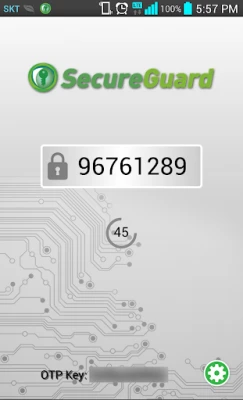
One of the standout features of SecureGuard is its integration of One-Time Passwords (OTP). This additional layer of security significantly strengthens the authentication process during login and server access. By requiring a unique password for each session, SecureGuard minimizes the risk of unauthorized access, making it a vital component of any security strategy.
Benefits of SecureGuard OTP Integration
- Increased Security: OTPs provide a dynamic authentication method that is difficult for attackers to compromise.
- Flexible Security Policies: SecureGuard allows organizations to set tailored security policies that incorporate OTPs, adapting to specific needs and compliance requirements.
- Enhanced Control: With OTPs, organizations can maintain tighter control over server access and command execution, ensuring that only authorized users can perform critical actions.
Setting Up SecureGuard: A Step-by-Step Guide
Implementing SecureGuard within your organization is a straightforward process. Follow these steps to establish a secure operating environment:
- Assess Your Needs: Identify the systems and data that require protection and determine the level of access control needed.
- Install SecureGuard: Deploy the SecureGuard solution across your network, ensuring compatibility with existing systems.
- Configure OTP Settings: Set up OTP integration to enhance security during user authentication and access control.
- Define Security Policies: Create and implement security policies that align with your organization’s requirements, utilizing the flexibility of SecureGuard.
- Monitor and Audit: Regularly review access logs and audit trails to ensure compliance and identify any potential security breaches.
Why Choose SecureGuard?
Choosing SecureGuard as your access control solution offers numerous advantages:
- Comprehensive Security: SecureGuard provides a holistic approach to security, covering all aspects of access control and auditing.
- User-Friendly Interface: The intuitive design of SecureGuard makes it easy for administrators to manage access rights and security policies.
- Scalability: As your organization grows, SecureGuard can easily scale to accommodate new systems and users without compromising security.
Conclusion: Secure Your Network with SecureGuard
In an era where cyber threats are increasingly sophisticated, implementing a robust access control solution like SecureGuard is essential for any organization. By integrating OTP and establishing tailored security policies, SecureGuard not only enhances security but also streamlines access management across your network. Protect your sensitive information and ensure operational efficiency with SecureGuard.
For more information on how SecureGuard can transform your network security, visit SecureGuard's official website.
Rate the App
User Reviews















Popular Apps










Editor's Choice









