
Latest Version
4.0
July 16, 2026
Vb2labs
Tools
Android
0
$2.49
com.vb2labs.android.sdelete.pro
Report a Problem
More About SDelete Pro - File Shredder
Unlock the Power of Secure Deletion with SDelete Pro
In an age where data privacy is paramount, ensuring the secure deletion of your personal files is more important than ever. SDelete Pro stands out as a highly advanced tool designed to leave no trace of your sensitive information. This article delves into the remarkable features of SDelete Pro, why it is essential for your digital security, and answers to frequently asked questions.
Why Choose SDelete Pro?
SDelete Pro is not just another file deletion app; it is a comprehensive solution for anyone concerned about data security. Here are some compelling reasons to consider:
- Advanced Secure Deletion: SDelete Pro employs sophisticated algorithms to ensure that your personal data is irretrievable. Once deleted, your files are gone for good.
- Support for Internal and External Storage: Whether your files are stored on your device's internal memory or an SD card, SDelete Pro can securely delete them all.
- Versatile File Shredding: The app can shred various file types, including photos, videos, audio files, documents, and more, ensuring comprehensive data protection.
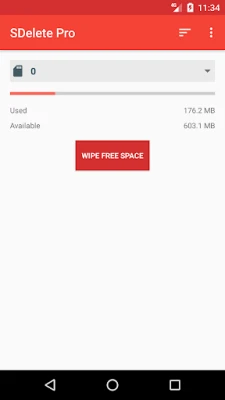
- Free Space Wiping: SDelete Pro offers a feature to wipe free space on your device, making previously deleted files unrecoverable.
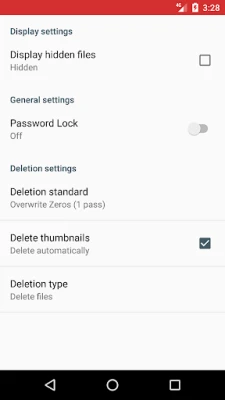
- Automatic Thumbnail Deletion: The app can automatically delete thumbnails for images and videos, further enhancing your privacy.
- International Deletion Standards: SDelete Pro adheres to recognized deletion standards, including US DoD 5220.22-M and NIST 800–88, ensuring compliance with global data protection regulations.
- Compatibility with Latest Android Versions: The app is designed to work seamlessly with the latest Android updates, ensuring optimal performance.
Key Features of SDelete Pro
SDelete Pro is packed with features that make secure deletion simple and efficient:
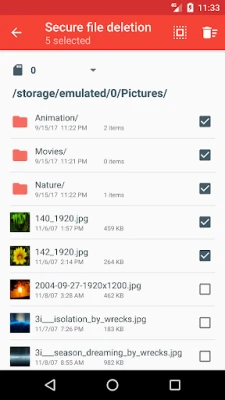
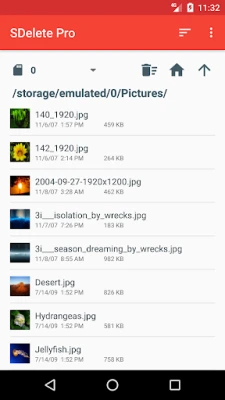
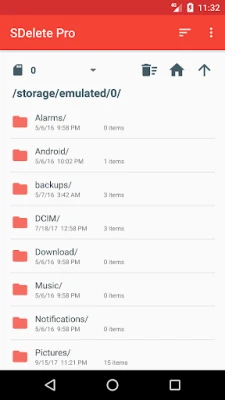
- User-Friendly Interface: The app boasts a smooth file browser that allows for quick navigation and easy deletion of files.
- Batch Deletion: Users can delete multiple files and folders simultaneously, saving time and effort.
- Thumbnail Previews: The file browser includes thumbnail previews for images and videos, making it easier to identify files before deletion.
- Integration with Other File Managers: You can delete files in SDelete by selecting them from other file managers and gallery apps, enhancing convenience.
- Hidden File Deletion: SDelete Pro can securely delete hidden files, ensuring that no trace of your data remains.
- Custom Shredding Patterns: Users can choose custom shredding patterns for added security, tailoring the deletion process to their needs.
- File Content Scrapping: The app allows you to scrap the contents of a file while leaving the file itself undeleted, providing flexibility in data management.
Frequently Asked Questions
What happens when I delete a file normally on my device?
When you delete files such as photos, videos, or documents using the standard method, they are not physically erased from your device. This means that if you sell or lose your device, someone could potentially recover your deleted data.
What if I accidentally delete a file using the SDelete app? Can I recover it?
Files deleted using SDelete are permanently erased and cannot be recovered. It is crucial to double-check before confirming any deletions.
Future Updates and Support
SDelete Pro is continuously evolving, with more features set to be introduced in future updates. For any support or suggestions, users can reach out to support@vb2labs.com.
In conclusion, SDelete Pro is an essential tool for anyone serious about data security. With its advanced features and user-friendly interface, it provides peace of mind by ensuring that your personal information is permanently deleted and unrecoverable. Don’t compromise on your privacy—choose SDelete Pro for secure file deletion today!
Rate the App
User Reviews















Popular Apps










Editor's Choice









