


Latest Version
1.7
July 04, 2026
2kit consulting
Tools
Android
0
Free
de.twokit.screen.recording.app
Report a Problem
More About Screen Recording App
The Ultimate Screen Recording App: Capture, Create, and Share with Ease
In today's digital landscape, creators need a reliable and straightforward screen recording solution that meets their diverse needs. Whether you're a gamer, educator, or content creator, having a tool that offers high-quality recordings without the hassle of watermarks, ads, or subscriptions is essential. This article explores a powerful screen recording app designed specifically for creators who value simplicity and functionality.
Key Features of the Screen Recording App
This innovative app is built for creators who want to record their screens effortlessly. Here are some standout features that make it a must-have:
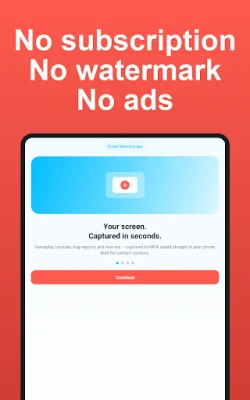
- No Watermarks: Enjoy your recordings without any distracting watermarks.
- No Ads: Experience uninterrupted recording sessions.
- No Subscription Required: Use the app without signing up or creating an account.
- Local Storage: All recordings are saved directly on your device, ensuring privacy and control.
- Multilingual Support: Available in 17 languages, making it accessible to a global audience.
Compatibility Across Devices
This app is designed to work seamlessly on various devices, including phones, tablets, and Android TVs. It is compatible with major brands such as Samsung Galaxy, Pixel, Xiaomi, and OnePlus.
Mobile and Tablet Functionality
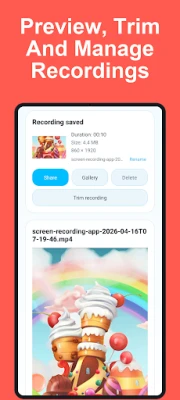
With a one-tap recording feature, users can easily capture their screens in either portrait or landscape mode. The inline preview allows for quick checks of recorded clips, enhancing the user experience.
Android TV Integration
The app features a D-pad-native layout, making it easy to navigate and control recordings. Users can save their recordings to internal storage or a USB drive, providing flexibility in managing content.
High-Quality Recording Capabilities
One of the app's most impressive features is its core recording functionality:
- High-Resolution Recording: Capture any app or home screen in stunning MP4 quality, up to 1080p at 60 fps.
- Customizable Recording Area: Record the full screen or select a specific region to capture.
- Advanced Codec Options: Choose between H.264 or H.265/HEVC codecs for optimal file sizes and quality.
- Internal Audio Capture: Record game sounds, music, and videos with adjustable volume settings.
- Microphone Narration: Mix internal audio with your voice for comprehensive recordings.
- Flexible Recording Controls: Pause and resume recordings without creating multiple files, and set auto-stop timers for convenience.
Convenient One-Tap Shortcuts
Enhance your recording experience with one-tap shortcuts. Add a record or screenshot widget to your home screen or a tile to Quick Settings, allowing you to capture content instantly without navigating through multiple menus.
Privacy Features for Sensitive Content
Protect your privacy with built-in privacy masks. Easily black out sensitive information such as passwords or personal messages during recordings. Adjust these masks before or during recording, making it ideal for tutorials that involve real data.
Facecam Overlay for Personal Touch
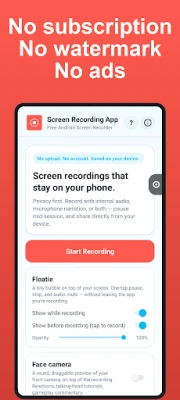
Add a personal touch to your recordings with the facecam overlay feature. This draggable bubble allows you to show your reactions while recording. Switch between front and back cameras mid-recording, and customize the size and position of the overlay for optimal viewing.
Interactive Drawing Tools
Engage your audience by drawing on the screen while recording. The app provides a pen and eraser with six color options and four width settings. All strokes are captured directly into the recording, eliminating the need for post-editing.
In-App Library for Easy Management
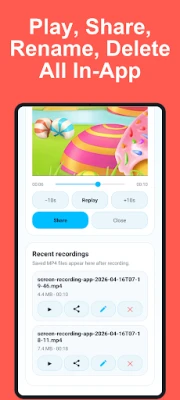
All recordings and screenshots are stored in a user-friendly in-app library. Here, you can:
- View resolution, frame rate, bitrate, orientation, and codec at a glance.
- Play recordings with transport controls for easy navigation.
- Trim recordings losslessly and rename or share them effortlessly.
- Recover recently deleted files within 30 days.
Customizable Themes for User Preference
Choose between light, dark, or system theme options to personalize your app experience. This flexibility ensures that the app fits seamlessly into your workflow.
Privacy and Data Security
Your privacy is paramount. The app ensures that all recordings remain on your device, with no uploads to external servers. It only requests necessary permissions, and no personal data is collected for advertising purposes.
Ideal Use Cases
This screen recording app is perfect for:
- Gamers capturing gameplay clips on devices like Samsung Galaxy and Pixel.
- Creators producing tutorials and reaction videos with integrated facecam.
- Developers documenting bugs with video context for better reporting.
- Teachers preparing engaging lessons and walkthroughs.
Getting Started with the App
Ready to start recording? Simply tap "Start Recording," choose what you want to capture, and begin. All your recordings will remain on your device, giving you complete control over your content.
In conclusion, this screen recording app is a game-changer for creators seeking a reliable, feature-rich solution. With its user-friendly interface, high-quality recording capabilities, and robust privacy features, it stands out as the ultimate tool for capturing and sharing your digital experiences.
Rate the App
User Reviews















Popular Apps










Editor's Choice









