

Latest Version
1.0.27
July 29, 2026
SpeedOut Lab
Tools
Android
1
Free
me.biplobsd.rsm
Report a Problem
More About Running Services Monitor
Unlocking the Power of Your Device: A Comprehensive Guide to Running Services Monitoring
In today's digital landscape, understanding the applications running on your device is crucial for optimizing performance and ensuring security. This article delves into the essential features of a robust running services monitor, designed to enhance your user experience and provide valuable insights into your device's operations.
Comprehensive Monitoring of Running Services
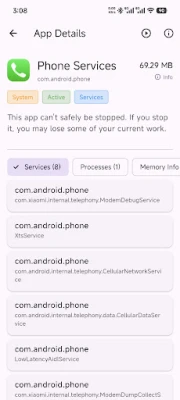
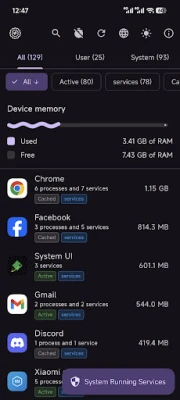
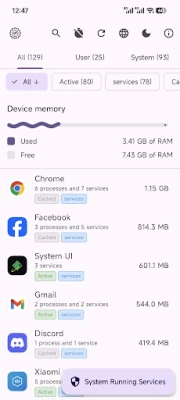
One of the standout features of a running services monitor is its ability to display a comprehensive list of all active services on your device. This functionality allows users to keep track of what is running in the background, ensuring that unnecessary applications do not consume valuable resources. By having a clear overview, users can make informed decisions about which services to keep active and which to disable.
Categorized View for Enhanced Usability
To streamline the user experience, the application offers a categorized view that allows users to easily switch between All, User, and System apps. This feature simplifies navigation, enabling users to quickly locate the specific applications they need to manage. Whether you are a casual user or a tech enthusiast, this organized approach enhances usability and efficiency.
Effortless App Search Functionality
Finding specific applications can often be a daunting task, especially when dealing with numerous installed apps. The built-in search bar addresses this challenge by allowing users to quickly locate specific apps. This functionality not only saves time but also enhances the overall user experience, making it easier to manage applications effectively.
In-Depth App Details at Your Fingertips
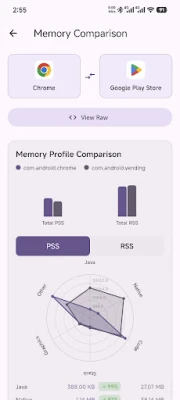
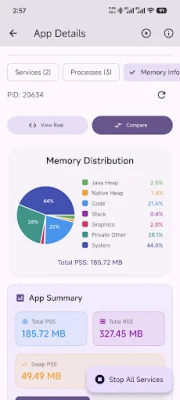
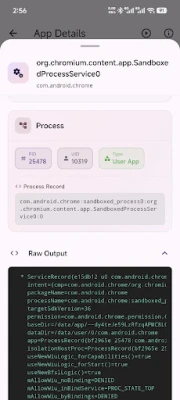
Understanding the intricacies of each application is vital for effective management. The running services monitor provides detailed information about each app, including the package name, version, and other relevant data. This transparency empowers users to make informed decisions regarding app updates, uninstalls, or troubleshooting, ultimately leading to a more optimized device performance.
Advanced Integration: Root & Shizuku Support
For users seeking advanced system interactions, the application first checks for root permissions before falling back to Shizuku where supported. This dual approach ensures that users can access deeper functionalities without compromising device security. By leveraging these advanced integrations, tech-savvy users can unlock the full potential of their devices.
Modern Aesthetics with Material Design 3
The user interface plays a significant role in the overall experience. The application boasts a modern and visually appealing UI, designed with Material Design 3 principles. This adaptive design not only enhances the aesthetic appeal but also ensures that the interface aligns with your device's theme, providing a seamless and enjoyable user experience.
Customizable Viewing Experience: Dark and Light Modes
Comfort is key when using any application, and the running services monitor addresses this with toggle options for dark and light themes. Users can easily switch between modes based on their preferences or lighting conditions, ensuring a comfortable viewing experience at all times. This feature is particularly beneficial for those who use their devices extensively, as it reduces eye strain and enhances usability.
Global Reach: Localization Support
In an increasingly globalized world, language support is essential. The application offers localization for multiple languages, including English, Bangla, and Chinese. This inclusivity ensures that users from diverse backgrounds can effectively utilize the application, breaking down language barriers and enhancing accessibility.
Conclusion: Empower Your Device Management
In conclusion, a running services monitor is an invaluable tool for anyone looking to optimize their device's performance and manage applications effectively. With features such as comprehensive monitoring, categorized views, in-depth app details, and advanced integrations, users can take control of their device like never before. Coupled with a modern UI and localization support, this application stands out as a must-have for both casual users and tech enthusiasts alike. Embrace the power of informed device management and unlock the full potential of your applications today!
For more details, visit the official GitHub page.
Rate the App
User Reviews















Popular Apps










Editor's Choice









