

Latest Version
February 06, 2026
Hod Studio Apps
Tools
Android
1
$1.99
br.com.hodstudio.runeinput.medieval
Report a Problem
More About Rune Input - Medieval
Unlocking the Mysteries of Runes: A Comprehensive Guide to Rune Input - Medieval
Runes have captivated the imagination of many, serving as a bridge to ancient cultures and mystical traditions. With the advent of technology, enthusiasts can now easily write and share these symbols through innovative applications like Rune Input - Medieval. This article will guide you through the features of this unique keyboard, troubleshooting tips, and privacy assurances, ensuring you can fully embrace the world of runes.
Understanding Runes and Their Significance
Runes are not just letters; they are symbols steeped in history and meaning. Originating from ancient Germanic languages, these characters were used for writing, divination, and magical purposes. Each rune carries its own significance, making them a fascinating subject for study and exploration.
Installing Rune Input - Medieval: A Step-by-Step Guide
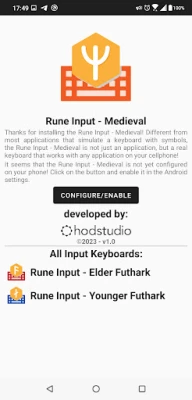
To start your journey with runes, you first need to install the Rune Input - Medieval keyboard on your Android device. Follow these simple steps:
- Download the Rune Input - Medieval app from the Google Play Store.
- Open the app and follow the installation prompts.
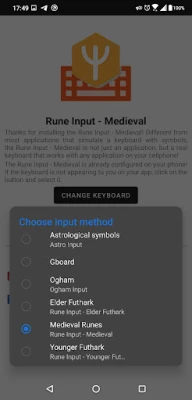
- Once installed, navigate to your device's Settings.
- Select System.
- Tap on Languages and input.
- Choose Virtual keyboard.
- Click on Manage Keyboards.
- Activate Rune Input - Medieval.
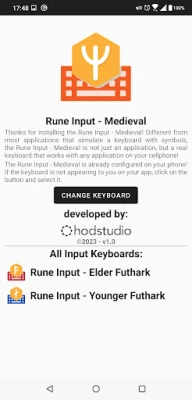
After activation, you can easily switch to the Rune Input - Medieval keyboard whenever you want to write in runes.
Using Rune Input - Medieval: Tips for Effective Writing
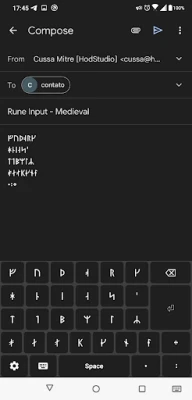
Once you have installed and activated the keyboard, using it is straightforward. When you open any app that requires text input, look for the keyboard icon on your screen. Tapping this icon allows you to select the Rune Input - Medieval keyboard. Start typing, and watch as your words transform into ancient symbols!
Troubleshooting: Issues with Viewing Runes
Some users may encounter issues displaying runes correctly. If you see squares or question marks instead of the intended characters, it may be due to font compatibility. Most Android devices come with default fonts that support runes, but not all do. If you experience this issue, consider the following:
- Check if your device's font settings support rune characters.
- Try using a different text application that may have better font support.
- Contact support at contato@hodstudio.com.br for assistance.
Privacy Policy: Your Data Matters
When using Rune Input - Medieval, your privacy is a top priority. The app is designed to promote the use of runes without compromising your personal information. Here’s what you need to know:
- No account creation is necessary, and the app does not request personal data.
- Typed characters are processed locally on your device and are not sent to external servers.
- Only usage statistics and error/crash information are collected, which are handled by Google’s servers for improvement purposes.
This means you can enjoy writing in runes without worrying about your data being misused.
Conclusion: Embrace the World of Runes
With the Rune Input - Medieval keyboard, you can easily explore the enchanting world of runes. Whether for personal expression, artistic endeavors, or cultural exploration, this tool opens up new avenues for creativity. Follow the installation guide, troubleshoot any issues, and rest assured that your privacy is protected. Dive into the ancient symbols and let your imagination run wild!
Rate the App
User Reviews















Popular Apps










Editor's Choice









