

Latest Version
May 22, 2026
Hod Publishing
Tools
Android
0
$1.99
br.com.hodstudio.runeinput.futhorc
Report a Problem
More About Rune Input - Futhorc
Unlocking the Mysteries of Runes: A Comprehensive Guide to Rune Input - Futhorc
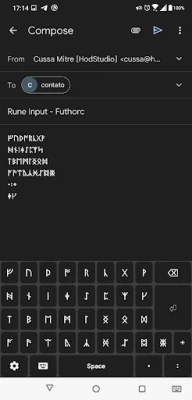
Runes, the ancient characters of the Germanic alphabets, have fascinated enthusiasts and scholars alike for centuries. With the advent of technology, these mystical symbols can now be easily accessed and utilized through modern applications like Rune Input - Futhorc. This article will guide you through the features, installation process, and privacy policies of this innovative rune keyboard.
Understanding Runes and Their Significance
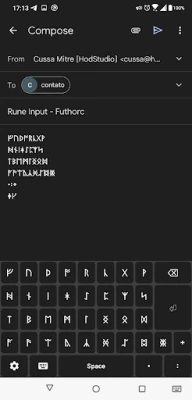
Runes are not just letters; they are imbued with historical and cultural significance. Originating from the Germanic tribes, these symbols were used for writing, divination, and magical purposes. The Futhorc, a variant of the runic alphabet, consists of unique characters that represent sounds and concepts. With Rune Input - Futhorc, users can easily type in these ancient symbols, bridging the gap between the past and the present.
How to Install and Configure Rune Input - Futhorc
To start using the Rune Input - Futhorc keyboard, follow these simple steps:
- Download the App: Begin by downloading the Rune Input - Futhorc app from the Google Play Store.
- Access Settings: After installation, navigate to your device's Settings.
- Select System: Tap on System to access language and input options.
- Languages and Input: Choose Languages and input from the menu.
- Virtual Keyboard: Select Virtual keyboard to manage your keyboard settings.
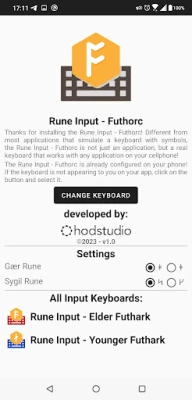
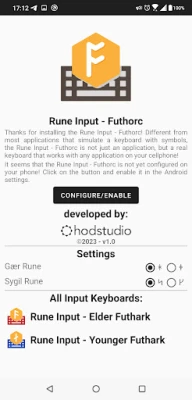
- Manage Keyboards: Tap on Manage Keyboards and activate Rune Input - Futhorc.
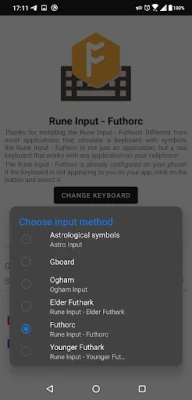
Once activated, you can easily switch to the Rune Input - Futhorc keyboard while using any app. Look for the keyboard icon on your screen, tap it, and select the Rune Input - Futhorc option to start typing in runes.
Troubleshooting Rune Display Issues
Some users may encounter issues displaying runes correctly, particularly on Android devices. If you see squares or question marks instead of the intended runes, it may be due to the text font not supporting these characters. To resolve this, consider changing your font settings or using a font that fully supports runic characters.
Privacy Policy: Your Data Matters
At Rune Input - Futhorc, user privacy is a top priority. The app is designed to promote the use of runes without compromising your personal information. Here’s what you need to know:
- No Account Required: Users do not need to create an account, ensuring a hassle-free experience.
- No Personal Data Collection: The app does not request or collect any personal information from users.
- Data Usage: Only app usage statistics and error/crash reports are collected, which are processed directly by Google’s servers.
This means that your typed characters remain on your device, processed by the operating system without being sent to third parties. Enjoy the freedom of typing in runes without worrying about your privacy.
Conclusion: Embrace the Power of Runes
Rune Input - Futhorc opens up a world of possibilities for those interested in the ancient art of runes. Whether you are a scholar, a practitioner of divination, or simply curious about these symbols, this app provides an accessible platform to explore and express your creativity. By following the installation steps and understanding the privacy policies, you can confidently use this tool to connect with the rich history of runes.
Start your journey today and unlock the mysteries of the Futhorc with Rune Input - Futhorc!
Rate the App
User Reviews















Popular Apps










Editor's Choice









