
Latest Version
2.5.10
October 24, 2024
TinyByte Apps, LLC
Tools
Android
0
Free
com.tinybyteapps.robyte
Report a Problem
More About Roku TV Remote Control: RoByte
Unlock the Full Potential of Your Roku with RoByte: The Ultimate Remote Control App
In the ever-evolving world of streaming, having a reliable and efficient remote control app is essential for an optimal viewing experience. Enter RoByte, a powerful Roku remote control application designed to enhance your streaming sessions. With its user-friendly interface and a plethora of features, RoByte stands out as a top choice for Roku users. Let’s explore the remarkable features and benefits of this app that can transform your Roku experience.
Seamless Setup and Device Compatibility
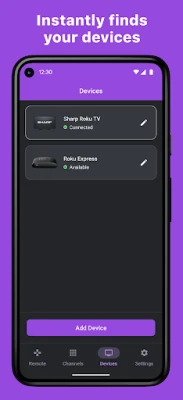
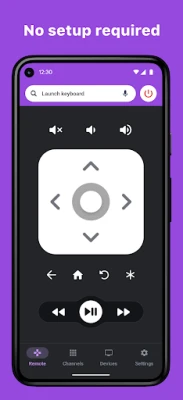
One of the standout features of RoByte is its no-setup-required functionality. The app automatically scans for your Roku device, allowing you to connect effortlessly. Whether you own a TCL, Sharp, Hisense, or any other supported Roku TV brand, RoByte ensures compatibility and ease of use.
Effortless Channel Navigation
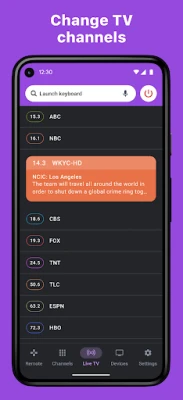
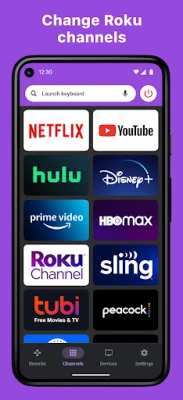
Switching between channels has never been easier. RoByte includes an easy channel switcher that allows you to view all your TV channels at a glance. With just a few taps, you can jump directly to your favorite channel, making your viewing experience more enjoyable and efficient.
Enhanced Text and Voice Entry
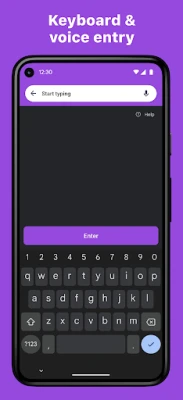
Typing on a remote can be cumbersome, especially when searching for content on platforms like Netflix, Hulu, or Disney+. RoByte addresses this issue by enabling users to utilize their keyboard for fast text and voice entry. This feature significantly speeds up the process of finding your favorite shows and movies.
Comprehensive Volume and Input Control
With RoByte, you can easily adjust your Roku TV's volume and toggle the input settings directly from your device. This level of control ensures that you can manage your viewing experience without the hassle of juggling multiple remotes.
Multi-Device Pairing and Customization
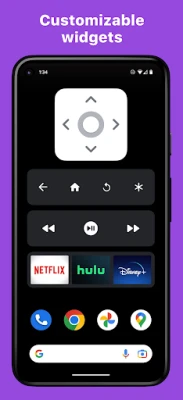
RoByte allows you to pair with multiple Roku devices, making it an ideal solution for households with more than one Roku TV. Additionally, the app features customizable widgets that can transform your Android home screen into a Roku remote, providing quick access to your favorite functions.
Support for Wearable Technology
For those who love convenience, RoByte offers Android Wear support. This feature allows you to control playback functions such as play and pause directly from your wrist, making it easier than ever to manage your viewing experience without reaching for your phone.
Beautiful Design and User Experience
RoByte boasts a stunning design that adheres to material design principles. The app’s aesthetic appeal, combined with its intuitive layout, ensures that users can navigate effortlessly, enhancing the overall user experience.
Free and Pro Features: Choose Your Experience
RoByte offers a range of features in both its free and Pro versions:
- Free Features:
- Basic Roku remote control functionality
- Play, pause, fast forward, and rewind options
- Pairing with multiple Roku devices
- Pro Features:
- Advanced Roku channel switcher
- Power button functionality
- Volume control options
- Keyboard and voice search capabilities
- TV channel switcher
- Homescreen widgets for quick access
- Dedicated Android Wear app
Quick Tips for Optimal Performance
To ensure a smooth experience with RoByte, consider the following quick tips:
- Most connection issues can be resolved by simply reinstalling the RoByte app.
- Ensure that your device is connected to the same Wi-Fi network as your Roku device for seamless connectivity.
Contact and Support
If you encounter any issues or have questions, RoByte offers support via email at tinybyteapps@gmail.com. For more information on privacy policies, visit RoByte Privacy Policy.
Note: This Roku remote app is not designed to control Roku SoundBridge.
Conclusion: Elevate Your Roku Experience with RoByte
In conclusion, RoByte is more than just a remote control app; it’s a comprehensive tool that enhances your Roku viewing experience. With its array of features, seamless setup, and beautiful design, RoByte is a must-have for any Roku user looking to streamline their streaming experience. Download RoByte today and unlock the full potential of your Roku device!
Rate the App
User Reviews















Popular Apps










Editor's Choice









