Latest Version
9.4.73
June 05, 2026
osApps
Tools
Android
0
Free
com.osfunapps.remotefortcl
Report a Problem
More About Remote control for TCL TVs
Ultimate Guide to the TCL TV Remote Control App: Your All-in-One Solution
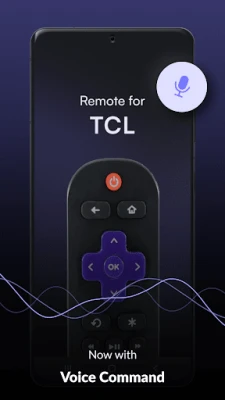
Are you in search of a free TCL TV remote control app that seamlessly integrates with all your TV applications? Do you want a reliable remote control solution for your TCL Roku and Android smart TVs? Look no further! The Remote Control for TCL TV app is here to revolutionize your viewing experience.
What is the TCL TV Remote Control App?
The Remote Control for TCL TV app is designed to provide you with a comprehensive solution for controlling your TCL television. Whether you've misplaced your physical remote or it has stopped functioning, this app offers the same intuitive control as your original remote. With this app, you can manage your TV effortlessly, ensuring you never miss a moment of your favorite shows.
Compatibility: Works with All TCL TV Models
This versatile app is compatible with a wide range of TCL TVs, including:
- Regular TVs
- Smart TVs
- Android TVs
- Roku TVs
Simply download the app, follow the straightforward connection instructions, and enjoy your entertainment from your Android smartphone.
Easy Connection Process
To utilize the Smart TV or TCL Roku remote control features, ensure that your smartphone and TV are connected to the same Wi-Fi network. Unlike many other TCL remote apps, this one is optimized for quick detection of your TV on the network, allowing you to connect with just a tap.
If your TV isn't automatically discovered, you can manually add it by entering the IP address. The app provides detailed video instructions to guide you through the process of finding your IP address, ensuring a hassle-free setup.
Features of the TCL Remote Control App
Once connected, you can take advantage of various interfaces and control features:
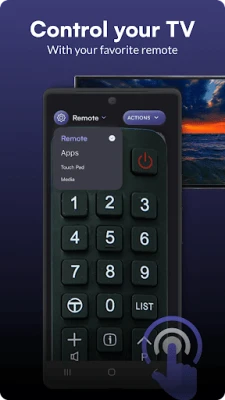
- Remote Control Screen: A full-screen remote interface that mimics a traditional remote, allowing you to tap buttons easily.
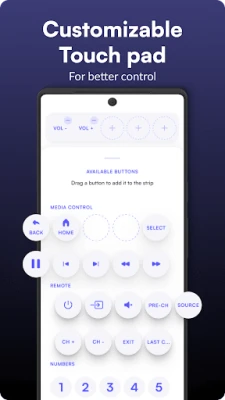
- Touch Pad Screen: Customize your experience by adding favorite buttons to the top strip or navigate using the built-in touch area.
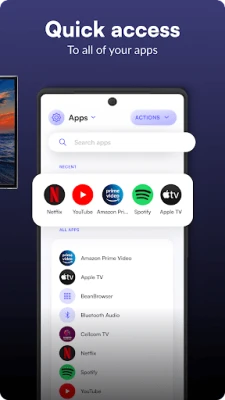
- Apps Screen: Access all installed apps on your TV and quickly open your favorites.
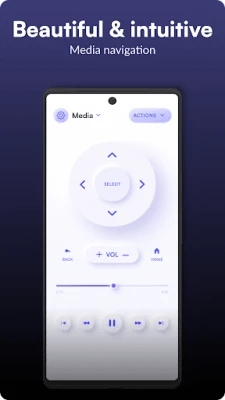
- Media Screen: A user-friendly interface for seamless media navigation.
Control Your TCL TV Without Wi-Fi
One standout feature of this app is its ability to function as a TCL Roku TV remote without Wi-Fi. You can connect to older TCL TVs using Infrared technology. To switch to this mode, simply select the Infrared option at the top of the screen, and you can start using the remote immediately. The interface will remain consistent with your initial selection.
How to Use the TCL Remote Control App
For Wi-Fi Remote Control Connections:
- Connect your smartphone to the same Wi-Fi network as your TV.
- Select your TV from the list of available devices.
- If your TV is not found, manually add it by entering the IP address.
For Infrared Remote Control Connections:
- Select Infrared from the connection types at the top of the screen.
- Enjoy using your remote and explore different remote designs.
Key Features of the Remote Control for TCL
- Comprehensive TCL TV remote control functionality
- Compatible with Roku, Android, and Smart TVs
- Supports older TVs without Wi-Fi connectivity
- Choose between Wi-Fi or Infrared connection modes
- Manually add devices for easy access
- Variety of remote interfaces: regular remote, touchpad, apps, media, and more
Take Control of Your TV Today!
It's time to regain control of your television experience with this efficient and user-friendly remote control app. Download the Remote Control for TCL TV app today and enjoy seamless navigation and control over your entertainment!
Supported Models
The app supports a variety of TCL models, including:
- D2Z-1386403818
- 4PZ-9219270687
- GKGL-74476
- IX4-05407094
Contact Us
If you have any questions or need assistance with the Remote Control for TCL app, please reach out to us at support@os-apps.com. Enjoy your TCL Android TV remote experience!
Disclaimer
This app is not the official TCL app and is not affiliated with TCL in any way. It serves as a supplementary tool for TV owners to enhance their remote control experience.
Rate the App
User Reviews















Popular Apps










Editor's Choice









