

Latest Version
3.0.0.67
August 24, 2024
Remo Software
Tools
Android
0
Free
com.remo.remoduplicatephotosremover
Report a Problem
More About Remo Duplicate Photos Remover
Effortlessly Manage Your Photos: The Ultimate Duplicate Photo Remover
In today's digital age, our devices are filled with countless photos, many of which are duplicates that clutter our storage. One standout solution in Remo's storage management suite is its innovative duplicate photo remover. This powerful application is designed to help you locate, preview, and delete duplicate images with ease.
Why Duplicate Photos Are a Problem
Did you know that, on average, 17% of the photos on your device are identical copies? These duplicates not only consume valuable storage space but can also slow down your device's performance. With over a million downloads, Remo's duplicate photo remover leverages its proprietary intelligent De-Dupe Algorithm to efficiently scan and identify similar photos, including those taken in burst mode or HDR settings. Why hold onto unnecessary duplicates when you can reclaim your storage space?
Key Features of Remo's Duplicate Photo Remover
Smart De-Dupe Scan Modes
The application offers two primary scanning modes to cater to your needs:
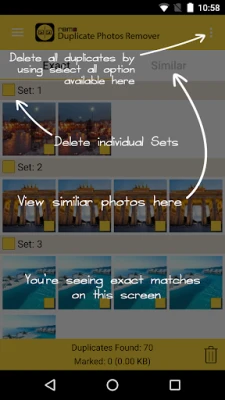
- Scan for Similar Photos: This mode identifies images that are similar but not identical, such as photos with the same background taken from different angles.
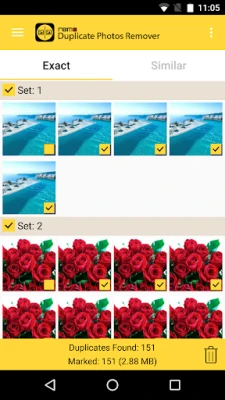
- Scan for Exact Photos: This feature meticulously scans your device to find and highlight photos that are exact duplicates.
Preview Duplicate Pictures in Sets
After the scanning process, the app organizes duplicate photos into sets for easy viewing. This allows you to quickly assess which images you want to keep and which ones can be deleted.
Determine Memory Consumption
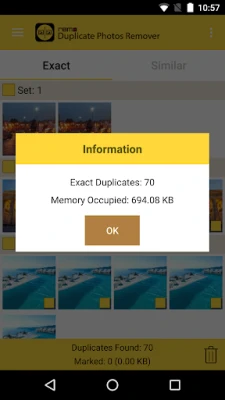
One of the standout features of this application is its ability to display the amount of memory consumed by duplicate images. This insight helps you understand the impact of duplicates on your device's storage.
Background Operation
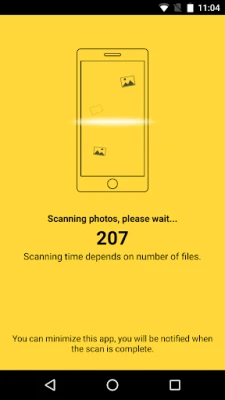
The duplicate photo remover operates seamlessly in the background, allowing you to continue using your phone for other tasks while it scans for duplicates. The scan time varies based on the number of images on your device, ensuring efficiency without interrupting your workflow.
Retention of a Single Copy
Worried about losing your favorite photos? The app guarantees that even if you delete an entire set of duplicates, it will retain one original copy of each image. This feature provides peace of mind as you declutter your photo library.
Track Deleted Duplicates
Users can easily monitor the number of images deleted from their phone memory, giving you a clear picture of how much space you've reclaimed.
Quick Removal of Duplicates
Once the scanning process is complete, removing duplicate photos takes just seconds. This swift action allows you to optimize your device's storage without hassle.
How to Get Started
Ready to regain valuable storage space on your device? Download Remo's Duplicate Photo Remover today and experience the ease of organizing and optimizing your photo library. With its user-friendly interface and powerful features, managing your photos has never been easier.
Conclusion
In a world where our devices are overflowing with images, having a reliable tool to manage duplicate photos is essential. Remo's Duplicate Photo Remover not only helps you identify and delete unnecessary duplicates but also ensures that your original memories are preserved. Don't let duplicate photos take up space on your device—download the app now and take control of your photo storage!
Rate the App
User Reviews















Popular Apps










Editor's Choice









