

Latest Version
1.2.568206642
July 19, 2026
Google LLC
Tools
Android
0
Free
com.google.android.accessibility.reader
Report a Problem
More About Reading mode
Unlock the Power of Reading Mode: A Comprehensive Guide
In today's fast-paced digital world, reading can often feel overwhelming. Fortunately, the Reading Mode app offers a streamlined solution to enhance your reading experience. This guide will walk you through the installation process, highlight key features, and explain how to make the most of this powerful tool.
Getting Started with Reading Mode
To begin your journey with Reading Mode, follow these simple steps:
- Download and Install: Head to the Play Store and download the Reading Mode app.
- Open the App: Locate the Reading Mode icon on your home screen and tap to launch it.
- Follow the Tutorial: Read through the tutorial, which will guide you to the settings page at the end.
- Enable Reading Mode: In the settings, tap on “Reading Mode” and toggle on the “Reading Mode Shortcut” to grant the app access to your device.
- Explore Entry Points: For additional setup options, visit this link to learn about different entry points for Reading Mode.
Key Features of Reading Mode
Reading Mode is packed with features designed to enhance your reading experience. Here are some of the standout functionalities:
1. Focused Reading View
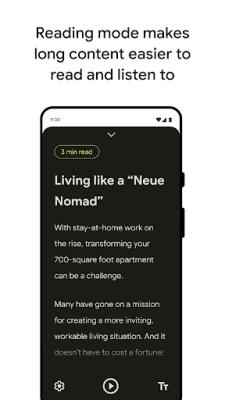
Reading Mode offers a customizable reading environment that eliminates distractions. This focused view allows you to immerse yourself in content without the clutter of ads or notifications.
2. Text-to-Speech Functionality
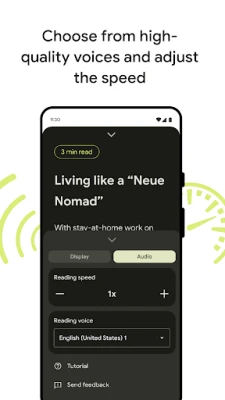
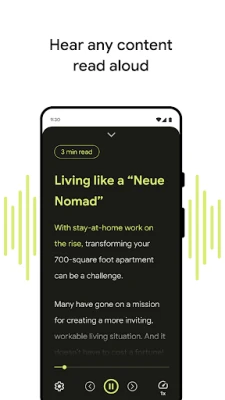
With the text-to-speech feature, you can listen to written content being read aloud. Choose from a variety of high-quality long-form voices, and easily control audio playback with options to rewind, fast forward, and adjust the reading speed.
3. Customizable Font Options
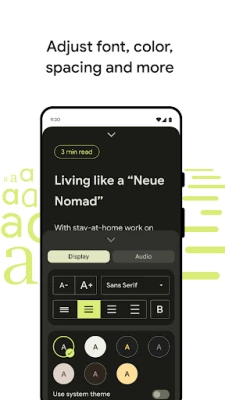
Personalize your reading experience by adjusting font types, sizes, colors, and line spacing. This flexibility ensures that you can create a reading environment that suits your preferences and needs.
4. Quick Access Integration
Once installed, Reading Mode integrates seamlessly into your phone's interface, allowing for quick and easy access whenever you need it.
5. Multi-Language Support
Reading Mode currently supports multiple languages, including English, French, Italian, and Spanish, with plans to add more languages in the future. This feature makes it accessible to a broader audience.
6. Compatibility with TalkBack
If you use a screen reader, Reading Mode is designed to work effortlessly with TalkBack, ensuring that you can navigate and utilize the app with ease.
7. Privacy-Focused Design
Your privacy is paramount. Reading Mode ensures that no content is sent off your device, keeping your reading habits secure and confidential.
Requirements for Using Reading Mode
To enjoy the benefits of Reading Mode, ensure that your device meets the following requirements:
- Compatible with phones running Android 9 and later.
- Supports English, French, Italian, and Spanish languages.
Permissions Notice
As an accessibility service, Reading Mode requires certain permissions to function effectively. It can observe your actions and window content to provide a tailored reading experience.
Join the Community
Become part of the conversation by joining the Accessible Google Group. Here, you can provide feedback, share your experiences, and stay updated on product enhancements.
Conclusion
Reading Mode is a powerful tool that transforms how you engage with written content. By following the installation steps and exploring its features, you can create a personalized reading experience that enhances focus and accessibility. Download Reading Mode today and unlock a world of reading possibilities!
Rate the App
User Reviews















Popular Apps










Editor's Choice









