

Latest Version
7.01.build123
September 15, 2024
RARLAB (published by win.rar GmbH)
Tools
Android
0
Free
com.rarlab.rar
Report a Problem
More About RAR
Unlocking the Power of RAR: Comprehensive Guide to File Compression and Management
In today's digital age, efficient file management and compression are essential for both personal and professional use. RAR is a powerful tool that not only creates RAR and ZIP files but also unpacks a variety of archive formats. This article delves into the extensive functionalities of RAR, highlighting its capabilities and how it can streamline your file management tasks.
What is RAR?
RAR, short for Roshal Archive, is a proprietary archive file format that supports data compression, error recovery, and file spanning. Developed by Eugene Roshal, RAR is widely recognized for its ability to compress files into smaller sizes while maintaining high quality. This makes it an ideal choice for users looking to save storage space and enhance file transfer speeds.
Key Features of RAR
RAR offers a plethora of features that cater to various file management needs. Here are some of the standout functionalities:
Comprehensive Archive Support
RAR can create and unpack multiple archive formats, including:
- RAR
- ZIP
- TAR
- GZ
- BZ2
- XZ
- 7z
- ISO
- ARJ
This versatility ensures that users can work with various file types without needing multiple software solutions.
Repair and Recovery Functions
One of the standout features of RAR is its ability to repair damaged ZIP and RAR files. The repair command can restore corrupted archives, making it a valuable tool for users who encounter issues with their files. Additionally, RAR supports recovery records, which enhance the chances of recovering lost data.
Advanced Compression Techniques
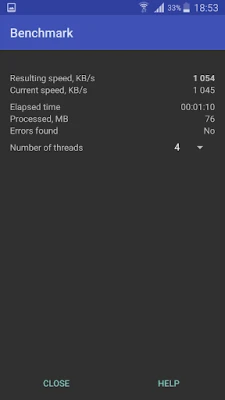
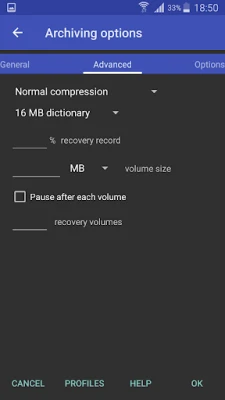
RAR utilizes advanced compression algorithms, allowing users to create solid archives and utilize multiple CPU cores for faster data compression. This not only speeds up the process but also optimizes the compression ratio, resulting in smaller file sizes without sacrificing quality.
Encryption and Security
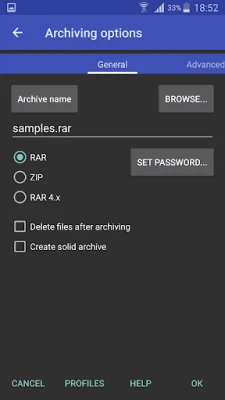
Security is a top priority for many users, and RAR addresses this with robust encryption options. Users can create password-protected ZIP files and RAR archives, ensuring that sensitive information remains secure during storage and transfer.
Unpacking and File Management
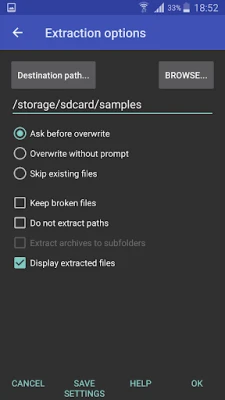
RAR's unpacking capabilities extend beyond standard ZIP files. The unzip function supports ZIP and ZIPX formats, including those compressed with BZIP2, LZMA, PPMd, and XZ algorithms. This flexibility allows users to access a wide range of compressed files effortlessly.
Moreover, RAR provides essential file management functions, including:
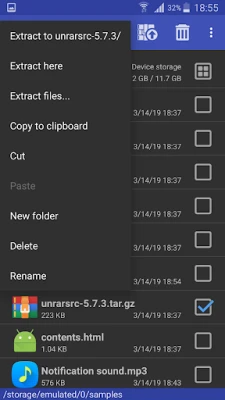
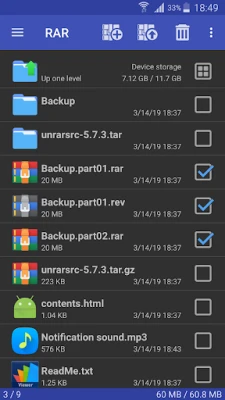
- Copying files and folders
- Deleting files and folders
- Moving and renaming files
- Creating new folders
- Installing applications from APK packages
These features make RAR not just a compression tool but a comprehensive file management solution.
Compatibility with RAR Archives
The unrar command is compatible with all versions of RAR archives, including the latest RAR5 format. This ensures that users can access and extract files from both password-protected and multipart RAR archives without any hassle.
Contributing to RAR's Global Reach
If you're interested in helping RAR reach a broader audience, consider contributing by translating the software into your language. You can download the necessary language files from the "RAR extras" section on www.rarlab.com and follow the instructions provided in the readme.txt file. Your contribution can help make RAR more accessible to users worldwide.
Conclusion
RAR is an indispensable tool for anyone looking to manage and compress files efficiently. With its extensive features, including support for various archive formats, advanced compression techniques, and robust file management capabilities, RAR stands out as a leading choice in the realm of file compression software. Whether you're a casual user or a professional, RAR can significantly enhance your file management experience.
Rate the App
User Reviews















Popular Apps










Editor's Choice









