

Latest Version
Apex.5.15.2
July 19, 2026
QmakerTech
Education
Android
1
Free
com.devup.qcm.maker
Report a Problem
More About Quiz Maker (Create Quiz /Test)
Unlock the Power of Interactive Learning with QuizMaker: Your Ultimate Quiz Creation Tool
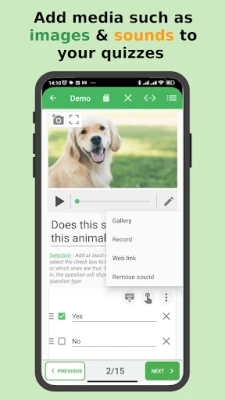
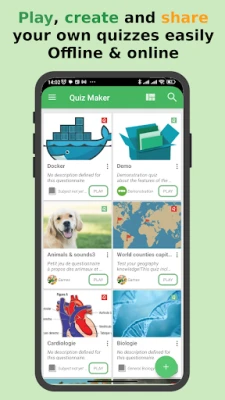
In today's fast-paced educational landscape, engaging students and enhancing their learning experience is paramount. The QuizMaker app revolutionizes the way quizzes are created and shared, offering a dynamic platform for interactive test quizzes that incorporate multimedia elements like images and sounds, along with automatic scoring. Whether for self-evaluation or entertainment, QuizMaker empowers users to create, play, and share quizzes effortlessly.
Create Your Own Quizzes with Ease
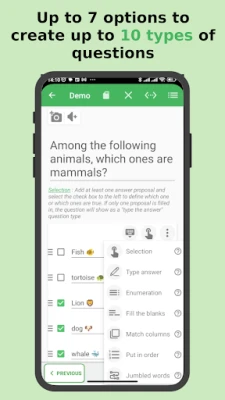
QuizMaker provides a versatile suite of features that allows you to design quizzes tailored to your specific needs. Here’s what you can create:
- Multiple Choice Questions: Engage users with questions that have several answer options.
- Single Answer Questions: Test knowledge with straightforward questions requiring one correct answer.
- Open-Ended Questions: Encourage critical thinking by allowing users to provide their own answers.
- Open-Ended with Multiple Answers: Challenge users to think broadly and provide several responses.
- Enumeration: Ask users to list items in a specific order.
- Fill in the Blanks: Assess knowledge retention with incomplete statements.
- Put in Order: Test understanding of sequences or processes.
- Match Columns: Enhance learning through association tasks.
Seamless Sharing and Playing Experience
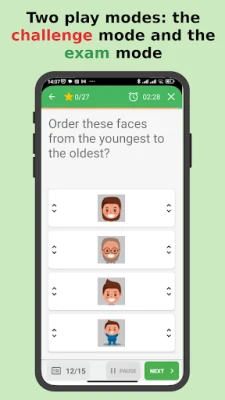
Once you’ve crafted your quiz, sharing it is a breeze. Save your creations as a *.qcm file, making it easy to distribute to friends, students, or colleagues. Recipients can play quizzes using the QuizMaker app or any compatible reader. You can choose between two engaging play modes:
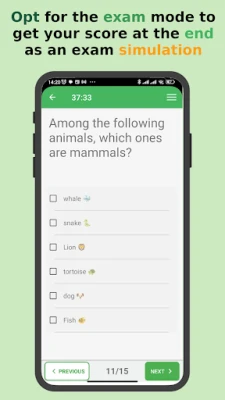
- Exam Mode: Simulate a real exam environment for serious assessment.
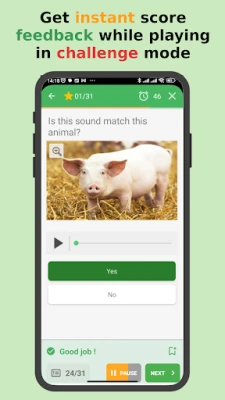
- Challenge Mode: Compete against the clock for a fun, game-like experience.
Customize Your Quizzes for Maximum Engagement
QuizMaker allows for extensive customization, ensuring that your quizzes meet your specific requirements. You can configure:
- Case Sensitivity: Decide if answers should be case-sensitive.
- Help with Answer Entry: Provide hints to assist users in answering questions.
- Randomization Strategy: Shuffle questions and answers to enhance the challenge.
- Custom Scoring Policy: Set your own scoring rules to reflect the quiz's objectives.
- Multimedia Integration: Add images and sounds to enrich the quiz experience.
With these features, you can create quizzes that are not only educational but also entertaining, making learning a more enjoyable process.
Understanding the *.qcm File Format
The *.qcm file format is designed specifically for interactive quizzes. Here’s what you need to know:
- It supports multimedia content, including images and sounds, along with automatic scoring.
- A *.qcm file is a compressed package containing questions, answer options, and multimedia elements.
- The structure of a *.qcm file allows for seamless interpretation by any compatible application.
Efficient File Management with QuizMaker
QuizMaker serves as a comprehensive file manager for your quiz files. It allows you to:
- Read and Execute: Open and play quiz files stored on your device.
- Edit Quizzes: Modify existing quizzes or create new ones using an intuitive interface.
- Organize Files: Rename, copy, move, or delete quiz files as needed.
All quizzes created with QuizMaker are saved as shareable *.qcm files, ensuring that anyone with the app can access and enjoy your quizzes.
Who Can Benefit from QuizMaker?
QuizMaker is an invaluable tool for a variety of users:
- Teachers: Prepare engaging lessons and assessments that captivate students.
- Students: Practice for exams and reinforce learning through interactive quizzes.
- Trainers: Create training modules that combine education with entertainment.
Whether you’re preparing lessons, studying for exams, or simply enjoying the art of quizzing, QuizMaker transforms learning into an engaging game.
Conclusion: Elevate Your Learning Experience with QuizMaker
With QuizMaker, you can easily create, play, and share quizzes that enhance learning and make education enjoyable. This powerful quiz creator not only supports unlimited quiz creation but also fosters a fun environment for learning. Embrace the future of education with QuizMaker and turn every quiz into an exciting adventure!
Rate the App
User Reviews














Popular Apps










Editor's Choice









