

Latest Version
1.9.9.1
May 30, 2026
AtolphaDev
Tools
Android
0
Free
com.atolphadev.quikshort
Report a Problem
More About Quikshort: Shortcut Creator
Unlock Your Device's Potential with Quikshort: The Ultimate Shortcut Manager
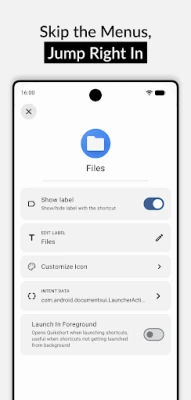
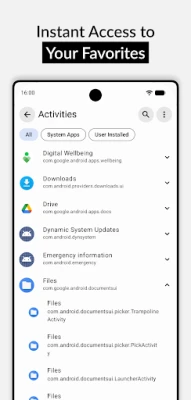
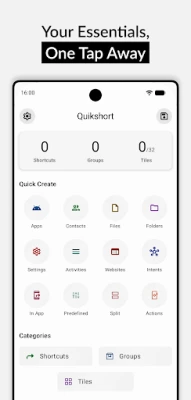
In today's fast-paced digital world, efficiency is key. Quikshort is designed to streamline your mobile experience by allowing you to create shortcuts for apps, in-app activities, frequently accessed files, and more. This powerful tool simplifies navigation and enhances productivity, making it an essential addition to your device.
Home Screen & Quick Settings: Unlimited Possibilities
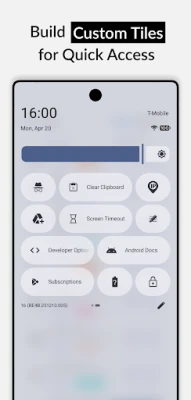
Quikshort empowers users to create an unlimited number of home screen shortcuts and groups. This feature allows for easy access to your most-used applications and files. Additionally, with the Pro version, you can configure up to 15 custom tiles in your quick settings panel, expanding the total to 32 tiles. This flexibility ensures that you can tailor your device to meet your specific needs.
Customization Features: Make It Yours
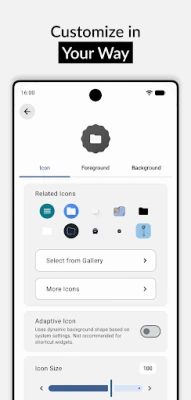
Personalization is at the heart of Quikshort. Users can design their shortcuts by:
- Applying icons from third-party icon packs
- Choosing solid or gradient background colors
- Adjusting icon shapes and sizes
- Using personal images to create unique custom shapes
This level of customization allows you to create a home screen that reflects your style and preferences, making your device truly yours.
Groups Feature: Organize with Ease
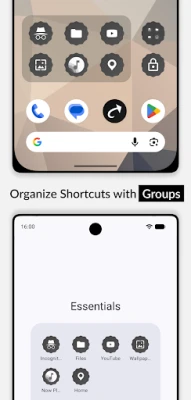
Quikshort's grouping feature allows you to combine multiple related shortcuts into a single, easily accessible group. This functionality enables you to:
- Access all related shortcuts with a single tap
- Place groups as open folders directly on your home screen
- Set groups to open as a dialog box or bottom sheet for quick access
By organizing your shortcuts into groups, you can enhance your workflow and reduce clutter on your home screen.
Backup and Restore: Never Lose Your Shortcuts
Quikshort ensures that your generated shortcuts are safely stored in your device's storage. This feature allows you to modify and update your shortcuts without starting from scratch. Additionally, you can export your shortcuts as files for backup purposes or import them onto another device, ensuring that your personalized setup is always within reach.
Action Shortcuts: Simplify Everyday Tasks
Quikshort enables you to create action shortcuts for everyday tasks, enhancing your device's functionality. With this feature, you can:
- Toggle device settings such as Do Not Disturb and brightness
- Manage your clipboard efficiently
- Trigger physical commands like taking a screenshot, locking your device, or opening the power menu
These action shortcuts save you time and streamline your daily activities, making your device more user-friendly.
Accessibility Service Usage: Your Privacy Matters
Quikshort utilizes the Accessibility Service API exclusively to enable specific action shortcuts, including the Power Menu, Lock Device, and Screenshot functions. This permission is only requested when a user creates any of these specific action shortcuts. Importantly, Quikshort does not collect, store, or share any personal or sensitive data through the Accessibility Service. The service is solely used for executing the mentioned action shortcuts, ensuring your privacy is protected.
Support & Feedback: We're Here to Help
If you encounter any issues or have feature requests, Quikshort is committed to providing support. You can reach out via email at support@atolphadev.com. Additionally, comprehensive documentation is available at Quikshort Documentation, offering guidance on maximizing the app's potential.
Conclusion: Transform Your Mobile Experience with Quikshort
Quikshort is more than just a shortcut manager; it is a powerful tool that enhances your mobile experience by providing customization, organization, and efficiency. With its user-friendly features, you can create a personalized setup that meets your unique needs. Whether you're looking to streamline your daily tasks or simply want to make your device more accessible, Quikshort is the solution you've been searching for. Download Quikshort today and unlock the full potential of your device!
Rate the App
User Reviews














Popular Apps










Editor's Choice









