Latest Version
2.7.0
April 04, 2026
EdgePro
Tools
Android
0
$2.49
com.edgepro.controlcenter
Report a Problem
More About Quick Settings
Unlock the Power of Your Galaxy Device with Edge Panels: A Comprehensive Guide
In the fast-paced world of technology, having quick access to essential features can significantly enhance your user experience. The Edge Panels on Galaxy devices offer a streamlined way to manage your settings and applications efficiently. This article delves into the main features, supported devices, and how to maximize the use of Edge Panels for an optimized mobile experience.
Main Features of Edge Panels
The Edge Panels provide a variety of functionalities that cater to everyday needs. Here’s a closer look at what you can do:
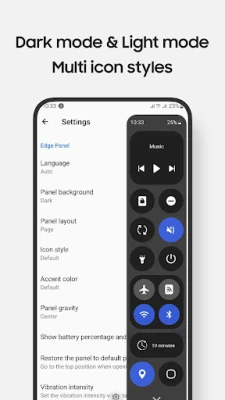
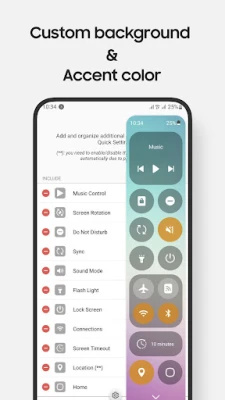
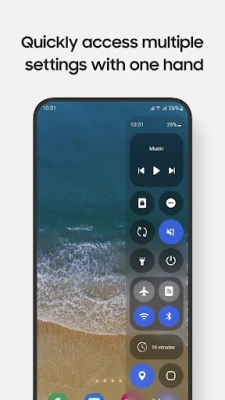
- Toggle Settings: Easily switch Wi-Fi, Bluetooth, Do Not Disturb, Mobile Data, and more with just a tap.
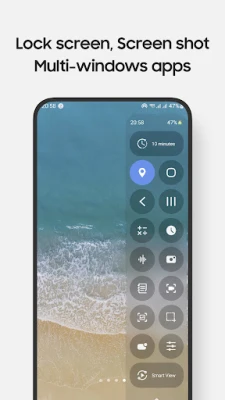
- Access Frequently Used Apps: Open apps like Camera, Calculator, and Clock in full-screen or pop-up views for quick access.
- Control Music Playback: Manage your music effortlessly without navigating away from your current task.
- Screen Recording: Capture your screen with customizable options to suit your needs.
- Take Screenshots: Snap specific portions of your screen for easy sharing or reference.
- Adjust Sound and Brightness: Fine-tune your device’s audio and display settings with ease.
- Lock Screen: Secure your device with a single tap.
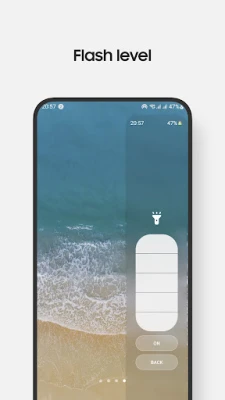
- Multiple Flashlight Levels: Access various brightness settings for your flashlight.
- One-Handed Notification Access: Pull down the notification bar effortlessly with one hand.
- Screen Timeout Options: Choose from multiple timeout settings to save battery life.
- Navigation Buttons: Utilize Home, Back, and Recents buttons for seamless navigation.
- QR Code Scanning: Quickly scan QR codes for instant access to information.
- Screen Mirroring: Use Smart View to mirror your screen on compatible devices.
- Customizable Control Panel: Design and layout your control panel to fit your preferences.
- Night Mode Support: Enjoy a comfortable viewing experience in low-light conditions.
Important Notes for Users
To enhance your experience with Edge Panels, keep the following points in mind:
- Long Press for Settings: Long press on items to access their settings. For instance, long press on the Lock screen to open the power dialog.
- Volume and Brightness Control: Due to Edge Panel limitations, adjustments are made through taps instead of sliders.
- Manual Toggle for System Controls: Certain controls like Airplane Mode and Mobile Data require manual toggling for user safety.
- Lock Screen Feature: For devices running Android 9 (Pie) or later, the Lock screen feature operates normally. Older versions may require a pattern or password for security.
- Device Compatibility: The app is designed for Galaxy devices with Edge Panels and is not optimized for tablets or foldable devices, except for the Z Flip series.
Supported Devices
The Edge Panels are compatible with a range of Galaxy devices, including:
- Note Series
- S Series
- A Series
- Z Flip Series
How to Enable Edge Panels
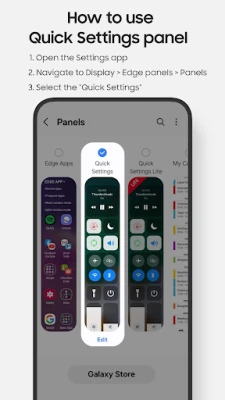
To start using the Quick Settings panel, follow these simple steps:
- Open the Settings app on your device.
- Navigate to Display.
- Select Edge Panels.
- Enable the Quick Settings Panel.
- If you encounter issues after updates, uncheck and recheck the Quick Settings Panel option.
Permissions Required for Optimal Functionality
To ensure all features work seamlessly, the app requires specific permissions, which are clearly outlined during use:
- Accessibility Permission: This is necessary for the app to perform certain controls. To disable it, go to Settings > Accessibility > Installed apps and turn off Quick Settings.
- Audio Recording Permission: Required for the Screen Recording feature.
- Camera Permission: Needed to access the camera for QR code scanning and flashlight controls.
- Read Phone State Permission: Allows read-only access to phone state for Wi-Fi and Mobile Data controls.
Contact Us
We value your feedback! Share your thoughts or inquiries at edge.pro.team@gmail.com.
App Originality
This app is independently developed for Galaxy devices and is not affiliated with or endorsed by any other platforms or brands. Experience the unique features of Edge Panels and elevate your mobile experience today!
With the Edge Panels, managing your Galaxy device has never been easier. Embrace the convenience and efficiency that comes with quick access to your most-used features and settings.
Rate the App
User Reviews















Popular Apps










Editor's Choice









