
Latest Version
June 20, 2026
Vidus6
Tools
Android
0
Free
com.vidus6.qr.scanner
Report a Problem
More About QR & Barcode Scanner - QRBot
Unlock the Power of QR Codes with QRBot: Your Ultimate Scanning Solution
In today's fast-paced digital world, efficiency and simplicity are paramount. QRBot offers a seamless experience for scanning and generating QR codes and barcodes, ensuring you can access information quickly and securely. With no unnecessary distractions, QRBot focuses on delivering clean, reliable scanning capabilities that cater to your needs.
Scan Anything with Ease
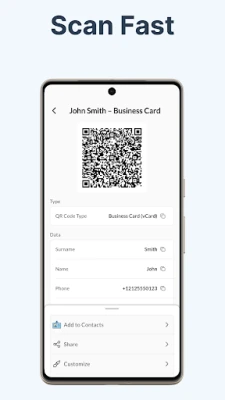
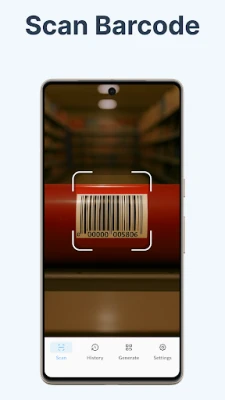
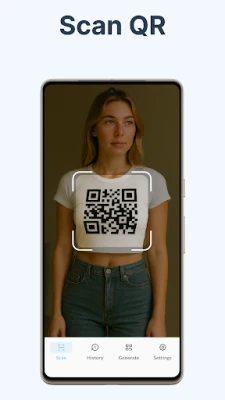
- Real-Time Camera Scanning: Just point your camera, scan, and you're done.
- Import from Photo Gallery: Effortlessly scan QR codes or barcodes from saved images.
- Instant Actions: Open URLs, connect to Wi-Fi, dial numbers, save contacts, and add calendar events in seconds.
- Comprehensive Format Support: QRBot supports a wide range of formats including QR Code, Data Matrix, Aztec, PDF-417, EAN-13, EAN-8, UPC-A, UPC-E, Code 128, Code 39, Code 93, Codabar, and ITF.
Create Any Code with Versatility
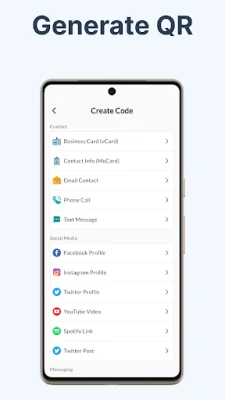
QRBot's QR code generator and barcode maker is designed to accommodate over 20 different types of codes, including:
- Website Links: Generate QR codes for easy access to your online content.
- Wi-Fi Network Sharing: Share your Wi-Fi password as a printable QR code, perfect for guests.
- Contact Cards: Create vCards or meCards to share your information with a single scan.
- Communication Codes: Generate codes for email, SMS, and phone numbers.
- Calendar Events: Simplify event sharing with QR codes.
- Social Media Profiles: Link to your Instagram, Facebook, WhatsApp, Telegram, Viber, YouTube, Spotify, and X/Twitter profiles.
- Crypto Wallet Addresses: Securely share your cryptocurrency information.
- Plain Text: Create QR codes for any text you wish to share.
Design Your Code to Stand Out
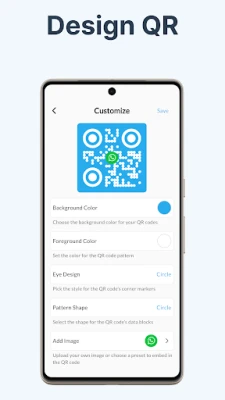
Customization is key to making your QR codes memorable. QRBot allows you to:
- Choose Custom Colors: Align your QR code with your brand or personal style.
- Select Unique Eye Shapes: Make your QR code visually appealing on flyers, menus, or business cards.
- Maintain a Clean Aesthetic: Enjoy a minimalistic design that looks great both on-screen and in print.
History & Recovery Features
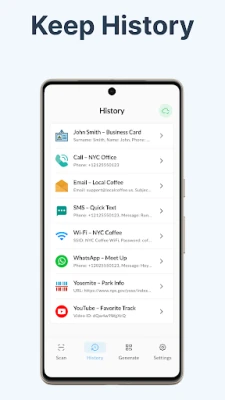
QRBot keeps track of your scanning and generating activities:
- Searchable History: Access a complete history of every code you've scanned or generated.
- Recently Deleted Bin: Easily recover codes you may have accidentally removed.
Privacy & Security First
Your privacy is paramount with QRBot. The app is designed with a privacy-first approach, ensuring your scans remain on your device by default. Key security features include:
- PIN Lock: Protect your scanning history with a secure PIN.
- Biometric Unlock: Use fingerprint or facial recognition for quick access.
- Blur-on-Minimize: Sensitive codes disappear when you switch apps for added security.
- Encrypted Cloud Sync: Optionally sync your history across multiple devices securely.
Supported Formats for Every Need
QRBot supports a wide array of formats, ensuring you can scan and generate codes for various applications:
- QR Code
- Data Matrix
- Aztec
- PDF-417
- EAN-13
- EAN-8
- UPC-A
- UPC-E
- Code 128
- Code 39
- Code 93
- Codabar
- ITF
Common Use Cases for QRBot
QRBot is versatile and can be used in various scenarios, such as:
- Scanning QR codes on restaurant menus or table cards.
- Joining Wi-Fi networks effortlessly by scanning the QR code on the router.
- Instantly sharing your contact details as a QR code.
- Opening links from billboards, posters, or product packaging.
- Generating QR codes for small businesses, events, or personal cards.
- Reading barcodes on products without leaving the app.
- Organizing and securely storing all your codes in one convenient location.
Premium Features for Enhanced Functionality
While the free version of QRBot covers all essential scanning and generating features, upgrading to the premium subscription unlocks additional benefits:
- Cloud Sync: Access your codes across multiple devices.
- Comprehensive Security Suite: Enjoy features like PIN lock, biometric access, and blur-on-minimize.
- Advanced QR Design Customization: Take your QR codes to the next level with enhanced design options.
Why Choose QRBot?
In a market flooded with QR scanner and code reader apps, QRBot stands out. Many alternatives are cluttered with ads, demand unnecessary permissions, or hide features behind complex interfaces. QRBot offers a fast startup, a clean user interface, and a genuine commitment to your privacy.
Download QRBot for free today and take control of every QR code and barcode you encounter. Experience the difference of a dedicated scanning solution that prioritizes your needs.
Rate the App
User Reviews















Popular Apps










Editor's Choice









