

Latest Version
July 22, 2026
Havabee
Finance
Android
0
$2.09
com.havabee.pocket
Report a Problem
More About Pocket: Expense Tracker
Master Your Finances with Pocket: The Ultimate Expense Tracking App
In today's fast-paced world, managing your finances efficiently is crucial. Enter Pocket, the innovative expense tracking app that learns your habits and simplifies your financial management. With its intuitive features and user-friendly interface, Pocket is designed to help you take control of your spending effortlessly.
Learn Your Spending Habits
Pocket quietly observes your financial patterns, understanding your daily routines. It recognizes that you often grab coffee on weekday mornings, order takeout on Friday nights, and pay your subscriptions on specific dates. Over time, Pocket pre-fills amounts, suggests categories, and highlights the right merchants before you even start typing, making expense tracking seamless.
Add an Expense in Under 5 Seconds
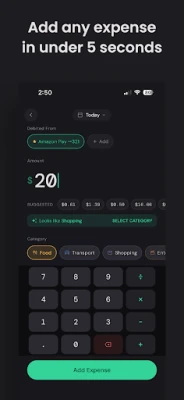
With Pocket, logging an expense is a breeze. Simply open the app, and you'll find your most likely amount already suggested. Category and merchant options are presented as instant-tap chips, allowing you to confirm your entry in seconds. Pocket outperforms any other expense app on the market in speed and efficiency.
Your Dashboard: The Command Center for Your Finances
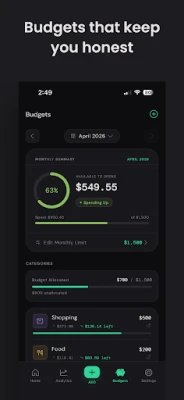
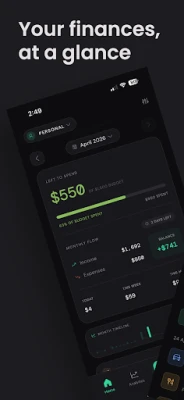
Your Pocket dashboard serves as your financial command center, displaying one crucial number: your "Left to Spend." This figure represents not just your balance but your budget minus any upcoming known expenses, recalculated daily. Below this, a monthly timeline visualizes your spending patterns, while customizable list views allow you to show or hide tags and account details as needed.
Smart Features That Work Quietly
- Time-aware amount suggestions based on your last 90 days of spending.
- Category and subcategory suggestions appear as you type.
- Merchant memory ranks suggestions by frequency and recency.
- Automatic detection of recurring bills—no manual setup required.
- Spending spike alerts notify you when any category exceeds twice your average.
- Contextual bank account memory remembers which account you typically use.
- Account-to-account transfers allow you to move money without affecting your expense totals.
- Biometric app lock secures your data with fingerprint or biometric unlock.
- SMS auto-import feature parses bank messages for easy review.
Auto-Import from Bank SMS
Pocket enhances your experience by reading bank SMS messages to detect debits and credits. Credit card bill payments are automatically classified as transfers, and duplicate notifications are merged for clarity. Every transaction appears in a review queue, ensuring that all processing occurs on your device, keeping your personal messages private.
Cloud & Local Backups for Peace of Mind
With Pocket, you can rest easy knowing your data is secure. The app automatically backs up your information to your personal Google Drive AppData folder, ensuring complete privacy. Additionally, you can export your transaction history as a secure, local .pocket file for added security.
Receipts & Document Attachments
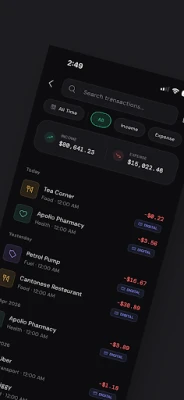
Never lose a receipt again! Pocket allows you to snap a photo, select from your gallery, or upload PDF invoices directly to any transaction. You can view full-screen interactive previews at any time, making it easy to keep track of your expenses.
Nested Subcategories & Custom Tags for Precise Tracking
Track your spending with unparalleled precision using Pocket's nested subcategories and custom tags. Create personalized tags to filter transactions across various dimensions, and utilize nested subcategories (like Food > Groceries) for detailed logs. You can also bulk-update subcategories for past transactions effortlessly.
Home Screen Widgets for Quick Access
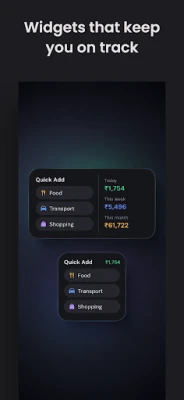
Keep your finances front and center with Pocket's home screen widgets. The Quick Add widget allows you to log expenses directly from your home screen with just two taps. You can always see today's spending and your monthly total, with full support for both light and dark themes.
Multiple Books & Accounts for Easy Management
Separate your personal and business expenses with Pocket's Books feature. Switch between them instantly, copy existing bank accounts, and adjust cash balances with automatic offset calculations. View total balances across cash, banks, and wallets for a comprehensive financial overview.
Interactive Analytics for In-Depth Insights
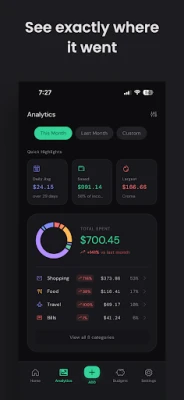
Gain valuable insights into your spending habits with Pocket's interactive analytics. Analyze your expenses by category, subcategory, merchant, account, and time period. Simply tap any segment in your charts to access a pre-filtered transaction list, making it easier to understand your financial behavior.
Completely Private by Design
Pocket prioritizes your privacy. No account is required, and there’s no cloud sync or advertisements. Every piece of data remains on your device, with all suggestions, patterns, and predictions processed locally. Your information is yours alone.
Available in 18 Languages
Pocket is accessible to a global audience, supporting 18 languages, including English, Arabic, Chinese (Simplified & Traditional), French, German, Spanish, Portuguese, Italian, Japanese, Korean, Dutch, Polish, Swedish, Czech, Thai, Indonesian, Vietnamese, and Malay.
In conclusion, Pocket is not just an expense tracking app; it's a comprehensive financial management tool that adapts to your lifestyle. With its smart features, user-friendly interface, and commitment to privacy, Pocket empowers you to take control of your finances like never before. Start mastering your spending today!
Rate the App
User Reviews















Popular Apps










Editor's Choice









