

Latest Version
June 05, 2026
Google LLC
Tools
Android
0
Free
com.google.android.apps.pixel.creativeassistant
Report a Problem
More About Pixel Studio
Unlock Your Creativity with Pixel Studio: A Comprehensive Guide
In today's digital age, creativity knows no bounds, especially with innovative tools like Pixel Studio. This powerful application allows users to transform their ideas into stunning visuals effortlessly. Whether you're an artist, a marketer, or simply someone who loves to create, Pixel Studio offers a plethora of features that can elevate your projects. Let’s explore how you can maximize your experience with this remarkable tool.
Create Stunning Visuals with Ease
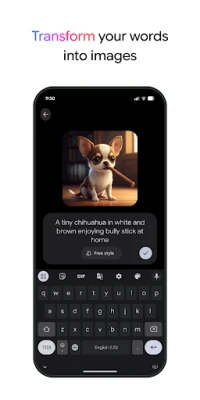
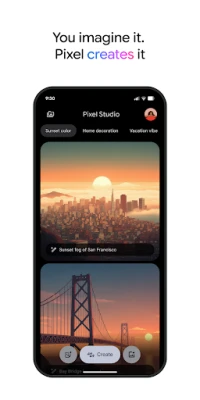
Pixel Studio empowers users to generate captivating images by simply entering a description. This feature is perfect for those who may not have advanced design skills but still want to produce eye-catching graphics. You can also upload your own images to personalize your projects further.
Design Custom Stickers Effortlessly
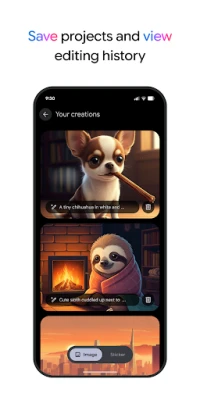
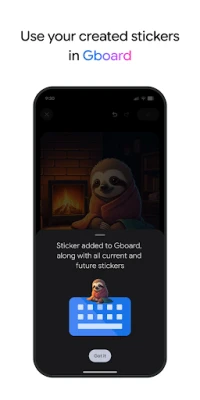
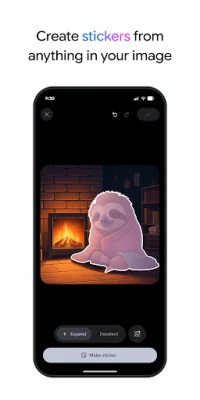
One of the standout features of Pixel Studio is the ability to create and add stickers. By describing the sticker you envision, the application automatically generates it and saves it to your Studio projects and Google Keyboard (Gboard). This functionality allows for seamless integration of custom stickers into your messaging, making your conversations more engaging and fun.
Enhance Your Images with Captions and Highlights
Adding captions to your images has never been easier. Pixel Studio offers a variety of fonts and colors, allowing you to customize your text to match your style. You can also circle specific parts of an image or highlight areas to draw attention to important details. This feature is particularly useful for presentations, social media posts, or any project where you want to convey a message clearly.
Intuitive Gesture Controls for Image Editing
Editing images is a breeze with Pixel Studio's intuitive gesture controls. You can easily remove or move items within your images using simple gestures, making the editing process quick and efficient. This user-friendly approach ensures that even beginners can navigate the app with confidence.
Seamlessly Insert New Elements into Existing Images
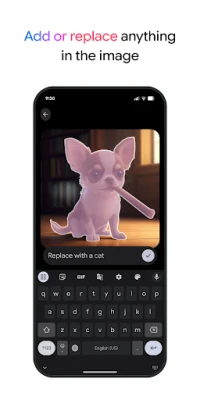
Want to add a new element to an existing image? Pixel Studio allows you to do just that by simply describing the item you wish to insert. This feature opens up endless possibilities for creativity, enabling you to enhance your visuals without starting from scratch.
Integrate Stickers Directly in Google Keyboard
With Pixel Studio, you can create stickers directly within Google Keyboard (Gboard) while messaging others. This integration makes it easy to share your custom creations in real-time, adding a personal touch to your conversations. Whether you're sending a quick message or engaging in a lengthy chat, your unique stickers will make your communication stand out.
Modify Screenshots with Your Favorite Features
Pixel Studio also allows you to modify your screenshots using your favorite functionalities from the app. This means you can annotate, highlight, or embellish your screenshots to better convey your message or share important information. This feature is particularly useful for tutorials, presentations, or any scenario where visual clarity is essential.
Availability and Accessibility
While Pixel Studio offers a wide range of features, it's important to note that some functionalities may not be available in every country, region, or language. Always check the app's availability in your area to ensure you can take full advantage of its capabilities.
Learn More About Pixel Studio
For more information on how to use Pixel Studio and its features, visit the official support page: Learn more about Pixel Studio.
Terms and Policies
Before diving into the creative world of Pixel Studio, familiarize yourself with the terms and policies governing its use. You can find detailed information here: Terms and Policies.
Safety First: Google’s Commitment
Every Google product, including Pixel Studio, is designed with user safety in mind. To learn more about Google’s safety measures, visit the Safety Center: Google Safety Center.
In conclusion, Pixel Studio is a versatile tool that caters to a wide range of creative needs. With its user-friendly features and seamless integration with Google Keyboard, it empowers users to express their creativity like never before. Start exploring Pixel Studio today and unlock your creative potential!
Rate the App
User Reviews















Popular Apps










Editor's Choice









