

Latest Version
4.66 Pro
March 22, 2026
Yaroslav Syrytsia
Tools
Android
0
$2.99
ua.com.streamsoft.pingtoolspro
Report a Problem
More About PingTools Pro
Unlocking Network Insights: The Ultimate Guide to PingTools Pro
In today's digital age, maintaining a robust and efficient network is crucial for both personal and professional use. Whether you're a tech enthusiast or a system administrator, having the right tools at your disposal can make all the difference. One such tool that stands out is PingTools Pro. This comprehensive application offers a suite of features designed to enhance your network management experience. Below, we delve into the various functionalities of PingTools Pro, highlighting how each can benefit you.
1. Info Tool: Your Network Status at a Glance
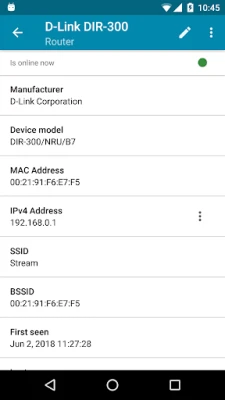
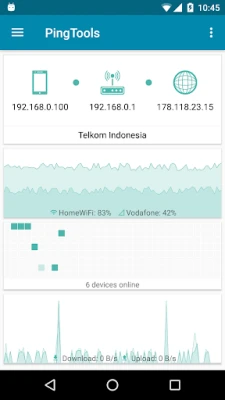
The Info Tool provides a detailed overview of your network connection status. With this feature, you can easily view your Wi-Fi router's IP address, your external IP address, and essential information about your Internet Service Provider (ISP). Additionally, the Info screen presents useful charts that illustrate Wi-Fi connection quality and network usage, allowing you to monitor performance effectively.
2. Watcher: Stay Informed About Network Resources
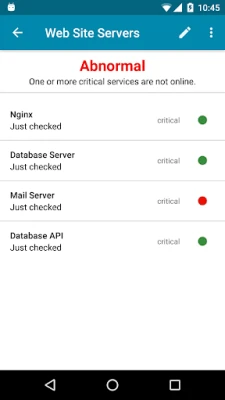
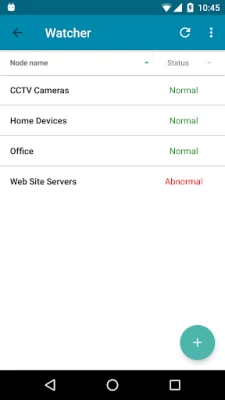
Watcher is a proactive tool that checks network resources on a scheduled basis. It notifies you of any changes in the state of these resources, ensuring you remain aware of potential issues. This feature is invaluable for maintaining network reliability and addressing problems before they escalate.
3. Local-Area Network: Discover Connected Devices
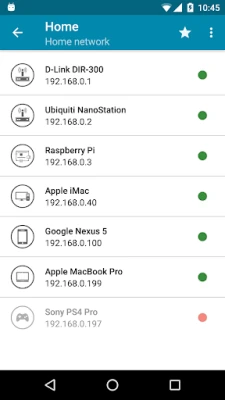
The Local-Area Network feature allows you to identify all devices connected to your network. You can easily see who is online, determine the hardware manufacturer, and understand what services are running on each device. This insight is crucial for network security and management.
4. Ping: Monitor Remote Hosts Effortlessly
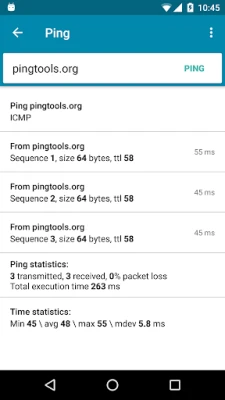
The Ping tool is a classic network utility that needs no introduction. It allows you to use a standard set of parameters, along with advanced features like TCP and HTTP/HTTPS ping. With background operation and sound notifications, you can monitor the status of remote hosts without constant distraction.
5. GeoPing: Global Resource Availability Check
GeoPing enables you to check the accessibility of your resources from various global locations. With just one click, you can determine if your website is reachable from places like Singapore, ensuring your online presence is robust worldwide.
6. Traceroute: Visualize Your Data Path
The Traceroute tool is essential for system administrators. It displays the route packets take from your device to a target host. The Visual Traceroute feature uses a map to illustrate how data packets traverse the globe, providing valuable insights into network performance and potential bottlenecks.
7. iPerf: Analyze Network Bandwidth
iPerf is a powerful utility for analyzing network bandwidth. Based on iperf3, it supports both server and client modes, allowing you to conduct thorough bandwidth tests and optimize your network performance.
8. Port Scanner: Identify Open Ports
The Port Scanner is a robust multi-threaded TCP port scanner. This tool provides a comprehensive list of open ports on remote devices, often including descriptions of the applications using them. Understanding open ports is vital for network security and management.
9. Whois: Domain and IP Information
The Whois utility displays detailed information about a domain or IP address. With Whois, you can find registration dates, organizational details, and contact information, making it an essential tool for domain management and research.
10. UPnP Scanner: Discover Local Devices
The UPnP Scanner identifies UPnP devices on your local network. This feature helps you find the IP addresses of routers, gaming consoles like Xbox or PlayStation, media servers, and other devices. It also supports DLNA-compatible TVs and media boxes, enhancing your home network experience.
11. Bonjour Browser: Explore Network Services
The Bonjour Browser is a network utility for exploring Bonjour (ZeroConf, Avahi) services. Built into Apple's operating systems, this tool allows you to search for network addresses of devices like iPhones and iPods, simplifying device management.
12. Wi-Fi Scanner: Analyze Access Points
The Wi-Fi Scanner provides a list of access points in your vicinity. You can discover the manufacturer of each access point, assess signal strength, and visualize this information through charts. This feature supports both 2.4 GHz and 5 GHz devices, ensuring comprehensive Wi-Fi analysis.
13. Subnet Scanner: Explore Your Wi-Fi Subnet
The Subnet Scanner scans your Wi-Fi subnet to identify other hosts. It can check hosts via Ping or multiple TCP ports, allowing you to find services running in your subnet, such as SSH on port 22. You can also configure the IP address range for custom scans, enhancing your network exploration capabilities.
14. DNS Lookup: Troubleshoot Domain Issues
The DNS Lookup tool queries Domain Name System (DNS) name servers. It's useful for troubleshooting network issues or finding the IP address of a domain or mail server. The tool also supports reverse DNS queries, providing comprehensive DNS management.
15. Wake on LAN: Remotely Power On Devices
Wake on LAN allows you to turn on a network computer remotely by sending a special data packet known as a Magic Packet. This feature is invaluable when you lack physical access to a computer that has unexpectedly shut down.
16. IP Calculator: Simplify Network Setup
The IP Calculator is an essential utility for configuring network equipment. It helps you calculate network parameters, determine IP address ranges, and establish subnet masks, streamlining the setup process.
Conclusion: Why Choose PingTools Pro?
PingTools Pro has earned recognition as the “App of The Day” by MyAppFree, and for good reason. With its extensive suite of tools, it empowers users to manage their networks effectively and efficiently. Whether you're troubleshooting connectivity issues, analyzing bandwidth, or discovering connected devices, PingTools Pro is your go-to solution for comprehensive network management.
Embrace the power of PingTools Pro and take control of your network today!
Rate the App
User Reviews















Popular Apps










Editor's Choice









