

Latest Version
2.6.5-Pro
June 09, 2026
AppPlanex
Tools
Android
1
$9.99
com.appplanex.pingmasternetworktools.pro
Report a Problem
More About Ping Master: Network Tools PRO
Unlock the Power of Networking with Ping Master: Network Tools PRO
In today's digital age, having a reliable network tool is essential for both personal and professional use. Ping Master: Network Tools PRO stands out as a comprehensive solution, offering a suite of features designed to enhance your networking experience. This article delves into the myriad functionalities of this powerful application, ensuring you can optimize your network management effectively.
Comprehensive Network Information at Your Fingertips
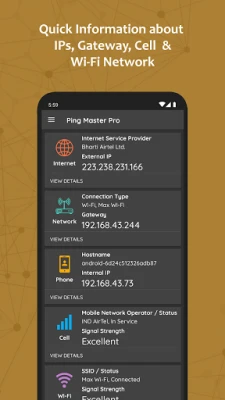
Ping Master provides quick access to vital network information, including:
- IP Addresses: Instantly retrieve details about network IPs and gateways.
- Cell and Wi-Fi Networks: Gain insights into available cellular and Wi-Fi networks in your vicinity.
Advanced Ping Tools for Accurate Response Measurement
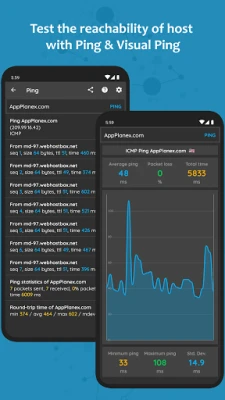
Utilize the Ping Tools feature to measure the response time of hosts using various protocols:
- ICMP: Standard ping protocol for network diagnostics.
- TCP: Test connectivity using the Transmission Control Protocol.
- HTTP/HTTPS: Measure response times for web servers securely.
The Visual Ping Tool offers real-time graphs, allowing you to visualize continuous pings to a specified host, enhancing your ability to monitor network performance.
Domain and IP Address Insights with Whois
Discover essential information about any domain or IP address using the Whois feature. This tool provides:
- Owner details
- Date of registration
- Contact information
Traceroute: Mapping Your Network Path
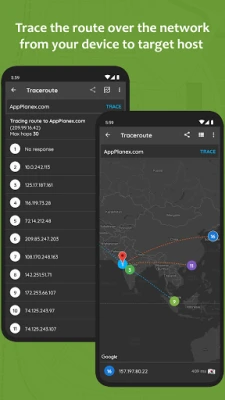
Track the journey of packets across the IP network with the Traceroute tool. This feature displays the hops taken from your device to the target host, complete with a visual map for easy understanding.
Wi-Fi Analysis and Device Scanning
Ping Master excels in Wi-Fi analysis, allowing you to:
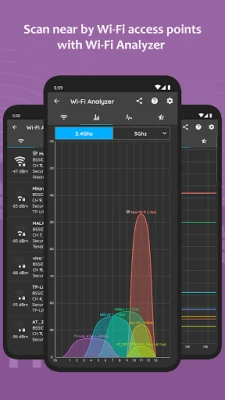
- Scan Wi-Fi Access Points: Identify nearby access points and gather detailed information using the Real-Time Channel Graph, Time Graph, and Channel Ratings.
- LAN Scanner: Discover all devices connected to your network, whether through Wi-Fi or hotspot.
Internet Speed Testing and Data Usage Monitoring
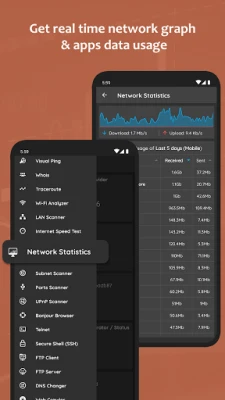
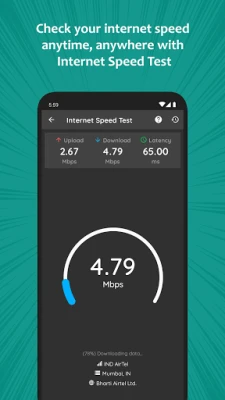
Test your internet speed effortlessly with the built-in speed test feature. Additionally, monitor real-time network data usage, providing insights into data consumption by each application.
Comprehensive Scanning and Management Tools
Ping Master offers a variety of scanning tools, including:
- IP Range Scanning: Scan any IP address range and identify open ports.
- Telnet and SSH Management: Manage connections securely with Telnet and SSH clients.
- FTP Client and Server: Transfer files between your device and FTP servers seamlessly.
DNS Management and Analysis
Effortlessly manage your DNS settings with the DNS Changer feature, which allows you to:
- Change your device's DNS address
- Test the speed of various DNS servers
Additionally, query the domain name system to obtain DNS records such as NS, SOA, MX, and TXT. The DMARC Lookup feature enables you to parse and validate DMARC records for enhanced email security.
Remote Access and Geolocation Features
Ping Master includes advanced functionalities such as:
- Wake on LAN: Turn on remote computers via network messages.
- IP Geolocation: Obtain geolocation information for any IP address or host.
Utility Tools for Enhanced Networking
In addition to the core features, Ping Master provides a range of utility tools, including:
- IP Calculator: Split your network into sub-networks efficiently.
- URL and Base64 Encoding/Decoding: Easily encode and decode URLs and Base64 text.
- Password and UUID Generators: Generate secure passwords and unique identifiers.
- Hash Generator: Create hashes for data integrity verification.
Backup and Restore Functionality
Ping Master also features a Backup and Restore option, allowing you to save and retrieve your searched or queried data effortlessly.
Important Note on DNS Changer
It’s important to note that the DNS Changer feature utilizes a VPN service solely to set up a local VPN interface for changing DNS server addresses. Your network traffic will not be routed through a remote VPN server, ensuring your privacy and security.
Get in Touch
If you have any questions, queries, or suggestions regarding the Ping Master app, feel free to reach out at support@AppPlanex.com.
In conclusion, Ping Master: Network Tools PRO is an indispensable tool for anyone looking to optimize their network management. With its extensive features and user-friendly interface, it empowers users to take control of their networking needs efficiently.
Rate the App
User Reviews















Popular Apps










Editor's Choice









