

Latest Version
2.4.4-Free
June 20, 2026
AppPlanex
Tools
Android
0
Free
com.appplanex.pingmasternetworktools
Report a Problem
More About Ping Master - Network Tools
Unlocking the Power of Network Tools: A Comprehensive Guide
In today's digital age, understanding your network is crucial for both personal and professional use. Whether you're a casual user or an IT professional, having access to reliable network tools can significantly enhance your experience. This article explores the myriad benefits of using advanced network tools, highlighting their functionalities and how they can optimize your connectivity.
Comprehensive IP Information
One of the primary features of advanced network tools is their ability to provide detailed IP information. Users can easily access:
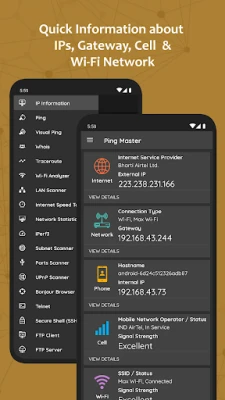
- External IP: Your public-facing IP address.
- Gateway IP: The IP address of your network gateway.
- Internal IP: The IP address assigned to your device within your local network.
Network Cell and WiFi Connection Insights
Understanding your network's performance is essential. These tools offer:
- Network Cell Info: Information about your cellular network connection.
- WiFi Network Connection Information: Details about your current WiFi connection, including signal strength and security type.
Real-Time Network Statistics
Stay informed about your network's performance with real-time statistics. Users can monitor:
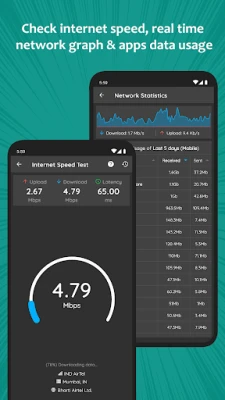
- Download and Upload Speeds: Track your internet speed in real-time.
- App Data Usage: See which applications are consuming your bandwidth.
Ping and Traceroute Tools
Diagnosing connectivity issues is made easy with:
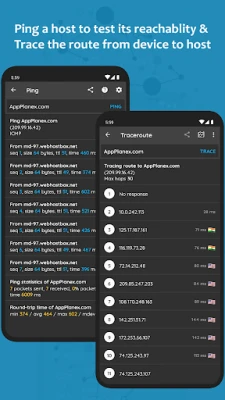
- Ping Test: Check the reachability of a host and measure round-trip time.
- Traceroute: Visualize the path your data takes to reach a target host, identifying any potential bottlenecks.
Local Area Network (LAN) Scanning
Identify devices connected to your network with:
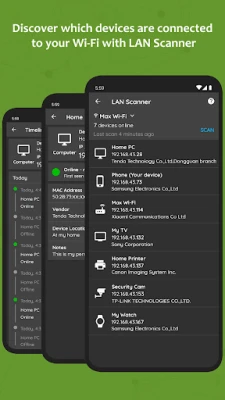
- LAN Scanner: Discover all devices on your local network.
- UPnP Scanner: Find Universal Plug and Play devices, such as media servers and smart devices.
WiFi Analysis and Optimization
Enhance your WiFi experience with:
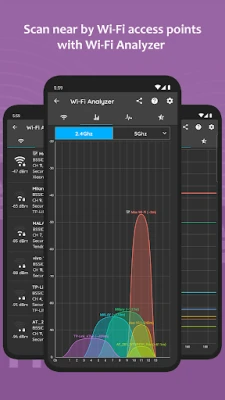
- WiFi Analyzer: Analyze nearby WiFi networks, including channel graphs and ratings.
- Internet Speed Test: Measure your internet speed to ensure optimal performance.
Advanced Network Utilities
This suite of tools also includes:
- FTP Client: Manage remote servers effortlessly.
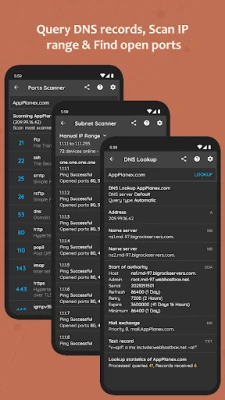
- DNS Lookup: Retrieve DNS records for any domain.
- Ports Scanner: Identify open ports on your network.
- Whois Lookup: Find domain ownership information.
- IP Geo Location: Determine the geographical location of an IP address.
Performance Measurement and Tuning
For those looking to optimize their network performance, tools like:
- iPerf3: Measure and tune network performance.
- Subnet IP Scanner: Scan IP ranges efficiently.
Additional Features for Enhanced Functionality
The app also includes a variety of additional tools, such as:
- IP & Host Converter: Easily convert between IP addresses and hostnames.
- Router Setup: Simplify the configuration of your network equipment.
- Password Generator: Create strong passwords for enhanced security.
Documentation and Support
Each tool comes with comprehensive documentation, allowing users to understand its functionality fully. For any questions or suggestions, users can reach out to support at support@AppPlanex.com.
Conclusion
In conclusion, the suite of network tools available offers invaluable resources for anyone looking to enhance their network experience. From detailed IP information to advanced diagnostics and performance tuning, these tools cater to a wide range of users. Whether you're troubleshooting connectivity issues or optimizing your network, having the right tools at your disposal can make all the difference.
For those interested in a more comprehensive experience, consider exploring Ping Master: Network Tools PRO, which offers additional features and an ad-free experience.
Rate the App
User Reviews















Popular Apps










Editor's Choice









