

Latest Version
2.5.9
December 26, 2025
Manuel Wrage
Tools
Android
0
$2.49
com.ivianuu.pie
Report a Problem
More About Pie Controls Gestures
Unlock the Power of One-Handed Navigation with Pie Control
In today's fast-paced world, efficiency is key, especially when it comes to using your smartphone. The Pie Control app revolutionizes the way you interact with your device, allowing you to navigate seamlessly with just one hand through intuitive gestures. This article delves into the features, customization options, and actions available in Pie Control, ensuring you get the most out of this innovative tool.
What is Pie Control?
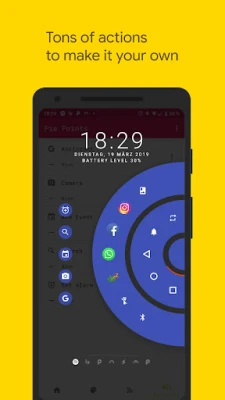
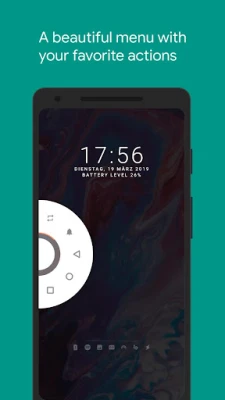
Pie Control is a powerful application designed to enhance your smartphone experience by providing a visually appealing and functional menu that can be accessed with a simple swipe from the edge of your screen. This menu displays your favorite actions, notifications, and essential status information, all while keeping your navigation smooth and efficient.
Key Features of Pie Control
- Customizable Color Settings: Tailor the appearance of your Pie Control to match your style.
- Notification Access: View all your notifications directly within the Pie Control interface.
- Multiple Pies: Create and manage multiple pie menus for different tasks.
- Two Rows: Utilize two rows for a more organized layout.
- Pie Points: Access specific actions quickly with pie points.
- Stateful Icons: Icons that change based on their state for better clarity.
- Trigger Area Settings: Customize the area from which you can trigger the Pie Control.
- Extensive Customization: Fine-tune your Pie Control experience with numerous options.
- Material Design: Enjoy a sleek, modern interface that adheres to Material Design principles.
- Custom Icons: Use your own icons for a personalized touch.
- Broadcast Support: Integrate with automation apps like Tasker for enhanced functionality.
- Xposed Framework Support: Boost compatibility and features with Xposed Framework.
- Hide Navigation Bar: Conceal the navigation bar without root access using the "Hide Navigation Bar" feature.
Essential Actions at Your Fingertips
Pie Control offers a wide array of actions that can be executed effortlessly. Here are some of the key actions you can perform:
- Back
- Home
- Recents
- Torch
- Lock Screen
- Screenshot
- Open Notification Shade
- Open Quick Settings
- Open Power Dialog
- Launch Apps
- App Shortcuts
- Open Camera
- Open Dialer
- Open Call Log
- Open Contacts
- Switch to Last App
- Toggle Bluetooth
- Toggle WiFi
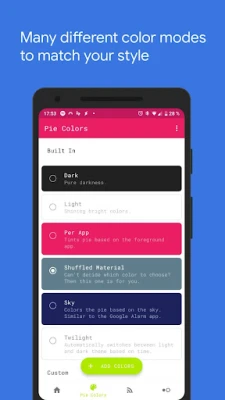
Color Customization Options
Personalize your Pie Control experience with a variety of color settings:
- Custom Colors: Choose your preferred colors for a unique look.
- Light and Dark Modes: Switch between light and dark themes effortlessly.
- Per App Tinting: Automatically match the Pie Control colors to the foreground app.
- Shuffled Material: Enjoy random color tints for a dynamic appearance.
- Twilight Mode: Automatically alternate between light and dark themes based on time.
- Sky Mode: Match the Pie Control color to the sky's hue.
Special Acknowledgments
A heartfelt thank you to the Paranoid Android team for their stunning pie redesign, which served as the inspiration for developing this application. Their innovative approach has significantly influenced the user experience of Pie Control.
Accessibility Services
Pie Control utilizes accessibility services to execute actions such as back, home, and quick settings programmatically. Rest assured, this app does not collect any data through these services, ensuring your privacy is maintained.
Hiding the Navigation Bar
With Vivid Navigation Gestures, you can hide your stock navigation bar as long as the gestures are enabled. Note that this feature requires ADB or root access to function properly.
How to Set Up ADB on Your PC
- Enable Developer Mode in your Android settings.
- Activate USB Debugging.
- Set up ADB on your PC.
- Run the following command to grant the necessary permissions:
adb shell pm grant com.ivianuu.pie android.permission.WRITE_SECURE_SETTINGS
To restore the navigation keys, disable the app or execute this command:
adb shell wm overscan 0,0,0,0
Resources for ADB Installation
For detailed instructions on installing ADB, check out the following resources:
Join the Community
For more tips, tricks, and discussions about Pie Control, visit the Reddit community.
In conclusion, Pie Control is an essential tool for anyone looking to enhance their smartphone navigation experience. With its extensive features, customization options, and user-friendly interface, it empowers you to navigate your device with ease and style.
Rate the App
User Reviews















Popular Apps










Editor's Choice









