
Latest Version
June 26, 2026
Tech Gadgets
Tools
Android
1
$1.49
com.techgadgets.bt_pc_master_pro
Report a Problem
More About PC Master Pro: Bluetooth Mouse
Transform Your Android Device into a Wireless Controller for Windows PC with Bluetooth PC Master
In today's digital age, the ability to control your Windows PC remotely using your Android device has become increasingly valuable. Bluetooth PC Master is a revolutionary mobile application that allows you to turn your smartphone into a versatile wireless controller for your computer. This article explores the various features and functionalities of Bluetooth PC Master, highlighting how it enhances your computing experience.
Seamless Touchpad Control
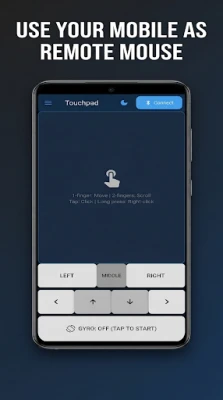
One of the standout features of Bluetooth PC Master is its intuitive touchpad functionality. Users can effortlessly control mouse movements and clicks using simple touch gestures. This feature is particularly useful for presentations or when you want to navigate your PC from a distance without the need for a physical mouse. The touchpad's sensitivity can be customized to suit your preferences, ensuring a smooth and responsive experience.
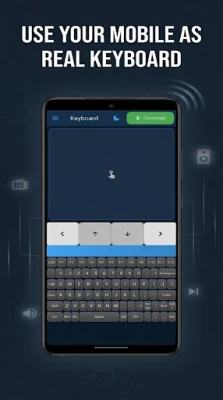
Full Keyboard Input at Your Fingertips
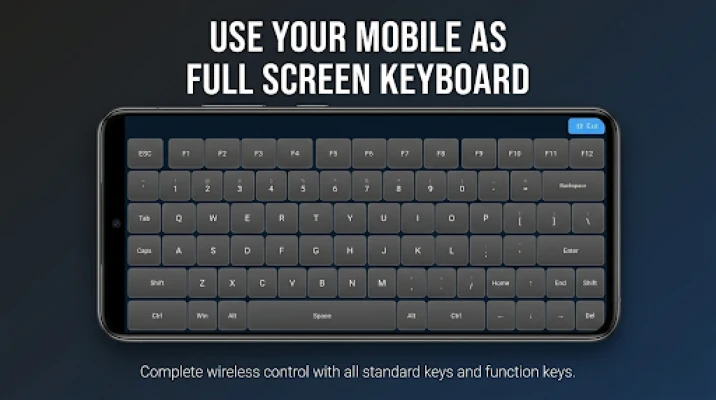
Bluetooth PC Master offers a comprehensive keyboard input option, allowing users to type with ease. The app includes all the essential modifier keys and special characters, making it perfect for writing documents, sending emails, or chatting online. Whether you need to type a quick message or engage in a lengthy discussion, the full keyboard functionality ensures you have all the tools you need right at your fingertips.
Gamepad Emulation for Gamers
For gaming enthusiasts, Bluetooth PC Master provides an impressive gamepad emulation feature. This allows users to emulate a traditional game controller, complete with analog sticks, a D-pad, and buttons. Whether you're playing action-packed games or navigating through complex menus, the gamepad functionality enhances your gaming experience, providing precision and control that can rival physical controllers.
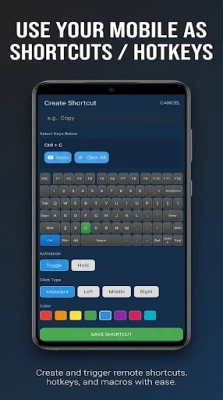
Customizable Shortcuts for Efficiency
Efficiency is key when it comes to productivity, and Bluetooth PC Master understands this. The app allows users to create custom keyboard shortcuts for quick actions. This means you can streamline your workflow by assigning specific commands to easily accessible buttons on your Android device. Whether you need to open applications, execute commands, or perform repetitive tasks, customizable shortcuts can save you valuable time.
Media Player Control Made Easy
Managing audio playback has never been easier. With Bluetooth PC Master, you can control your media player directly from your Android device. Adjust the volume, play, pause, or skip tracks without needing to switch back to your computer. This feature is particularly useful during presentations or when you're enjoying media content from a distance.
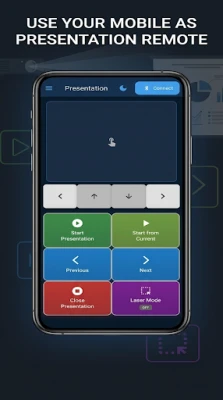
Effortless Presentation Navigation
Presentations can be nerve-wracking, but Bluetooth PC Master simplifies the process. The app includes dedicated controls for navigating slideshows, allowing you to move through your presentation seamlessly. This feature ensures that you can focus on delivering your message without the distraction of fumbling with your computer.
Comprehensive System Control
Bluetooth PC Master also offers robust system control features. Users can lock, sleep, restart, or shut down their PC directly from their Android device. This level of control is particularly beneficial for those who want to manage their computer remotely, ensuring that you can maintain your workflow without being tethered to your desk.
Customizable Settings for a Personalized Experience
Every user has unique preferences, and Bluetooth PC Master caters to this by offering customizable settings. You can adjust the sensitivity of mouse and scroll controls, utilize gyroscope-based input, and customize the layout of the gamepad to suit your gaming style. This level of personalization ensures that you have a tailored experience that meets your specific needs.
Privacy and Security: Your Data Stays Local
In an era where data privacy is paramount, Bluetooth PC Master stands out by ensuring that all functionality operates locally on your device. There is no data collection or external server communication, providing users with peace of mind. You can enjoy the full range of features without worrying about your personal information being compromised.
Conclusion: Elevate Your PC Experience with Bluetooth PC Master
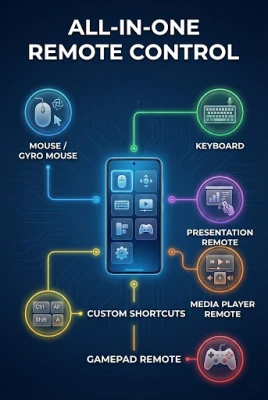
Bluetooth PC Master is more than just an application; it is a powerful tool that transforms your Android device into a comprehensive wireless controller for your Windows PC. With features like touchpad control, full keyboard input, gamepad emulation, customizable shortcuts, and robust system control, it enhances your productivity and entertainment experience. Plus, with a focus on privacy and customization, Bluetooth PC Master is the ideal solution for anyone looking to take control of their PC from a distance. Download Bluetooth PC Master today and revolutionize the way you interact with your computer!
Rate the App
User Reviews















Popular Apps










Editor's Choice









