
Latest Version
1.0.17
May 26, 2026
Tech Gadgets
Tools
Android
0
Free
com.techgadgets.bt_pc_master
Report a Problem
More About PC Master: BT Mouse & Keyboard
Transform Your Android Device into a Wireless PC Controller with Bluetooth PC Master
In today's digital age, the ability to control your Windows PC remotely from your Android device is not just a luxury; it's a necessity. Enter Bluetooth PC Master, a revolutionary mobile application that seamlessly transforms your smartphone into a powerful wireless controller for your computer. This guide will explore the various features and functionalities of Bluetooth PC Master, ensuring you can maximize your productivity and entertainment experience.
Multiple Input Methods for Ultimate Control
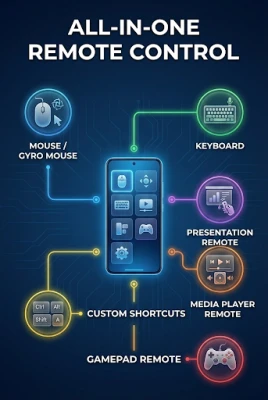
Bluetooth PC Master offers a variety of input methods, allowing you to choose the one that best suits your needs. Whether you're navigating through documents, playing games, or controlling media, this app has you covered.
Touchpad Functionality
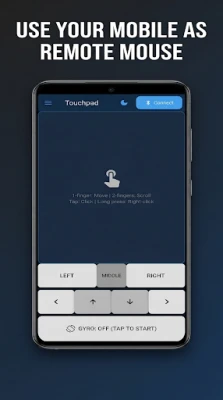
The touchpad feature enables you to control mouse movements and clicks using intuitive touch gestures. With a simple swipe of your finger, you can navigate your desktop with precision. This functionality is perfect for users who prefer a laptop-like experience on their Android devices.
Full Keyboard Input
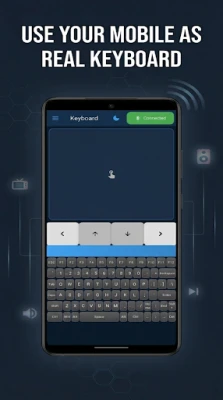
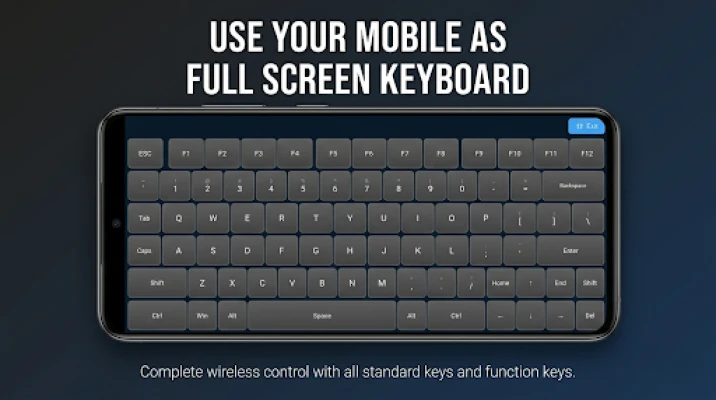
Need to type an email or write a report? Bluetooth PC Master provides a complete keyboard interface, including modifier keys and special characters. This feature ensures that you can easily input text without the hassle of switching devices.
Gamepad Emulation
For gaming enthusiasts, the app includes a gamepad emulation feature. With analog sticks, a D-pad, and responsive buttons, you can enjoy your favorite PC games as if you were using a traditional game controller. This functionality enhances your gaming experience, making it more immersive and enjoyable.
Custom Keyboard Shortcuts
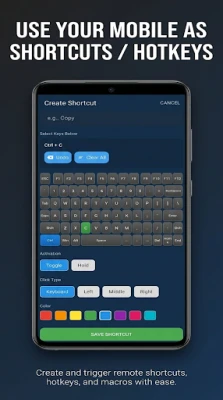
Efficiency is key when working on a PC, and Bluetooth PC Master allows you to create custom keyboard shortcuts for quick actions. Whether you need to open applications, execute commands, or perform specific tasks, these shortcuts can save you valuable time.
Media Control at Your Fingertips
Managing your media playback has never been easier. Bluetooth PC Master includes dedicated controls for audio playback and volume adjustment. Whether you're listening to music, watching a movie, or giving a presentation, you can control everything from your Android device without interrupting your flow.
Seamless Presentation Navigation
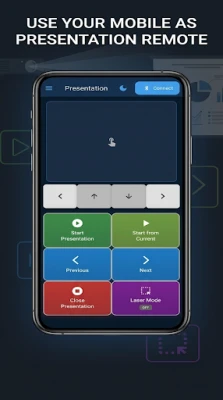
For professionals and educators, the app offers dedicated controls for navigating slideshows. With Bluetooth PC Master, you can effortlessly move through your presentation slides, ensuring a smooth and engaging experience for your audience.
Comprehensive System Control
Bluetooth PC Master goes beyond basic controls by providing comprehensive system management options. You can lock, sleep, restart, or shut down your PC directly from your Android device. This feature is particularly useful for users who want to manage their systems remotely without needing to be physically present.
Customizable Settings for Enhanced User Experience
One of the standout features of Bluetooth PC Master is its customizable sensitivity settings for mouse and scroll controls. Users can adjust these settings to suit their preferences, ensuring a comfortable and efficient experience. Additionally, the app supports gyroscope-based input, allowing for even more control options.
Layout Customization for Gamepad
Every gamer has their unique style, and Bluetooth PC Master recognizes this by offering layout customization for the gamepad. You can tailor the button layout to fit your gaming preferences, ensuring that you have the best possible experience while playing your favorite titles.
Privacy and Security: Your Data is Safe
In an era where data privacy is paramount, Bluetooth PC Master operates entirely locally on your device. There is no data collection or external server communication, ensuring that your information remains secure. You can enjoy the app's functionalities without worrying about your privacy being compromised.
Conclusion: Elevate Your PC Experience with Bluetooth PC Master
Bluetooth PC Master is more than just an app; it's a comprehensive solution for anyone looking to enhance their PC experience using their Android device. With its multiple input methods, customizable settings, and robust features, it empowers users to take control of their computers like never before. Whether you're a professional, a gamer, or someone who enjoys media, Bluetooth PC Master is the perfect companion for your Windows PC. Download it today and unlock the full potential of your Android device!
Rate the App
User Reviews














Popular Apps










Editor's Choice









