


Latest Version
March 26, 2026
Peoples Bank of Clifton, Waynesboro and Hohenwald
Finance
Android
1
Free
com.peoplesbanktn.biz
Report a Problem
More About PBbanking Mobile Business
Maximize Your Business Banking Experience with Our Mobile App
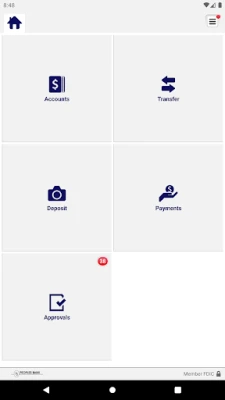
In today's fast-paced business environment, managing your finances efficiently is crucial. Our mobile banking app offers a suite of features designed to streamline your banking experience, allowing you to focus on what truly matters—growing your business. Below, we explore the key functionalities of our app that can help you manage your accounts, deposit checks, and review transactions seamlessly.
Effortlessly Manage Your Accounts
Stay on top of your business finances with our user-friendly mobile app. Here’s how you can manage your accounts effectively:
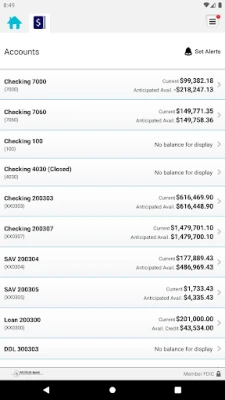
- Check Business Account Balances: Instantly view the balances of all your business accounts in one place. This feature helps you keep track of your financial health at a glance.
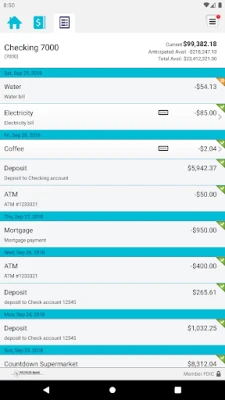
- View Recent Transactions: Access a detailed history of your recent transactions, including check images. This transparency allows you to monitor your spending and ensure accuracy in your financial records.
- Transfer Money Between Accounts: Easily transfer funds between your business accounts with just a few taps. This feature is perfect for managing cash flow and ensuring that your accounts are always balanced.
Convenient Check Deposits
Depositing checks has never been easier. With our mobile app, you can deposit checks from anywhere, saving you time and effort:
- Deposit Checks with Ease: Simply snap a picture of each check to deposit it directly into your account. This feature eliminates the need for physical trips to the bank, making banking more convenient than ever.
- View Deposit History: Keep track of all your deposits within the app. This feature allows you to monitor your deposit activity and ensures that you have a complete record of your transactions.
Review and Approve Transactions with Confidence
Maintaining control over your business finances is essential. Our app provides robust features for reviewing and approving transactions:
- Approve Scheduled Transactions: Easily approve transactions scheduled through Business Banking, including fund transfers, ACH transfers, and wire transfers. This feature ensures that you have the final say on all outgoing funds.
- Receive Alerts for Pending Approvals: Stay informed with real-time alerts when approvals are pending. This functionality helps you manage your transactions proactively and avoid any delays.
Getting Started is Simple
Embarking on your mobile banking journey is straightforward. Follow these steps to get started:
- Download the App: Visit your device's app store to download our mobile banking app.
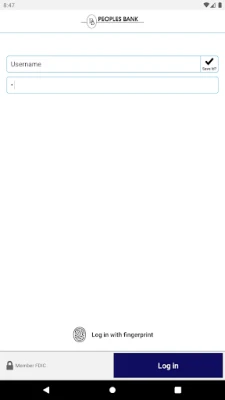
- Sign On: Use your Business Banking user credentials to log in securely.
- No Additional Fees: Enjoy all these features without incurring extra charges.
For more information about Peoples Bank mobile services, visit www.pbbanking.com or call us at 877-656-3311. Please note that carrier’s data rates may apply.
Conclusion
Our mobile banking app is designed to empower business owners by providing essential tools for managing finances efficiently. With features that allow you to check balances, deposit checks, and approve transactions, you can take control of your business banking anytime, anywhere. Download the app today and experience the convenience of modern banking at your fingertips.
Rate the App
User Reviews















Popular Apps










Editor's Choice









