
Latest Version
Version
9.7.2
9.7.2
Update
September 09, 2024
September 09, 2024
Developer
Kidslox, Inc.
Kidslox, Inc.
Categories
Tools
Tools
Platforms
Android
Android
Downloads
0
0
License
Free
Free
Package Name
com.kidslox.app
com.kidslox.app
Report
Report a Problem
Report a Problem
More About Parental Control - Kidslox
Kidslox Parental Control App
Ultimate Guide to Kidslox: The Best Parental Control App for Screen Time Management
In today's digital age, managing your child's screen time and online activities has become increasingly important. With the rise of smartphones and tablets, parents need effective tools to ensure their children engage with technology safely and responsibly. Kidslox is a comprehensive parental control app designed to help families monitor and regulate screen time, track locations, and block inappropriate content. This article explores the features and benefits of Kidslox, making it an essential tool for modern parenting.Why Choose Kidslox for Screen Time Management?
Kidslox stands out as a reliable parental control app that empowers parents to take charge of their children's digital experiences. With its user-friendly interface and robust features, Kidslox allows you to tailor your approach to screen time management according to your family's unique needs.Key Features of Kidslox Parental Control App
Kidslox offers a variety of tools that make it easy for parents to monitor and manage their children's device usage. Here are some of the standout features:1. Instant Lock for Immediate Control
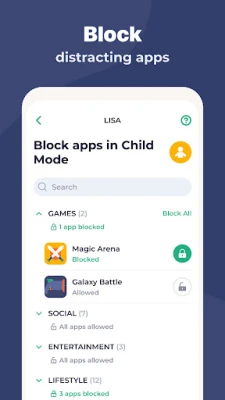
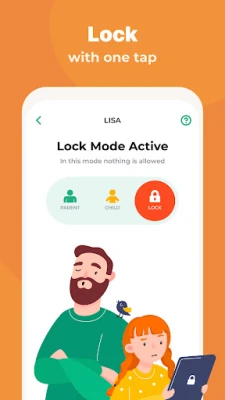
With the instant lock feature, parents can remotely block access to apps on both Android and iPhone devices. This is particularly useful for those moments when you need your child to focus on homework or family time without distractions.2. Customizable Screen Time Schedules
Kidslox allows you to set specific times for when your child can use their smartphone. For instance, you can establish a bedtime curfew that automatically disables the device at a designated hour, promoting healthier sleep habits.3. Daily Time Limits for Balanced Usage
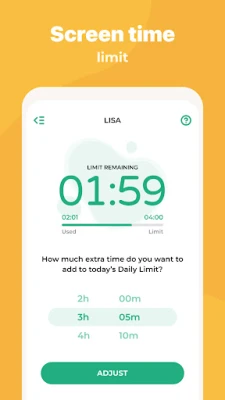
To prevent excessive screen time, Kidslox enables you to set daily limits. Once your child reaches their allotted time, the app will lock the device or block specific apps, encouraging them to engage in other activities.4. Reward System for Positive Reinforcement
Kidslox introduces a unique screen time rewards system, allowing parents to grant extra screen time for completing chores, homework, or other responsibilities. This feature not only promotes accountability but also encourages children to develop a balanced approach to technology use.5. Comprehensive Activity Monitoring
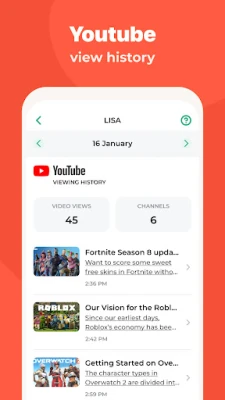
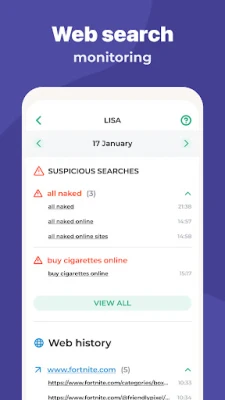
Stay informed about your child's online activities with Kidslox's monitoring tools. Parents can easily track app usage, web surfing habits, and the amount of time spent on various applications, ensuring they are aware of their child's digital footprint.6. Custom Modes for Tailored Control
Kidslox offers customizable modes that allow parents to block specific apps at different times. For example, you can permit educational apps during study hours while restricting gaming apps to designated free time, fostering a more productive environment.Location Tracking for Peace of Mind
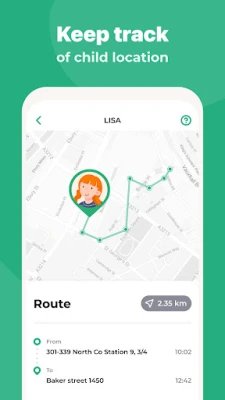
One of the standout features of Kidslox is its location tracking capabilities. Parents can:1. Monitor Your Child's Location
Utilize GPS tracking to know your child's whereabouts at all times. This feature provides peace of mind, especially for parents of younger children.2. Set Geo-Fenced Notifications
Receive alerts when your child enters or exits designated geo-fenced zones. This ensures you are always informed about their movements, enhancing safety.3. Access Location History
Kidslox allows parents to view their child's location history, providing insights into their daily activities and helping to ensure they are where they should be.Content Blocking and Safe Browsing
In addition to screen time management, Kidslox excels in content filtering and blocking:1. Filter Inappropriate Content
Kidslox effectively filters out pornography and other adult content, ensuring your child has a safe browsing experience.2. Block In-App Purchases
Prevent unexpected charges by blocking in-app purchases, protecting your finances while allowing your child to enjoy their favorite games and apps.3. Enable Safe Search
With Kidslox, you can lock safe search settings on Google and other search engines, ensuring that your child only accesses age-appropriate content.4. Full Internet Blocker
For times when you want to limit internet access entirely, Kidslox provides a full internet blocker, allowing you to take control of your child's online experience.Cross-Platform Compatibility for Family Convenience
Kidslox is designed to work seamlessly across various devices, making it easy for families to manage screen time on all platforms:1. Mobile and Desktop Versions
Download the Kidslox app for Android and iOS devices, as well as desktop versions for Windows and Mac. This ensures that you can monitor and control your child's device usage from anywhere.2. Browser-Based Access
Access Kidslox controls through a web browser, allowing you to manage your child's device from your laptop or desktop, even when you're not physically with them.Getting Started with Kidslox
To begin using Kidslox, simply download the app on each device you wish to control. A single paid account allows you to manage up to 10 devices, making it a cost-effective solution for families with multiple children. Kidslox offers a 3-day free trial, allowing you to explore its features without any financial commitment. If you find that Kidslox meets your family's needs, you can continue using it with confidence.Support and Resources
Kidslox is dedicated to providing excellent customer support. If you have any questions or need assistance, their support team is available via in-app chat or email at support@kidslox.com.Conclusion
In a world where technology plays a significant role in children's lives, Kidslox emerges as a powerful ally for parents. With its comprehensive features for screen time management, location tracking, and content filtering, Kidslox empowers families to navigate the digital landscape safely and responsibly. Take control of your child's screen time today and experience the peace of mind that comes with using Kidslox. For more information, visit the official Kidslox website: Kidslox. Please note that Kidslox requires an internet connection to function effectively and utilizes various permissions to provide its services. For detailed terms and conditions, visit Kidslox Terms and Conditions.Rate the App
Add Comment & Review
User Reviews
Based on 0 reviews
No reviews added yet.
Comments will not be approved to be posted if they are SPAM, abusive, off-topic, use profanity, contain a personal attack, or promote hate of any kind.















More »

Popular Apps

Nova BrowserJef Studios

Throne WishlistThrone.com

Dark Web Browser : OrNETStronger Apps

LINE: Calls & MessagesLINE (LY Corporation)

XENO; Plan, AutoSave & InvestXENO Investment

Rogue SlimeQuest Seeker Games

Дядя Ваня VPNKONDAKOV

PrivacyWallPrivacyWall

Robinhood WalletRobinhood

Roman empire games - AoD RomeRoboBot Studio
More »
Editor's Choice

Grim Soul: Dark Survival RPGBrickworks Games Ltd

Craft of Survival - Gladiators101XP LIMITED

Last Shelter: SurvivalLong Tech Network Limited

Dawn of Zombies: Survival GameRoyal Ark

Merge Survival : WastelandStickyHands Inc.

AoD Vikings: Valhalla GameRoboBot Studio

Viking Clan: RagnarokKano Games

Vikings: War of ClansPlarium LLC

Asphalt 9: LegendsGameloft SE

Modern Tanks: War Tank GamesXDEVS LTD