

Latest Version
6.8.0
February 19, 2026
Adhiraj S. Chauhan
Tools
Android
1
Free
com.arjanvlek.oxygenupdater
Report a Problem
More About Oxygen Updater
Unlocking the Power of Oxygen Updater: Your Ultimate Guide to OnePlus Updates
In the fast-paced world of technology, staying updated is crucial, especially for OnePlus users. While OnePlus and OPPO roll out OTA (Over-The-Air) updates in a staggered manner, many users find themselves waiting longer than desired for the latest features and security patches. Enter the Oxygen Updater app—a third-party solution designed to streamline the update process and enhance your OnePlus experience.
What is Oxygen Updater?
Oxygen Updater is a third-party application that allows users to download official updates directly from OPPO, OnePlus, and Google servers. By verifying the integrity of the update files before installation, this app ensures that you receive the latest updates without the hassle of waiting in the rollout queue. In fact, it is faster than the standard OTA process 99% of the time.
For those who may not receive notifications, it’s essential to double-check your app and Android settings. Additionally, disabling battery optimizations can help ensure that the app functions smoothly. For more information, visit this guide.
Key Features of Oxygen Updater
- First-Launch Setup Wizard: Automatically detects your device and configuration options, allowing you to customize privacy settings.
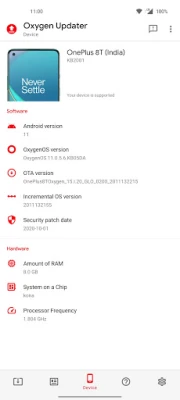
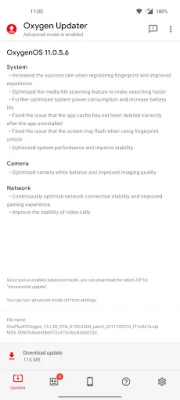
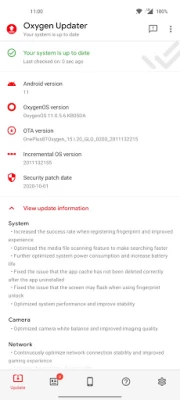
- Important Information Display: Access changelogs and device/OS version details, including security patches.
- Transparency: Check filenames and MD5 checksums to ensure file integrity.
- Robust Download Manager: Recovers from network errors, preventing data wastage.
- MD5 Verification: Protects against file corruption and tampering.
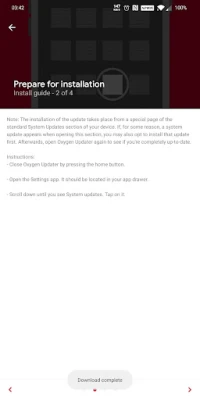
- Detailed Installation Guides: Step-by-step instructions to ensure a smooth update process.
- World-Class Support: Reach out via email or Discord for assistance, thanks to a supportive community.
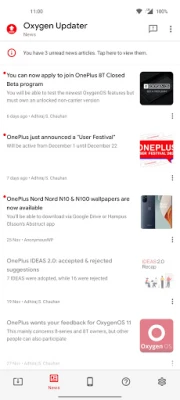
- High-Quality News Articles: Stay informed about OnePlus, OxygenOS, and related topics.
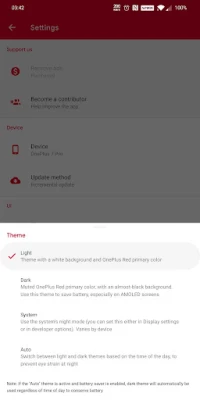
- Customizable Themes: Choose from Light, Dark, System, or Auto themes based on your preference.
- Accessibility Features: Designed to meet WCAG 2.0 standards, ensuring support for screen readers.
Supported Devices
Oxygen Updater is compatible with all OnePlus devices that are not carrier-branded (e.g., T-Mobile and Verizon). Carrier-branded devices often run a customized version of OxygenOS that is locked down, preventing manual firmware updates. For a complete list of supported devices, visit this page, and for frequently asked questions, check out this FAQ section.
Root Access and Additional Features
While Oxygen Updater works seamlessly without root access, granting root permissions unlocks additional features. Users can opt to become contributors by submitting OTA URLs captured from their devices and receive improved update method recommendations (full vs. incremental).
If you wish to update a rooted device while maintaining root access, follow these steps:
- Install the update via “local upgrade” as you normally would, but do not reboot.
- Open Magisk and select the “flash to inactive slot” option.
- Reboot your device and enjoy the latest features.
Update Tracks and Package Types
Oxygen Updater supports various update tracks and package types to cater to different user needs:
Update Tracks:
- Stable (default): Offers pristine quality, suitable for daily use.
- Open Beta (opt-in): Provides early access to new features, though it may contain bugs.
- Developer Preview (opt-in, if available): Intended for developers and enthusiasts, this track may be unstable.
Switching between different tracks may require enabling “advanced mode” in the app’s settings.
Package Types:
- Incremental (default): Smaller updates designed for specific source-target version combinations (e.g., 1.2.3 to 1.2.6). Note that this is incompatible with rooted devices.
- Full: Contains the entire OS, suitable for switching tracks or upgrading to a new major Android version (e.g., Android 11 to 12). Full packages are recommended if you are rooted or if an incremental update is unavailable.
Contact and Support
If you encounter any issues or have questions, feel free to reach out via email or Discord. The community is always ready to assist you.
Important Disclaimer
It’s essential to note that Oxygen Updater is a third-party application and not an official OnePlus product. Neither the app developer nor OnePlus is responsible for any actions taken while using this app. Regularly back up your files and media to avoid data loss.
OnePlus, OxygenOS, and their respective logos are registered trademarks of OnePlus Technology (Shenzhen) Co., Ltd. Additionally, AdMob™, AdSense™, Android™, Google Play, and the Google Play logo are registered trademarks of Google LLC.
In conclusion, Oxygen Updater is a powerful tool for OnePlus users looking to stay ahead of the curve with their device updates. With its user-friendly interface and robust features, it simplifies the update process, ensuring you never miss out on the latest enhancements and security improvements.
Rate the App
User Reviews















Popular Apps










Editor's Choice









