

Latest Version
May 17, 2026
Lufesu Inc.
Tools
Android
0
Free
com.lufesu.app.usage_overlay
Report a Problem
More About Overlay Monitor CPU/Battery
Maximize Your Device's Performance with Usage Overlay: The Ultimate Floating Monitor
In today's fast-paced digital world, having immediate access to your device's performance metrics is crucial. Usage Overlay is an innovative floating monitor that allows you to keep essential system information visible on your screen without interrupting your current activities. Whether you're gaming, checking performance, or monitoring your device's health, this tool is designed to enhance your experience.
Key Features of Usage Overlay
Usage Overlay is packed with features that cater to both casual users and tech enthusiasts. Here’s what you can expect:
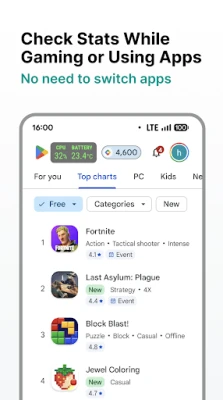
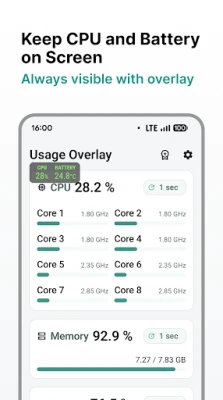
- Floating System Monitor: The overlay floats seamlessly over your games and applications, providing real-time data without disrupting your workflow.
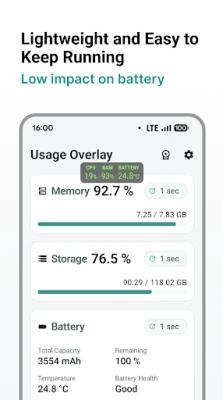
- CPU Usage Tracking: Get an estimated CPU usage percentage based on both current and maximum CPU frequency, allowing you to gauge your device's performance at a glance.
- Memory Usage Insights: Monitor your memory usage percentage to ensure your device runs smoothly and efficiently.
- Storage Monitoring: Keep track of your internal storage usage percentage, helping you manage your files effectively.
- Comprehensive Battery Details: Access vital battery information, including total capacity, remaining capacity, temperature, health, current, voltage, and both charging and discharging power rates.
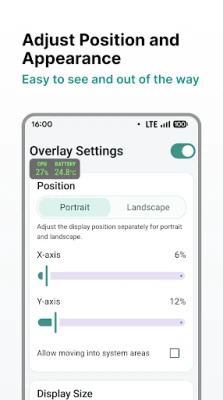
- Customizable Overlay: Adjust the position and size of the overlay to suit your preferences, ensuring that the information is easy to read.
- Selective Display Options: Choose which metrics you want to display, tailoring the overlay to your specific needs.
- Auto Start Support: Enjoy the convenience of having the overlay start automatically when you power on your device.
Real-Time Monitoring Made Easy
Usage Overlay is designed for real-time monitoring, ensuring that you have the information you need at your fingertips. You can position the overlay wherever it’s most convenient for you, resize it to fit your screen, and display only the data that matters most. This level of customization makes it an invaluable tool for anyone looking to optimize their device's performance.
Unlock Advanced Features with the Pro Version
For users seeking an enhanced experience, the Pro version of Usage Overlay offers additional features:
- Update Interval Settings: Customize how frequently the overlay updates, allowing for more precise monitoring.
- Custom Overlay Colors: Personalize the look of your overlay to match your style or preferences.
- Ad Removal: Enjoy an uninterrupted experience by removing ads with the Pro version.
The Pro version is available for a one-time purchase, eliminating the need for ongoing subscriptions.
Important Notes for Users
Before diving into the features of Usage Overlay, here are a few important notes:
- Internal Storage Support: Currently, the app supports internal storage monitoring only; external storage is not supported at this time.
- Device Compatibility: The available values and features may vary depending on your device and the Android version you are using.
- Overlay Permission Required: To function correctly, the app requires overlay permissions.
Conclusion: Your Go-To Solution for Device Monitoring
If you're in search of a straightforward and reliable floating CPU monitor, system monitor overlay, or battery overlay, Usage Overlay is the perfect solution. It simplifies real-time device information access, making it easier than ever to keep your device running at its best. With its user-friendly interface and customizable features, Usage Overlay is an essential tool for anyone looking to enhance their digital experience.
Don't let performance issues slow you down. Download Usage Overlay today and take control of your device's performance like never before!
Rate the App
User Reviews















Popular Apps










Editor's Choice









