

Latest Version
2.0.0
June 15, 2026
mouse tool
Tools
Android
0
Free
com.opautoclicker.autoclicker
Report a Problem
More About OP Auto Clicker - Auto Tap
Unlocking the Power of Autoclicking: A Comprehensive Guide
In today's fast-paced digital world, efficiency is key. Autoclicking tools have emerged as essential utilities for users seeking to streamline their interactions with mobile applications. This article delves into the features, permissions, and benefits of using an autoclicking application, ensuring you have all the information you need to enhance your user experience.
User-Friendly Interface: Simplifying Your Experience
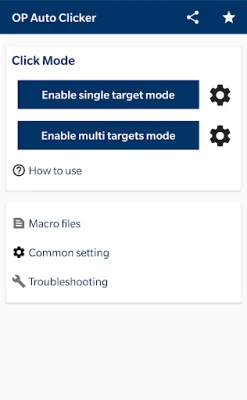
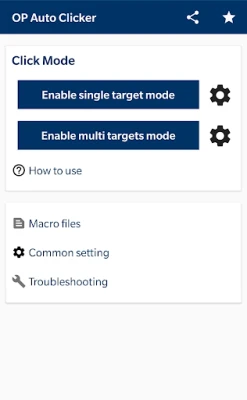
One of the standout features of modern autoclicking applications is their user-friendly interface. Designed with simplicity in mind, these tools allow users of all skill levels to navigate effortlessly. Whether you are a tech novice or a seasoned pro, you will find the layout intuitive and easy to use, enabling you to set up your autoclicking preferences in no time.
Multi-Click Points and Swipes: Versatility at Your Fingertips
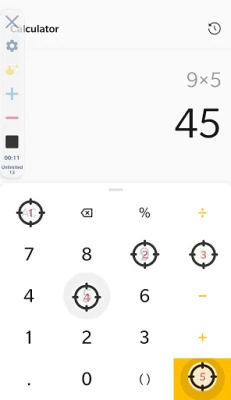
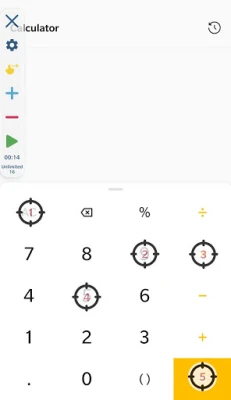
Autoclicking applications support multiple click points and swipes, providing unparalleled versatility. This feature allows users to automate various tasks across different applications, making it ideal for gaming, data entry, or any repetitive task. By customizing your click points, you can optimize your workflow and save valuable time.
Customizable Operator Interface: Tailor Your Experience
Another significant advantage of these applications is the ability to adjust the size and opacity of the operator interface. This customization ensures that the autoclicking tool seamlessly integrates with your device's screen, allowing you to maintain visibility and control over your tasks. Whether you prefer a discreet interface or a more prominent one, the choice is yours.
Parameter Settings: Fine-Tune Your Autoclicking
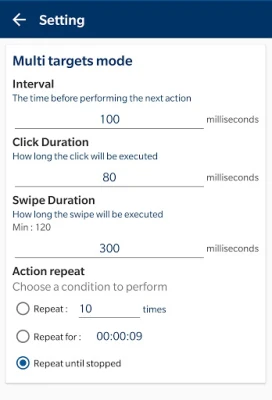
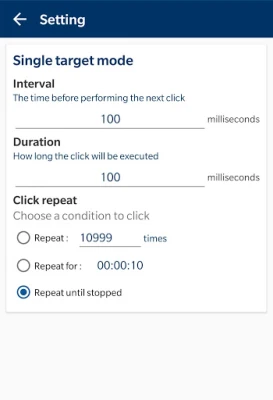
With the option to set parameters for clicks, users can define specific attributes such as delay, touch time, and the number of repetitions. This level of control allows for precise automation tailored to your needs. For instance, you can set a longer delay for tasks that require careful timing or increase the number of repetitions for tasks that demand efficiency.
Save and Load Scripts: Convenience at Its Best
Efficiency is further enhanced by the ability to save and load scripts. This feature allows users to create and store custom automation scripts for future use. Whether you need to replicate a complex series of clicks or simply want to save your favorite settings, this functionality ensures that your preferences are always at your fingertips.
No Root Required: Accessibility for All
One of the most appealing aspects of modern autoclicking applications is that they do not require root access. This means that users can enjoy the benefits of autoclicking without the risks associated with rooting their devices. By eliminating the need for root, these applications are accessible to a broader audience, making automation easier and safer.
Understanding Permissions: The Role of Accessibility Service
To achieve effective autoclicking, these applications require the Accessibility Service permission. This authorization enables the app to perform essential functions such as clicks and swipes. While some users may have concerns about permissions, it is important to note that this approach is necessary for the app to function correctly and enhance your user experience.
Privacy Matters: No Data Collection
When using autoclicking applications, privacy is a top concern for many users. Rest assured, these applications do not collect any private data. Your information remains secure, allowing you to use the app with peace of mind. The focus is solely on improving your efficiency without compromising your privacy.
Why Choose Autoclicking Applications?
In conclusion, autoclicking applications offer a range of features designed to enhance user experience and efficiency. With a user-friendly interface, customizable settings, and no need for root access, these tools are perfect for anyone looking to automate repetitive tasks. By leveraging the power of Accessibility Service, users can enjoy seamless functionality without sacrificing their privacy. Embrace the future of automation and unlock your device's full potential with an autoclicking application today!
Rate the App
User Reviews















Popular Apps










Editor's Choice









