

Latest Version
8.5.11.0
November 27, 2025
Samsung Electronics Co., Ltd.
Tools
Android
0
Free
com.samsung.android.sidegesturepad
Report a Problem
More About One Hand Operation +
Unlock the Power of Gesture Controls on Your Device
In today's fast-paced digital world, efficiency is key. One of the most innovative ways to enhance your device's usability is through gesture controls. This feature allows users to execute various functions with simple swipes, making navigation smoother and more intuitive. Let’s explore how to optimize these gesture controls for your smartphone or tablet.
Understanding Gesture Handles
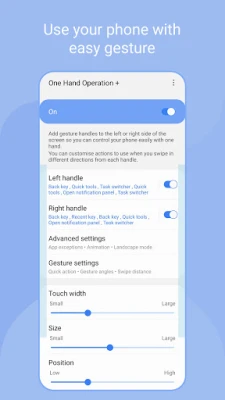
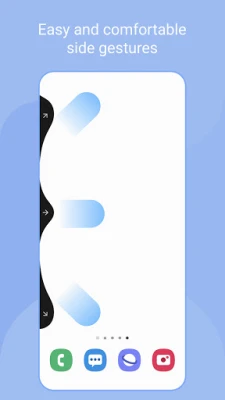
When you enable the gesture control feature, a sleek gesture handle appears on the left and right sides of your screen. This handle is designed for easy access, allowing you to swipe it to perform predefined functions. By default, the most commonly used function is the back button, providing a familiar and efficient way to navigate your device.
Customizing Your Gesture Functions
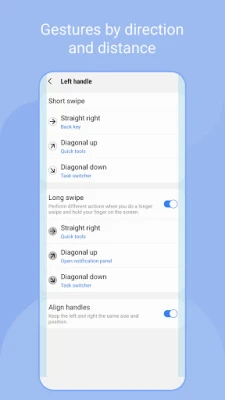
One of the standout features of gesture controls is the ability to customize functions for both horizontal and diagonal swipes. As you become accustomed to using short swipe gestures, you can expand your capabilities by assigning additional functions to longer swipes. This flexibility allows you to tailor your device's functionality to suit your personal preferences and usage habits.
Optimizing Gesture Recognition
Gesture recognition can vary based on several factors, including the size of your hand, the thickness of your thumb, and even the design of your phone case. To ensure optimal performance, various handle settings are available. Adjusting these settings can significantly enhance gesture recognition, making your experience more seamless.
Minimizing Touch Interference
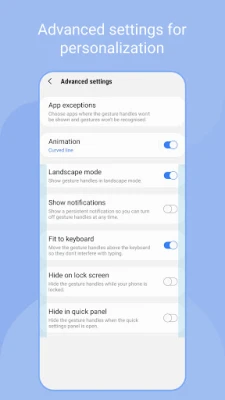
While the gesture handle is designed to be user-friendly, it can sometimes interfere with running applications. To mitigate this, it is advisable to keep the handle as thin as possible. If you encounter significant touch interference, especially while using resource-intensive applications like games, you can set [App Exceptions] in the [Advanced Settings]. This feature disables gesture handles while specific apps are in use, ensuring uninterrupted gameplay or app functionality.
Available Functions for Gesture Controls
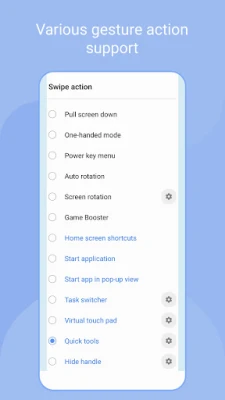
The current range of functions available for gesture controls is extensive, and more upgrades are on the horizon. Here’s a list of the functions you can utilize:
- Back key
- Home key
- Recent key
- Menu key
- Apps screen
- Previous app
- Forward (web browser)
- Open notification panel
- Open quick panel
- Screen off
- Close app
- Flashlight
- Split screen view
- Assistance app
- Finder search
- Screenshot
- Show/hide navigation bar
- Pull screen down
- One-handed mode
- Power key menu
- Home screen shortcuts
- Start application
- Start app in pop-up view
- Move screen
- Widget pop-up
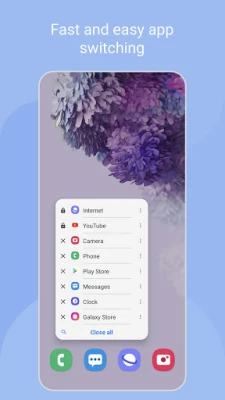
- Task switcher
- Quick tools
- Virtual touch pad
- Floating navigation buttons
- Keyboard shortcuts
Enhancing Your Experience with Gesture Controls
Embrace the convenience of gesture controls on your phone and tablet. By customizing your settings and familiarizing yourself with the available functions, you can significantly enhance your device's usability. Whether you’re navigating through apps, managing notifications, or multitasking, gesture controls offer a streamlined approach to interacting with your device.
As technology continues to evolve, staying updated with the latest features and enhancements will ensure you make the most of your device. Enjoy the freedom and efficiency that gesture controls bring to your daily digital interactions!
Rate the App
User Reviews















Popular Apps










Editor's Choice









