

Latest Version
4.29.1
May 24, 2026
Nordic Semiconductor ASA
Tools
Android
0
Free
no.nordicsemi.android.mcp
Report a Problem
More About nRF Connect for Mobile
Unlocking the Power of Bluetooth Low Energy: A Comprehensive Guide to nRF Connect Features
Bluetooth Low Energy (BLE) technology has revolutionized the way devices communicate wirelessly, enabling seamless connectivity and efficient data transfer. The nRF Connect application stands out as a powerful tool for developers and enthusiasts alike, offering a suite of features designed to enhance the BLE experience. This article delves into the key functionalities of nRF Connect, providing insights into how it can be utilized effectively.
Scanning for Bluetooth Low Energy Devices
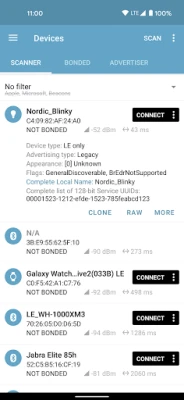
One of the primary features of nRF Connect is its ability to scan for Bluetooth Low Energy devices. This functionality allows users to discover nearby BLE devices effortlessly. The application provides a user-friendly interface that displays a list of available devices, making it easy to identify and connect to the desired hardware.
Parsing Advertisement Data
nRF Connect excels in parsing advertisement data from BLE devices. This feature enables users to view detailed information about each device, including its name, services, and other relevant data. By analyzing this information, developers can gain valuable insights into device capabilities and configurations.
Visualizing Signal Strength with RSSI Graphs
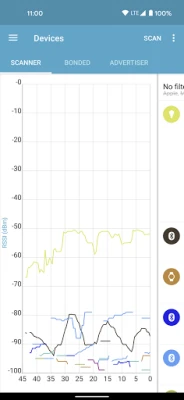
The application includes an RSSI graph that visualizes the Received Signal Strength Indicator (RSSI) of connected devices. This feature is crucial for assessing the quality of the connection and troubleshooting potential issues. Users can also export data to CSV and Excel formats for further analysis, making it easier to document and share findings.
Connecting to Bluetooth LE Devices
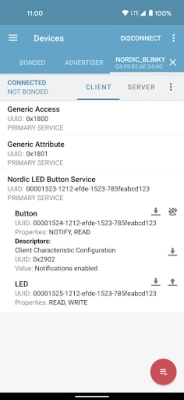
nRF Connect allows users to connect to Bluetooth LE devices seamlessly. Once connected, the application discovers and parses the services and characteristics offered by the device. This capability is essential for developers looking to interact with specific functionalities of their BLE hardware.
Reading and Writing Characteristics
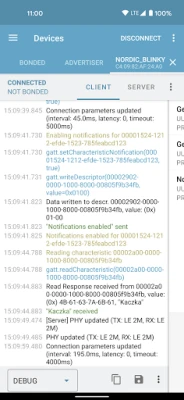
With nRF Connect, users can read and write characteristics of connected devices. This feature is vital for applications that require data exchange, enabling developers to send commands or retrieve information from the device. Additionally, users can enable or disable notifications and indications, allowing for real-time updates from the device.
Reliable Write Support
The application supports Reliable Write, ensuring that data is transmitted accurately and without loss. This feature is particularly important for applications where data integrity is critical, such as firmware updates or configuration changes.
Bluetooth SIG Characteristics Parsing
nRF Connect is equipped to parse the number of characteristics adopted by Bluetooth SIG. This functionality helps developers understand the standard characteristics available for BLE devices, facilitating easier integration and development.
Advanced Features for Enhanced Functionality
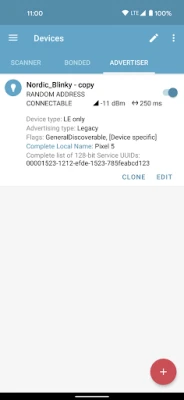
For users with Android 5.0 and above, nRF Connect supports Bluetooth LE advertising, allowing devices to broadcast their presence to nearby clients. Furthermore, devices running Android 8.0 or later can read and update PHY, enhancing communication efficiency.
GATT Server Configuration
The application provides robust GATT Server configuration options, enabling developers to set up and manage their BLE services effectively. This feature is essential for creating custom applications that require specific service configurations.
Device Firmware Update (DFU) Profile
nRF Connect supports the Device Firmware Update (DFU) profile, allowing users to upload new applications, SoftDevices, or bootloaders over-the-air (OTA). This capability simplifies the process of updating device firmware, ensuring that users can keep their devices up to date with the latest features and improvements.
McuMgr Support for Zephyr-based Devices
The application also supports McuMgr, a profile that enables users to control and update Zephyr-based devices. This feature is particularly beneficial for developers working with the Zephyr RTOS, providing a streamlined approach to device management.
Nordic UART Service Integration
nRF Connect integrates the Nordic UART Service, allowing for easy communication between devices. This service is ideal for applications that require serial communication, enabling developers to send and receive data effortlessly.
Recording and Replaying Operations with Macros
Another standout feature is the ability to record and replay common operations using Macros. This functionality allows users to automate repetitive tasks, saving time and reducing the potential for errors during testing and development.
Automated Testing for Bluetooth LE Devices
nRF Connect enables users to perform automated tests defined in XML files on Bluetooth LE devices. This feature is invaluable for developers looking to ensure the reliability and performance of their applications. For more information about automated tests, visit the GitHub page.
Compatibility and Additional Tools
nRF Connect is supported on Android version 4.3 or later, making it accessible to a wide range of devices. For those interested in hardware development, nRF5x Development kits can be ordered from Nordic Semiconductor.
To enhance the user experience, nRF Connect works seamlessly with the nRF Logger application, which stores logs in case of any issues. Users can download nRF Logger from the Google Play Store.
Conclusion
nRF Connect is a powerful application that offers a comprehensive suite of features for working with Bluetooth Low Energy devices. From scanning and connecting to advanced functionalities like firmware updates and automated testing, nRF Connect empowers developers to create innovative BLE applications with ease. Whether you are a seasoned developer or a newcomer to the world of Bluetooth technology, nRF Connect is an essential tool in your toolkit.
Rate the App
User Reviews















Popular Apps










Editor's Choice









