
Latest Version
April 08, 2026
ideasToCode
Tools
Android
1
Free
com.ideastocode.nonet
Report a Problem
More About NoNet: Block Internet for Apps
Unlock Your Potential with NoNet: Real-World Applications
NoNet transcends the conventional notion of "blocking"; it empowers you with control over your digital environment. Discover how our users are transforming their lives with NoNet's innovative features.
Enhance Your Concentration
In today’s fast-paced world, distractions abound. With NoNet, you can effortlessly block social media and chat applications while working or studying. This allows you to eliminate interruptions and achieve a state of deep focus, often referred to as the "flow state." Experience productivity like never before!
Child-Safe Device Management
Handing your smartphone to a child can be nerve-wracking, especially with sensitive apps like banking or shopping at their fingertips. NoNet allows you to block internet access for specific applications, ensuring that accidental transactions or deleted emails are a thing of the past. Keep your device kid-proof and worry-free!
Seamless Gaming Experience
For gaming enthusiasts, interruptions can ruin the experience. NoNet ensures that you can enjoy your favorite offline games without the annoyance of pop-up notifications or background updates that can cause lag. Dive into your gaming world without distractions!
Professional Presentations Made Easy
When sharing your screen during meetings, the last thing you want is a private message popping up. With NoNet, you can disconnect chat applications, allowing you to present with confidence and professionalism. Focus on delivering your message without the fear of unexpected interruptions.
Protect Your Personal Time
After a long day at work, it’s essential to unwind. NoNet allows you to block work-related chat groups while keeping your favorite streaming and music apps active. Enjoy your personal time guilt-free, knowing that work distractions are kept at bay.
Travel Smart with Data Management
Traveling can be costly, especially when it comes to data usage. NoNet helps you manage your roaming budget by preventing data-hungry applications from consuming your data in the background. Stay connected without overspending!
Introducing the Productivity Timer
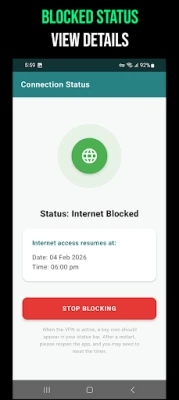
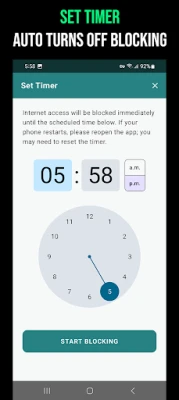
We understand that focus shouldn’t be a permanent state. Our new Custom Timer feature allows you to schedule focused work sessions. Need 45 minutes of uninterrupted study? Simply set the timer, and NoNet will automatically restore internet access once your session concludes. No more forgetting to reconnect!
How to Get Started with NoNet in Three Easy Steps
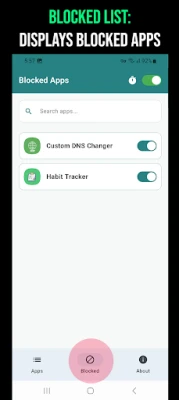
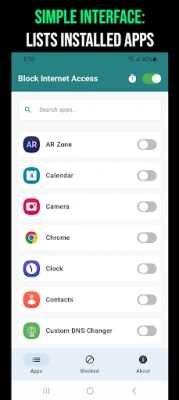
- Select: Open NoNet to view a straightforward list of all your installed applications.
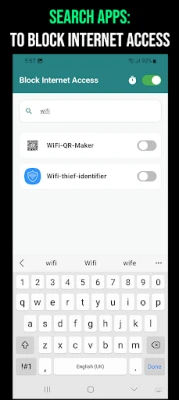
- Toggle: Search for the app that distracts you and flip the switch to block it.
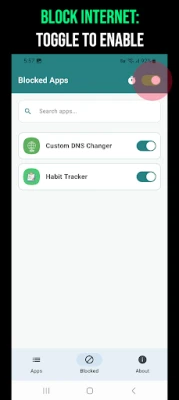
- Focus: Activate the master toggle at the top of the screen.
That’s all it takes! The selected applications will remain offline while everything else functions seamlessly.
Transparency and Technology: Understanding NoNet
We prioritize honesty with our users. You may wonder, is NoNet a VPN app? The answer is no. We do not alter your location, conceal your IP address for browsing, or offer proxy services. Instead, we utilize the VPN framework as it is the most secure, Google-approved method for managing per-app network connectivity.
Does NoNet Use a VPN?
Yes, NoNet employs the Android VpnService. However, unlike traditional VPNs that change your IP address or reroute your data to distant servers, NoNet creates a local tunnel on your device. This means it acts as a "gatekeeper" for your network traffic, stopping any blocked app's traffic right at the gate.
Your Privacy is Our Priority
At NoNet, we are committed to protecting your privacy:
- Zero Data Collection: We do not collect your data. All processing occurs locally on your device.
- No External Servers: Your traffic remains on your device and never leaves through us.
- Minimal Permissions: We only request what is absolutely necessary—internet access to manage connections and Google Play licensing. No access to your contacts, gallery, or any other personal data.
Take Control of Your Digital Life
Stop the distractions and start focusing. Download NoNet today and reclaim control over your digital environment. Whether for work, study, or simply enjoying a moment of peace, NoNet is here to help you disconnect from the noise and connect with what truly matters.
If you love the app, please leave us a review! Your feedback is invaluable in helping us create a more focused world.
Rate the App
User Reviews















Popular Apps










Editor's Choice









