Latest Version
Version
3.04
3.04
Update
September 01, 2024
September 01, 2024
Developer
evezzon
evezzon
Categories
Tools
Tools
Platforms
Android
Android
Downloads
0
0
License
Free
Free
Package Name
com.evezzon.nightowl
com.evezzon.nightowl
Report
Report a Problem
Report a Problem
More About Night Owl -Dimmer & Night Mode
Do your eyes feel tired when you read on your phone at night? Do you have trouble falling asleep after looking at your phone's screen for a long time? Night Owl might be the solution for you!
Transform Your Nighttime Phone Experience with Night Owl: The Ultimate Blue Light Filter
In today's digital age, our smartphones have become indispensable tools, often keeping us connected long into the night. However, prolonged exposure to blue light emitted by screens can lead to various health issues, including eye strain, insomnia, and headaches. Enter Night Owl, an innovative app designed to filter out blue light and enhance your nighttime phone experience. This article explores the features and benefits of Night Owl, ensuring you can enjoy your device without compromising your well-being.Why Blue Light Matters
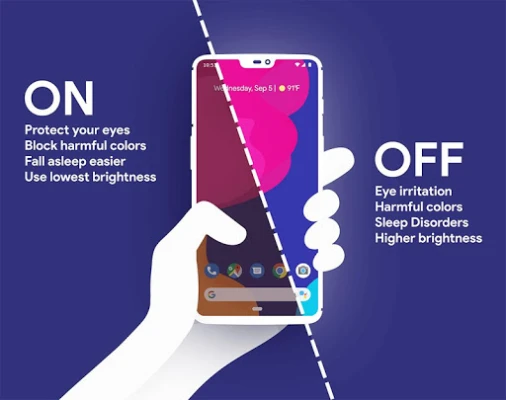
Blue light is a high-energy visible light that can disrupt your natural sleep cycle. When you use your phone in the dark, the bright screen can trick your brain into thinking it’s still daytime, making it difficult to fall asleep. Night Owl addresses this issue by providing a comprehensive solution to reduce blue light exposure and improve your overall comfort.Key Features of Night Owl
Night Owl is packed with features that make it a must-have for anyone who frequently uses their phone at night. Here’s a closer look at what this app offers:1. Comprehensive Screen Dimming
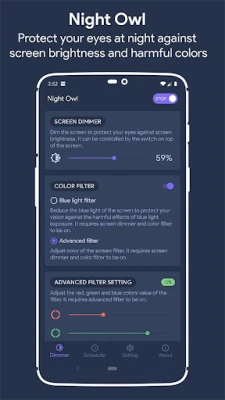
Night Owl goes beyond the standard Android settings by dimming not just the screen but also notification icons and the notification drawer. This ensures that your entire display is easier on the eyes, allowing for a more comfortable viewing experience in low-light conditions.2. Adjustable Filter Intensity
With Night Owl, you have complete control over the filter intensity. You can easily adjust the level of blue light filtering directly within the app or from the notification panel. This flexibility allows you to customize your experience based on your environment and personal preferences.3. Customizable Tint Colors
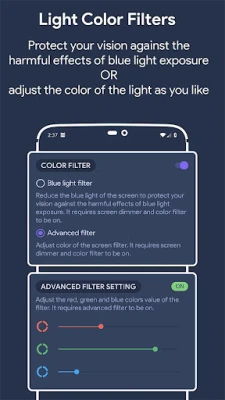
Not only can you filter blue light, but Night Owl also allows you to customize the tint color of your screen. Whether you prefer a warmer or cooler hue, you can tailor the display to suit your needs, enhancing your comfort while using your device at night.4. Smart Scheduling Options
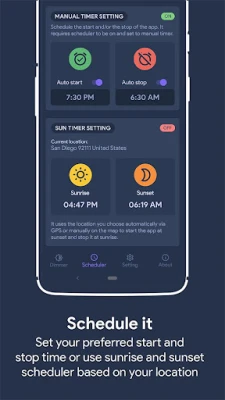
Night Owl features a smart scheduling option that lets you automate the app’s functionality. You can set it to start and stop automatically based on a timer or the sun scheduler, ensuring that your screen is always optimized for nighttime use without any manual intervention.5. Quick Access and Control
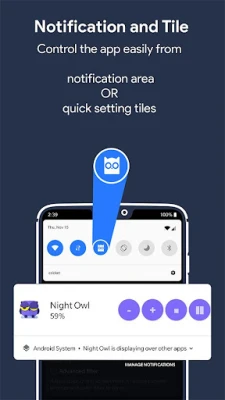
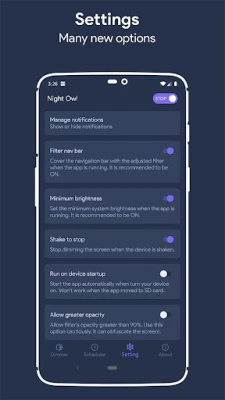
For those moments when you need to quickly adjust your settings, Night Owl offers a convenient shake feature. Simply shake your device to stop the app, providing instant control when you need it most. Additionally, you can use quick setting tiles to start or stop the app with ease.6. Enhanced Brightness Control
Night Owl can disable auto-brightness and automatically lower your device's brightness to the minimum when the app starts. This feature ensures that your screen is not only filtered but also dimmed to a comfortable level, reducing the risk of eye strain.How Night Owl Works
Night Owl utilizes the "Display over other apps" feature to apply a filter that darkens your screen and alters its color. This functionality allows the app to create a more comfortable viewing experience without compromising the quality of your content.Beta Feature: Accessibility Overlay
In its beta version, Night Owl employs Android's accessibility feature to display a tinted overlay across your entire screen, including the notification and lock screens. This ensures that every aspect of your device is optimized for nighttime use. Importantly, Night Owl does not read your screen content or collect any data through the Accessibility service, prioritizing your privacy and security.Conclusion: A Must-Have App for Nighttime Users
In a world where our devices are constantly at our fingertips, protecting our health while using them is paramount. Night Owl offers a robust solution to combat the adverse effects of blue light exposure, making it an essential app for anyone who uses their phone at night. With its array of features, including customizable filters, smart scheduling, and enhanced brightness control, Night Owl ensures that you can enjoy your device without sacrificing your well-being. Download Night Owl today and transform your nighttime phone experience into a more comfortable and healthier one. Say goodbye to eye strain and sleepless nights, and embrace a better way to use your smartphone after dark.Rate the App
Add Comment & Review
User Reviews
Based on 0 reviews
No reviews added yet.
Comments will not be approved to be posted if they are SPAM, abusive, off-topic, use profanity, contain a personal attack, or promote hate of any kind.















More »

Popular Apps

Nova BrowserJef Studios

Throne WishlistThrone.com

Dark Web Browser : OrNETStronger Apps

LINE: Calls & MessagesLINE (LY Corporation)

XENO; Plan, AutoSave & InvestXENO Investment

Rogue SlimeQuest Seeker Games

Дядя Ваня VPNKONDAKOV

PrivacyWallPrivacyWall

Robinhood WalletRobinhood

Roman empire games - AoD RomeRoboBot Studio
More »
Editor's Choice

Grim Soul: Dark Survival RPGBrickworks Games Ltd

Craft of Survival - Gladiators101XP LIMITED

Last Shelter: SurvivalLong Tech Network Limited

Dawn of Zombies: Survival GameRoyal Ark

Merge Survival : WastelandStickyHands Inc.

AoD Vikings: Valhalla GameRoboBot Studio

Viking Clan: RagnarokKano Games

Vikings: War of ClansPlarium LLC

Asphalt 9: LegendsGameloft SE

Modern Tanks: War Tank GamesXDEVS LTD