

Latest Version
9.0.1
July 31, 2025
wakdev
Tools
Android
0
Free
com.wakdev.wdnfc
Report a Problem
More About NFC Tools
Unlock the Power of NFC Tools: Automate Your Life with Ease
NFC Tools is a user-friendly application designed to record and manage information on NFC tags, ensuring compatibility with any NFC-enabled device. Whether you want to store contact details, URLs, phone numbers, social media profiles, or even specific locations, NFC Tools makes it simple and efficient.
Streamline Your Daily Tasks with NFC Technology
Beyond basic data storage, NFC Tools empowers users to automate repetitive tasks, transforming mundane actions into seamless experiences. Imagine effortlessly turning on Bluetooth, setting alarms, adjusting volume levels, or sharing WiFi configurations—all with a simple tap of your phone on an NFC tag.
For instance, with just a quick motion of your phone in front of an NFC tag before bedtime, your device can automatically switch to silent mode and set your alarm for the next morning. This level of convenience is not just a luxury; it’s a game-changer for busy individuals.
Advanced Features for Tech Enthusiasts
For those who crave more complexity, NFC Tools offers advanced features that allow you to set preset variables and conditions for intricate task automation. With over 200 available tasks and limitless combinations, you can customize your NFC tags to suit your unique lifestyle.
Read and Write Data Effortlessly
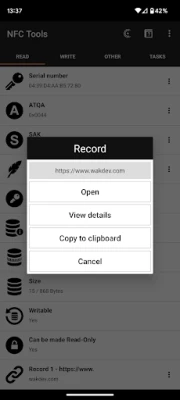
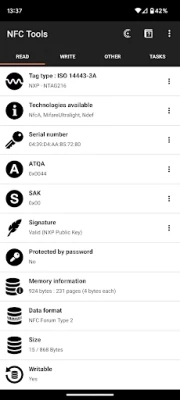
Utilizing the “Read” tab, you can easily access essential information about your NFC tags, including:
- The manufacturer and type of tag (e.g., Mifare Ultralight, NTAG215).
- The serial number of the tag (e.g., 04:85:c8:5a:40:2b:80).
- Available technologies and standards (e.g., NFC A, NFC Forum Type 2).
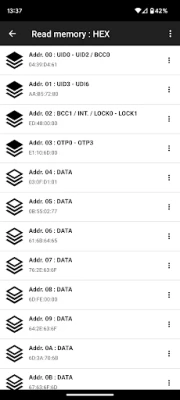
- Size and memory specifications.
- Writable or locked status of the tag.
- All data contained within the tag (NDEF records).
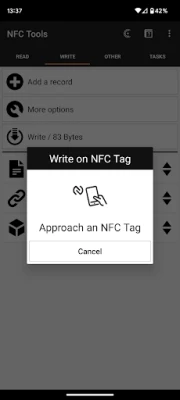
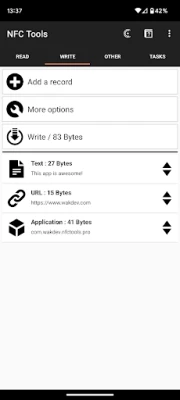
Switching to the “Write” tab allows you to record a variety of standardized data types, such as:
- Simple text, website links, videos, social profiles, or apps.
- Email addresses, phone numbers, or predefined text messages.
- Contact information or emergency contacts.
- Geolocation or addresses.
- WiFi or Bluetooth configurations.
- And much more.
The write function is versatile, enabling you to store extensive amounts of information on your NFC tags, making it a powerful tool for both personal and professional use.
Additional Features for Enhanced Functionality
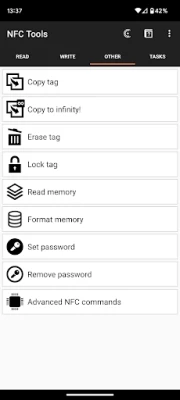
Under the “Other” tab, NFC Tools provides additional functionalities such as copying, erasing, and password-protecting your NFC tags. These features enhance the security and usability of your NFC data.
Automate Your Phone with Ease
The “Tasks” tab categorizes various actions that allow you to automate your phone effortlessly. Here are some examples of the available actions:
- Activate, deactivate, or toggle Bluetooth.
- Set sound profiles to silent, vibrate, or normal.
- Adjust screen brightness.
- Control volume levels for alarms, notifications, or ringtones.
- Set timers or alarms.
- Add events to your calendar.
- Launch apps or URLs/URIs.
- Send text messages or make calls.
- Utilize text-to-speech features to read aloud text.
- Configure WiFi networks.
- And much more.
Compatibility with Various NFC Tags
NFC Tools has been tested with a wide range of NFC tags, including:
- NTAG 203, 210, 210u, 212, 213, 213TT, 215, 216, 413 DNA, 424 DNA.
- Ultralight, Ultralight C, Ultralight EV1.
- ICODE SLI, SLI-S, SLIX, SLIX-S, SLIX-L, SLIX2, DNA.
- DESFire EV1, EV2, EV3, LIGHT.
- ST25TV, ST25TA, STLRI2K.
- Mifare Classic, Felica, Topaz, EM4x3x.
Get Support When You Need It
If you encounter any issues while using NFC Tools, don’t hesitate to reach out for assistance. The support team is ready to help you navigate any challenges you may face.
Requirements for Optimal Use
To fully utilize NFC Tools, ensure you have an NFC-compatible device. Additionally, to execute tasks, you will need to download the free app: NFC Tasks.
In conclusion, NFC Tools is not just an application; it’s a powerful ally in simplifying and automating your daily tasks. With its extensive features and user-friendly interface, it’s time to embrace the convenience of NFC technology and enhance your productivity.
Rate the App
User Reviews















Popular Apps










Editor's Choice









