

Latest Version
7.1.5
October 20, 2024
M2Catalyst, LLC.
Tools
Android
0
$1.99
com.wilysis.cellinfo
Report a Problem
More About Network Cell Info & Wifi
Enhance Your Mobile Experience with Network Cell Info: The Ultimate Signal Strength Tool
In today's fast-paced digital world, a reliable mobile connection is essential for both personal and professional communication. If you're seeking to optimize your mobile experience and achieve the best possible cellular and Wi-Fi signal strength, look no further than Network Cell Info. This innovative application not only provides users with real-time data on their signal strength but also reveals the specific cellular tower they are connected to, along with historical performance statistics.
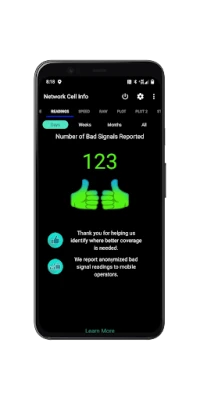
Introducing the Bad Signal Reporter
Imagine a scenario where every poor mobile signal you encounter is automatically reported to your mobile network operator (MNO). This could significantly enhance the quality of mobile networks, as operators would have access to crucial data and could take action to improve service. Fortunately, this is now a reality with Network Cell Info.
This powerful app allows users to report instances of bad signal—whether it’s no signal or weak coverage—by collecting data from consenting users. The app then compiles this information into a comprehensive Bad Signal Report, which is made available for free to MNOs worldwide. This collaborative approach not only benefits individual users but also contributes to the overall improvement of mobile network services.
Key Features of Network Cell Info
Network Cell Info is packed with features designed to enhance your mobile connectivity experience. Here are some of the standout functionalities:
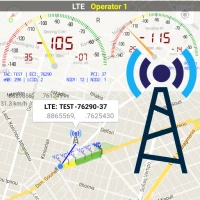
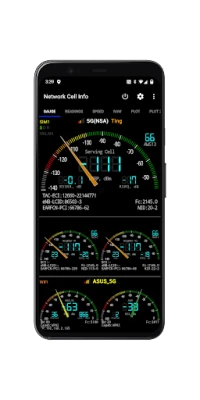
- Almost Real-Time Monitoring: Enjoy near-instantaneous updates (every second) on your cellular carrier and Wi-Fi signals through the Gauge and Raw Tabs.
- Comprehensive Network Support: The app supports various network types, including 5G, LTE+, LTE, IWLAN, UMTS, GSM, and CDMA.
- One-Tap Speed Test: Conduct a quick performance test of your Wi-Fi or mobile internet with just one tap, measuring download and upload speeds, ping, and jitter.
- Dual-SIM Support: Manage two SIM cards effortlessly with dedicated signal-meter gauges for both.
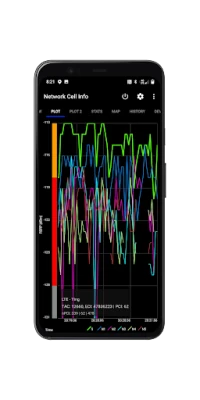
- Signal Plots: Visualize your connection with up to six signal plots, providing a clear picture of your network performance.
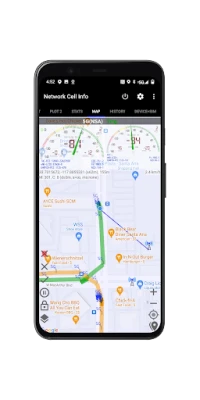
- Detailed History Logs: Access historical measurements of cellular signals directly from the Map tab.
- Personal Best Signal Finder: Utilize a map layer that displays your signal strength history by location, helping you identify the best spots for connectivity.
- Crowdsourced Best Signal Finder: Discover the nearest optimal signals from your carrier, based on community data.
- Measurement Settings: Customize your experience with settings for minimum distance, accuracy, and motion sensors.
- Export Database History: Easily export your historical measurements for further analysis.
Understanding Your Network Performance
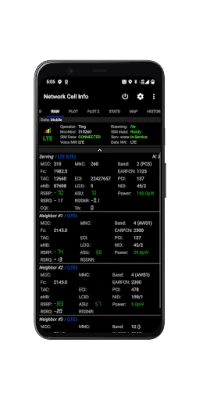
With Network Cell Info, users can gain valuable insights into their network performance. The app provides a Readings Tab that reports the number of bad signals encountered, allowing users to track connectivity issues over time. Additionally, the app offers a raw view of carrier network information, including connection statistics for 2G, 3G, 4G, and 5G networks.
By utilizing the app's features, users can make informed decisions about their mobile usage and identify areas where signal strength may be lacking. This proactive approach not only enhances individual user experiences but also contributes to the collective improvement of mobile network services.
Why Choose Network Cell Info?
Network Cell Info stands out in the crowded app marketplace due to its unique combination of features and user-centric design. Here are a few reasons why you should consider downloading this app:
- User-Friendly Interface: The app is designed with simplicity in mind, making it easy for users of all technical backgrounds to navigate and utilize its features.
- Community-Driven Improvement: By participating in the Bad Signal Reporting feature, users contribute to a larger effort to enhance mobile network quality for everyone.
- Comprehensive Data: The app provides a wealth of information, from real-time signal strength to historical performance, empowering users to optimize their mobile experience.
- Free Access for MNOs: The Bad Signal Reports generated by the app are available at no cost to mobile network operators, fostering collaboration between users and providers.
Conclusion
In an era where connectivity is paramount, Network Cell Info emerges as an essential tool for anyone looking to enhance their mobile experience. With its robust features, real-time monitoring, and community-driven approach to reporting bad signals, this app not only empowers users but also plays a vital role in improving mobile network services globally. Don’t settle for subpar connectivity—download Network Cell Info today and take control of your mobile experience!
For a detailed comparison of features, visit the Network Cell Info Features Page.
Rate the App
User Reviews















Popular Apps










Editor's Choice









