
Latest Version
April 26, 2026
krishna dev
Tools
Android
0
Free
com.krishna.netspeedlite
Report a Problem
More About Netspeed Lite
Master Your Internet Connection with Netspeed Lite: The Ultimate Bandwidth Management Tool
In today's digital age, whether you're connected to 5G, 4G LTE, or WiFi, having control over your bandwidth is essential. With Netspeed Lite, you can avoid unexpected data overage charges, identify which applications are consuming your data, and monitor your internet speed in real-time. This comprehensive guide will explore the core features and benefits of Netspeed Lite, ensuring you stay connected without any surprises.
Core Features & Benefits of Netspeed Lite
🌟 New! Floating Speed Bubble & Live Graph
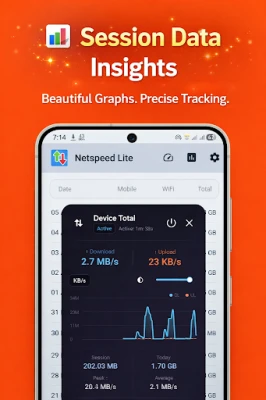
Stay informed about your connection status no matter where you are! The floating speed widget allows you to view your live internet speed and connection mode (WiFi or Mobile Data) directly on top of any app. Simply tap the floating bubble to access a real-time data usage graph without interrupting your current activity, whether you're gaming or streaming videos.
⚡ Live Speed in Status Bar & Notification
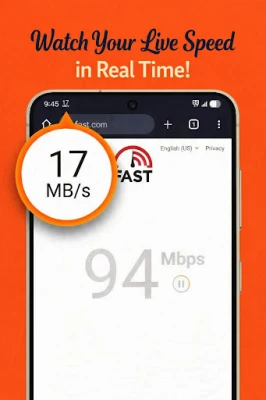
Keep your internet speed at your fingertips with a clean and unobtrusive indicator in your status bar. This feature displays your live upload and download speeds in real-time, allowing you to check your current bandwidth effortlessly while browsing, streaming, or gaming online.
📊 Powerful Data Usage Tracker
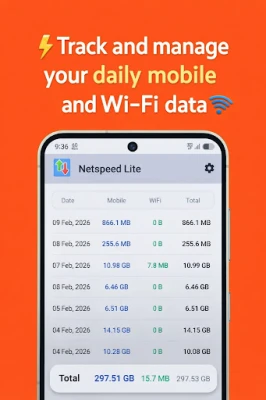
Concerned about exceeding your data limit? Netspeed Lite automatically tracks your daily and monthly data consumption across both Mobile and WiFi networks. With detailed history logs, you can gain insights into your digital habits and effectively manage your data cap.
📱 Per-App Data Usage Analytics
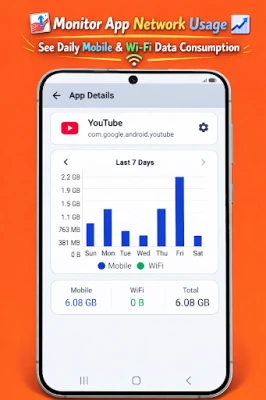
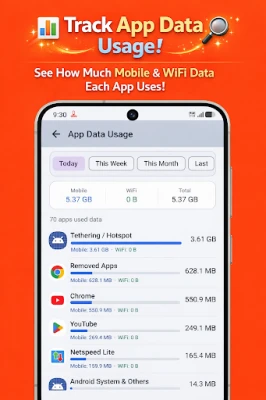
Discover which apps are draining your data! The advanced data manager provides a breakdown of data consumption on a per-app basis, making it easy to identify data-hungry applications running in the background.
🎨 Advanced Icon & Status Bar Customization
Personalize your network monitoring experience! Choose from a variety of custom icon styles and tailor the notification tray layout to perfectly match your phone’s aesthetic.
🌈 Dynamic Icon Colors
Enhance your status bar with dynamic colors that change based on your internet speed. For instance, green indicates a fast connection, while red signals a slow one. This feature allows you to gauge your connection quality at a glance without needing to read numbers.
⏱️ Interactive Speedometer UI
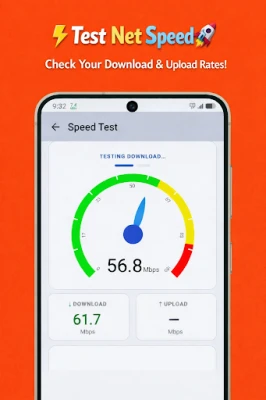
Open the app to access a beautifully designed, real-time speedometer gauge. Watch your network speed fluctuate with an active dial, providing a professional feel akin to a WiFi speed test.
🔄 Bits (bps) vs. Bytes (Bps) Toggle
Customize your metrics with ease. Toggle your live network speed display between Bits per second (kbps, Mbps) for raw bandwidth measurement or Bytes per second (kB/s, MB/s) to track exact file download speeds.
🔔 Smart Data Limit Alerts
Never worry about overage fees again. Set a custom data limit, and let our data usage monitor do the rest. Receive a warning notification at 80% usage and a final alert at 100%, ensuring you stay connected without exceeding your limits.
💡 Lightweight & Battery Efficient
Netspeed Lite is designed to be ultra power-efficient. It runs silently in the background with minimal impact on your device's RAM, CPU, or battery life, allowing you to enjoy seamless connectivity without draining your resources.
⚙️ Advanced Settings for Power Users
- Speed Display: Choose to show total combined speed or separate upload/download indicators.
- WiFi Signal Monitor: Display your live WiFi signal strength (%) in the notification area.
- Themes: Full support for system Dark Mode and Light Mode.
- One-Tap Setup: Grant permissions and start tracking your internet speed in seconds.
Why Choose Netspeed Lite?
For seamless streaming, gaming, and remote work, network stability is crucial. Netspeed Lite offers a premium, accurate network analysis experience that empowers you to take control of your connection. Monitor your mobile data usage, customize your status bar, and ensure you never exceed your data limits.
Download Netspeed Lite today and experience the smart way to track your internet speed. Stay connected, informed, and in control of your bandwidth like never before!
Rate the App
User Reviews















Popular Apps










Editor's Choice









