

Latest Version
2.329
September 29, 2024
Marcel Bokhorst, FairCode BV
Tools
Android
0
Free
eu.faircode.netguard
Report a Problem
More About NetGuard - no-root firewall
Maximize Your Privacy: The Ultimate Guide to NetGuard - A No-Root Firewall for Android
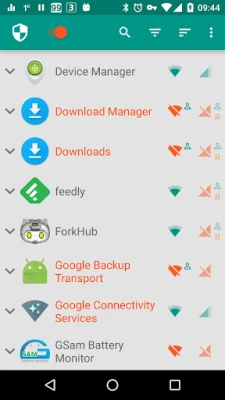
In an age where digital privacy is paramount, controlling your internet access has never been more crucial. With NetGuard, you can easily manage which applications and addresses can access your Wi-Fi and mobile connections without needing root permissions. This powerful tool not only enhances your privacy but also helps you save data and extend your device's battery life.
Why Block Internet Access?
Blocking internet access for specific applications can provide several benefits:
- Reduce Data Usage: By preventing unnecessary background data consumption, you can keep your data plan in check.
- Save Battery Life: Limiting internet access can significantly reduce battery drain, allowing your device to last longer between charges.
- Enhance Privacy: By controlling which apps can connect to the internet, you minimize the risk of data leaks and unauthorized tracking.
Key Features of NetGuard
NetGuard stands out as a user-friendly solution for managing internet access on Android devices. Here are some of its notable features:
- Simple to Use: The intuitive interface makes it easy for anyone to navigate and configure settings.
- No Root Required: Enjoy full functionality without the need for rooting your device.
- 100% Open Source: Transparency is key; the source code is available for anyone to review.
- No Tracking or Analytics: Your privacy is respected; there are no hidden data collection practices.
- No Advertisements: Experience a clean, ad-free environment while using the app.
- Active Development: Regular updates ensure that the app remains functional and secure.
- Compatibility: Supports Android 5.1 and later, as well as IPv4/IPv6 TCP/UDP protocols.
- Tethering Support: Easily manage internet access while tethering your device.
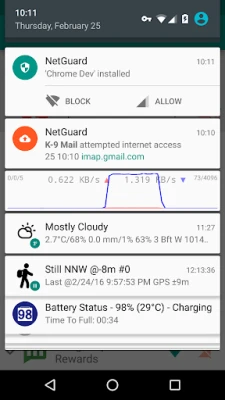
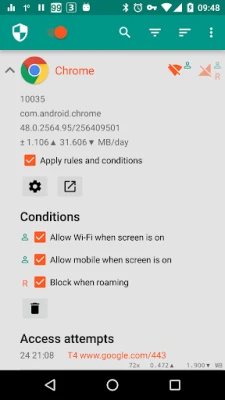
- Customizable Notifications: Get notified when an application accesses the internet, and record network usage per application.
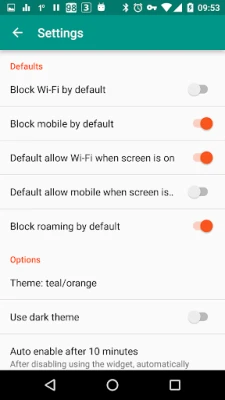
- Material Design: Enjoy a visually appealing interface with both light and dark themes.
Pro Features for Advanced Users
For those looking to take their internet management to the next level, NetGuard offers a range of pro features:
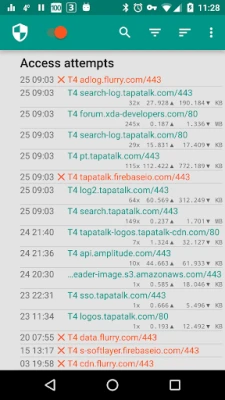
- Traffic Logging: Log all outgoing traffic, search and filter access attempts, and export PCAP files for detailed analysis.
- Individual Address Control: Allow or block specific addresses for each application, giving you granular control over your internet access.
- New Application Notifications: Receive alerts for new applications and configure settings directly from notifications.
- Network Speed Graph: Monitor your network speed in real-time with a status bar notification.
- Additional Themes: Choose from five extra themes in both light and dark versions for a personalized experience.
Why Choose NetGuard Over Other Firewalls?
NetGuard is unique in its offering of comprehensive features without requiring root access. Many other firewalls demand root permissions, which can void warranties and expose devices to security risks. With NetGuard, you can enjoy robust internet management while keeping your device secure and intact.
Join the Testing Program
If you’re eager to explore new features and contribute to the app's development, consider joining the testing program. You can sign up at this link.
Understanding Permissions
All necessary permissions for NetGuard are clearly outlined in the FAQ section on GitHub. This transparency ensures that users are fully informed about what the app requires to function effectively. For more details, visit this page.
How NetGuard Works
NetGuard utilizes the Android VPNService to route traffic through the app, allowing for on-device filtering rather than relying on external servers. It’s important to note that only one app can use this service at a time, which is a limitation set by the Android operating system.
Access the Source Code
For those interested in the technical aspects, the full source code of NetGuard is available on GitHub. This openness fosters community trust and allows developers to contribute to its ongoing improvement. Check it out at this link.
Conclusion
NetGuard is an essential tool for anyone looking to enhance their privacy and control over internet access on their Android devices. With its user-friendly interface, robust features, and commitment to user privacy, it stands out as the premier no-root firewall solution. Take charge of your digital life today with NetGuard!
Rate the App
User Reviews















Popular Apps










Editor's Choice









