

Latest Version
3.4
November 08, 2024
Phuongpn
Tools
Android
0
$0.00
com.phuongpn.wifisignalstrengthmeterpro
Report a Problem
More About Net Signal Pro:WiFi & 5G Meter
Unlocking Connectivity: The Ultimate Guide to Cellular and WiFi Signal Strength
In today's fast-paced digital world, reliable connectivity is essential. Whether you're streaming your favorite show, working from home, or simply browsing the web, understanding your cellular and WiFi signal strength can significantly enhance your online experience. This article delves into the features of a powerful app designed to provide comprehensive insights into your connectivity, ensuring you stay connected wherever you are.
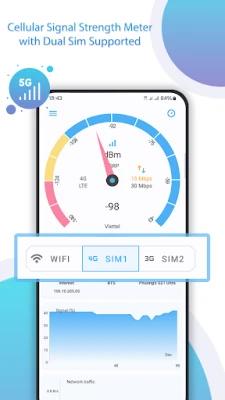
Comprehensive Cellular Signal Information
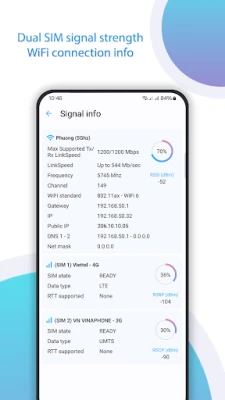
One of the standout features of this app is its ability to provide detailed cellular signal information. Users can access a wealth of data, including:
- Network Generations: View the status of 2G, 3G, 4G, and 5G networks.
- Network Operators: Identify your current network operator and SIM operator.
- Device Information: Get insights into your phone type and network type.
- Signal Strength: Monitor network strength in dBm for optimal performance.
- IP Address: View your device's IP address for better network management.
This comprehensive cellular signal information empowers users to make informed decisions about their connectivity, ensuring they can always find the best network available.
In-Depth WiFi Signal Analysis
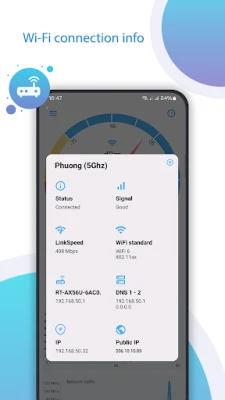
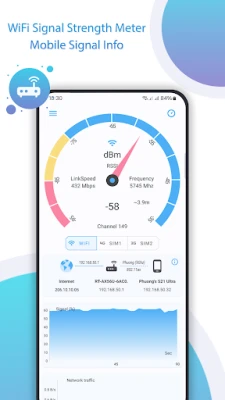
Understanding your WiFi signal is just as crucial as monitoring cellular connectivity. The app offers an extensive range of WiFi signal information, including:
- Wi-Fi Name (SSID): Identify the network you are connected to.
- BSSID: Access the unique identifier for your WiFi access point.
- Maximum Wi-Fi Speed: Check the potential speed of your connection.
- IP Address: View your local IP address for troubleshooting.
- Public IP Address: Understand your external IP for online activities.
- Network Capability: Assess the capabilities of your current network.
- Network Channel: Discover the channel your WiFi is operating on.
- Subnet Mask: Get details about your network's subnet.
- Gateway IP Address: Identify your network gateway for configuration.
- DHCP Server Address: Find the address of your DHCP server.
- DNS Addresses: Access DNS1 and DNS2 for better browsing.
This detailed WiFi signal analysis allows users to optimize their home or office network, ensuring a seamless online experience.
WiFi Roaming Insights
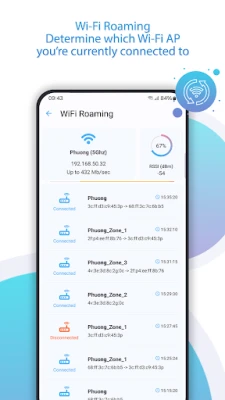
WiFi roaming is another critical feature of the app, enabling users to track their connectivity as they move. Key insights include:
- Access Point Information: Discover which Wi-Fi access point your device is using.
- Router Name: Identify the router you are connected to.
- Network ID: Access the unique identifier for your network.
- Connection Time: Monitor the duration of your connection to the network.
With these insights, users can easily troubleshoot connectivity issues and ensure they are always connected to the best available network.
Real-Time Signal Strength Updates
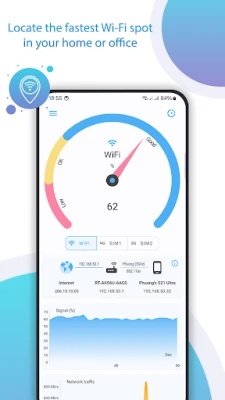
One of the most impressive features of this app is its ability to provide real-time updates on signal strength. As you move around your home, workplace, or any location with WiFi or cellular connectivity, the app continuously updates the signal strength. This dynamic feature allows you to:
- Identify Strong Signals: Quickly find areas with the best connectivity.
- Optimize Your Setup: Adjust your router placement or device location for improved performance.
- Enhance Your Experience: Enjoy uninterrupted streaming, gaming, and browsing.
By leveraging real-time signal strength updates, users can maximize their connectivity and enjoy a smoother online experience.
Rate Us and Share Your Experience
If you find the app beneficial, we encourage you to take a moment to rate us. Your feedback is invaluable and helps us improve our services. Thank you for being a part of our community!
Conclusion
In conclusion, understanding your cellular and WiFi signal strength is crucial for maintaining a reliable online experience. With features like comprehensive cellular signal information, in-depth WiFi analysis, WiFi roaming insights, and real-time updates, this app is an essential tool for anyone looking to optimize their connectivity. Stay connected, stay informed, and enjoy the digital world to its fullest!
Rate the App
User Reviews















Popular Apps










Editor's Choice









