
Latest Version
5.5.8
March 25, 2026
Smart Card Nepal Pvt Ltd
Finance
Android
0
Free
com.mobile.smartcard
Report a Problem
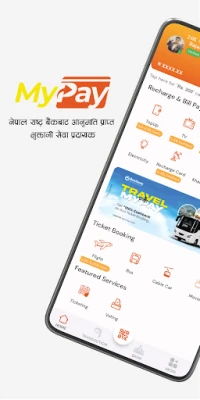
More About MyPay – Nepal’s Digital Wallet
Unlocking Financial Freedom: Discover MyPay, Nepal's Premier Digital Wallet
In today's fast-paced world, managing finances efficiently is crucial. MyPay stands out as more than just a digital wallet; it is your comprehensive financial partner in Nepal. From mobile recharges to utility bill payments, fund transfers, and even ticket bookings, MyPay offers a secure, convenient, and user-friendly platform to handle all your financial activities. Whether you are at home or on the go, MyPay ensures that your online payments are swift, secure, and simple.
Key Features of MyPay
Secure and Reliable Online Payments
MyPay employs cutting-edge encryption technology to guarantee that all your transactions are protected. Enjoy peace of mind knowing that your financial data is safe and secure with every payment you make.
Instant Mobile Recharges
Top up any mobile network in Nepal in seconds. With MyPay, recharging your NTC, Ncell, or other operators is as easy as a few taps on your smartphone. Stay connected without the hassle.
Effortless Bill Payments
Say goodbye to long queues and tedious processes. Pay your electricity, water, internet, DTH, ISP, and TV bills from the comfort of your home. With just a few taps, you can settle your bills quickly and efficiently.
Quick Fund Transfers
Transferring money has never been easier. Send funds to any bank account or digital wallet in Nepal securely and swiftly. With MyPay, moving money is as simple as sending a text message.
DEMAT and Mero Share Account Renewals
Stay on top of your investments with MyPay. Renew your DEMAT and Mero Share accounts directly through the app, ensuring that you never miss an opportunity in the financial market.
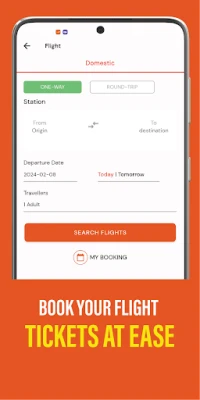
Convenient Ticket Booking
Planning a trip? MyPay allows you to book bus and flight tickets effortlessly from anywhere, at any time. Enjoy a hassle-free journey with just a few clicks.
Insurance Payments Made Easy
Keep your insurance policies up to date by paying your premiums directly through MyPay. We simplify the process, helping you secure your future without any stress.
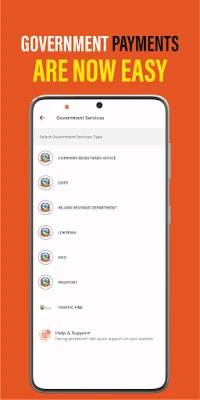
Streamlined Government Payments
Handle your government payments, including taxes and fees, conveniently through our integrated payment system. MyPay makes it easy to manage your financial obligations.
Top-Up & Entertainment Services
Recharge your TV subscriptions, ISP services, and pay for gaming vouchers directly from the app. Access a variety of entertainment services with ease.
Comprehensive Merchant Partnerships
MyPay collaborates with over 35 businesses across Nepal, including KTM CTY, Mero Doctor, and Bus Sewa, to provide you with a wide range of online payment options.
Event Ticketing and Voting Support
We offer ticketing and voting support for various events, ensuring a smooth experience for organizers and attendees alike.
Convenient Remittance Options
Receive remittances directly on the MyPay app from trusted companies like MyPay Money Transfer, Samsara Remit, and NIC Asia Remit, making it easier for you to manage your finances.
Adventure and Sports Pre-Booking
Book your adventure games and sports activities, such as paragliding, bungee jumping, and ATV rides, directly through MyPay. Experience the thrill without the hassle of planning.
Exam Preparation Resources
Prepare for your entrance exams with both physical and online classes available. MyPay offers free online classes for various exams, including driving license tests and engineering entrance preparations.
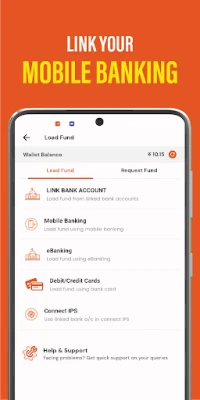
How to Load Funds into Your MyPay Wallet
Loading funds into your MyPay wallet is quick and straightforward. Here’s how you can do it:
1. Mobile Banking
- Open the MyPay App.
- Click on the Load Wallet icon on the Dashboard.
- Tap on Mobile Banking.
- Select your bank.
- Enter the amount to be loaded and the purpose, then click the Send button.
- Enter your wallet's mobile number and password, then click on login.
- Review all the details and click on Confirm.
- Enter the OTP received on your mobile to complete the fund load process.
2. Connect IPS
- Open the MyPay App.
- Click on the Load Wallet icon on the Dashboard.
- Tap on Connect IPS.
- Enter the amount and purpose, then tap on send.
- Enter all the details and tap on sign-in.
- Choose your preferred bank and tap on send.
3. Debit/Credit Cards
- Log in to your MyPay app on your smartphone.
- Go to the "Load Funds" or "Top-up" section in the app.
- Select "Debit/Credit Card" as your preferred payment method.
- Enter your card details and the amount you want to load.
- Verify the details and confirm the payment.
With MyPay, managing your finances has never been easier. Experience the convenience of a digital wallet that caters to all your financial needs, ensuring that you stay connected, secure, and in control of your money.
Rate the App
User Reviews















Popular Apps










Editor's Choice









