

Latest Version
2.46.1
July 22, 2026
Mind Work Solutions
Education
Android
0
Free
ru.babkin.mywords
Report a Problem
More About My Words: Learn Vocabulary
Master Multiple Languages at Your Own Pace with My Words
In today's globalized world, learning a new language has never been more accessible. With My Words, you can effortlessly expand your vocabulary in English, Spanish, German, French, Italian, Russian, and Dutch. This innovative app allows you to tailor your learning experience to fit your unique style and pace. Below, we explore the key features that make My Words an essential tool for language learners.
Personal Dictionary: Your Language Companion
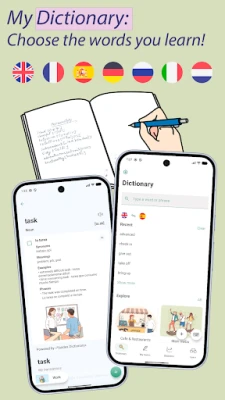
One of the standout features of My Words is its personal dictionary. Users can quickly add words and phrases, complete with translations, usage examples, synonyms, and audio pronunciations. This feature allows you to create a customized vocabulary list that reflects your learning needs and interests.
Book Reader: Transform Reading into Learning
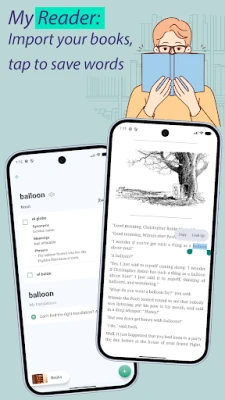
With the book reader functionality, you can import your own EPUB books and read them directly within the app. Simply tap on any word to look it up and save it instantly. This turns every book into a personalized vocabulary lesson, making reading not just enjoyable but also educational.
Flashcards with Images: Visual Learning Made Easy
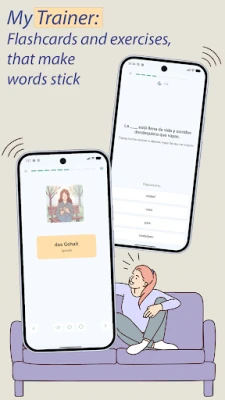
Studying can be more engaging with flashcards enriched with images. My Words offers cards that include pictures, meanings, synonyms, and example sentences, enhancing your memory retention and making the learning process more enjoyable.
Spaced Repetition: Optimize Your Study Time
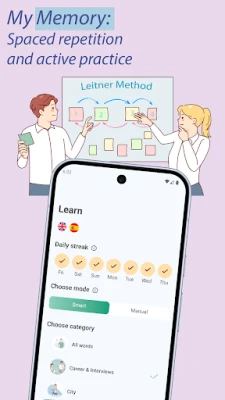
The app employs a spaced repetition system that schedules reviews based on your familiarity with each word. This means you can focus your efforts on what you need to practice, ensuring efficient use of your study time.
Custom Texts: Learn in Context
My Words allows you to add any text—be it articles, subtitles, or notes—and translate it. You can extract words to learn and even generate practice texts on various topics. This feature helps you build vocabulary in a natural context, making it easier to remember and use in real conversations.
Diverse Exercises: Reinforce Your Learning
To solidify your understanding, My Words offers a variety of exercise types. Engage in dictation for spelling, speaking exercises for pronunciation, translation tests, and multiple-choice quizzes. These diverse methods cater to different learning styles and reinforce your knowledge effectively.
Audio Player: Learn on the Go
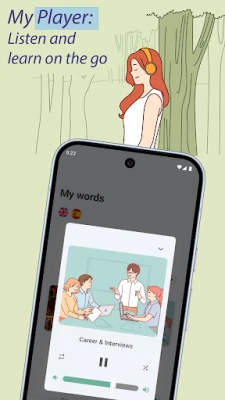
For those who prefer passive learning, the audio player feature allows you to listen to your word lists and translations during commutes, workouts, or leisurely walks. This way, you can absorb new vocabulary effortlessly while on the move.
Contextual Learning: Phrases and Articles
My Words emphasizes learning words within full sentences, making them feel natural in conversation. Additionally, you can study words alongside their grammatical articles in languages like German, Spanish, French, Italian, and Dutch, ensuring accurate recall.
Ready-Made Collections: Start Learning Quickly
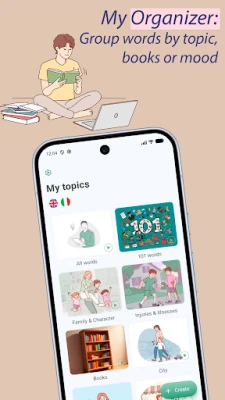
For those who want to dive right in, My Words offers popular word collections. These ready-made sets feature the most frequently used words, allowing you to start your language journey without delay.
CSV Import: Seamless Integration
If you have existing word lists from other sources or apps, you can easily import them via CSV. This feature ensures a smooth transition to My Words, allowing you to continue your learning without missing a beat.
Why Choose My Words?
- Free core version with unlimited word lookups.
- Comprehensive built-in dictionary with translations across all supported languages.
- English vocabulary level assessment to track your progress.
- Goal setting, statistics, progress charts, and daily streak tracking to keep you motivated.
- Home screen and lock screen widgets for quick access to your learning materials.
- Dark mode and a clean, minimalist design for a pleasant user experience.
- Push notification reminders to ensure you never miss a review session.
- Account sync across devices and platforms for seamless learning.
Empower Your Language Learning Journey
My Words is designed for independent learners who seek full control over their study materials. Whether you're delving into novels in a foreign language, binge-watching series, preparing for exams, or enhancing your professional vocabulary, this app allows you to add any word or phrase, practice it your way, and retain it for the long term.
Regardless of the language you are learning—be it English, Spanish, German, French, Italian, Russian, or Dutch—My Words empowers you to study your own words, your own way. Start your journey today and unlock the world of languages at your fingertips!
Rate the App
User Reviews










Popular Apps










Editor's Choice









