


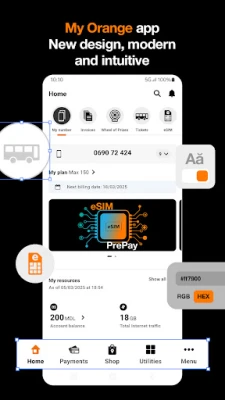
Latest Version
8.6.2
July 03, 2026
Orange Moldova
Tools
Android
0
Free
com.orange.myorange.omd
Report a Problem
More About My Orange Moldova
Ultimate Guide to Anti-Spam Protection: Safeguard Your Calls
In today's fast-paced digital world, unwanted calls can be a significant nuisance. Fortunately, with the Anti-Spam Protection feature, you can take control of your communication and ensure a more pleasant phone experience. This article delves into the benefits of activating Anti-Spam protection, the permissions required, and essential information about the My Orange app.
What is Anti-Spam Protection?
Anti-Spam Protection is a powerful tool designed to help you identify and manage unwanted calls before you even pick up the phone. By leveraging reliable data, this feature can recognize incoming calls and alert you to potential spam or telemarketing attempts. With the option to automatically block these numbers, you can enjoy uninterrupted communication and peace of mind.
How Does Anti-Spam Protection Work?
When you activate Anti-Spam Protection, the system analyzes incoming calls using a database of known spam numbers. If a call is identified as spam or telemarketing, you will receive a notification, allowing you to decide whether to answer or block the call entirely. This proactive approach not only saves you time but also enhances your overall phone experience.
Permissions Required for Anti-Spam Protection
To fully utilize the Anti-Spam feature, you must grant specific permissions to the My Orange app. These permissions are crucial for the app to function effectively:
- Access to Contact List: This permission allows the app to identify recognized numbers and display notifications for both known contacts and potential spam or telemarketing calls.
- Manage Phone Calls: By allowing the My Orange app to manage your phone calls, you enable it to block unwanted spam and telemarketing calls automatically.
Why is Anti-Spam Protection Important?
Activating Anti-Spam Protection is essential for several reasons:
- Enhanced Communication Experience: By filtering out unwanted calls, you can focus on important conversations without interruptions.
- Increased Safety: Reducing the number of spam calls minimizes the risk of falling victim to scams or fraudulent activities.
- Convenience: With automatic blocking features, you can enjoy a hassle-free phone experience, free from the annoyance of telemarketing calls.
Additional Features Coming Soon
The My Orange app is continuously evolving, with a host of exciting features planned for the future. Stay tuned for updates that will further enhance your user experience and provide even more tools for managing your communication effectively.
Key Information About My Orange App
Before you dive into the world of Anti-Spam Protection, here are some essential details you should know:
- The app is available for all Orange Abonament, PrePay, and Internet Acum PrePay customers.
- A 3G/4G internet connection is required for successful authentication in the My Orange app.
- Once authenticated, you can use any data connection, including Wi-Fi.
- The authentication session lasts for 14 days and resets automatically for another 14 days each time you open the app using an Orange 3G/4G connection.
- You can also authenticate through Wi-Fi using your Orange Account.
- The data used to download the app will be charged at your standard rate.
- Traffic within the app is free, except for the “Orange Stores” and “Orange Chat” sections.
- When using My Orange while roaming, data traffic will be charged according to your roaming rates and options.
Conclusion
In conclusion, activating Anti-Spam Protection is a vital step towards a more secure and enjoyable phone experience. By understanding how this feature works and the permissions required, you can take full advantage of the My Orange app. With continuous updates and improvements on the horizon, you can look forward to an even better communication experience. For more details, visit Orange's official website.
Rate the App
User Reviews















Popular Apps










Editor's Choice









