


Latest Version
8.5.1
July 06, 2025
WebmasterGM
Games
Android
0
Free
com.WebmasterGM.musicboxlite
Report a Problem
More About Music Box Kids Game
Discover the Ultimate Multilingual Educational Music Game for Children
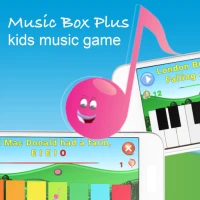
Introducing Music Box Plus, a vibrant and engaging educational music game designed specifically for children. This innovative app is completely free to install, with no subscriptions or ads, ensuring a seamless learning experience for young musicians.
Why Choose Music Box Plus?
Music Box Plus stands out with its colorful and user-friendly design, making it accessible for children of all ages. Learning to play an instrument can often be overwhelming due to the multitude of signs, symbols, and instructions. This app simplifies the learning process by focusing on two essential elements: pitch and duration. By using straightforward symbols, children can easily grasp these concepts and start making music.
Engaging Learning Experience
The app features a clear scoring system that allows users to track their progress. Children can quickly identify which songs they have mastered and which ones require further practice. This feedback encourages them to improve their skills while having fun.
Choose Your Instrument
Upon launching the app, users can select from two instruments:
- Children's Xylophone: An eight-key instrument perfect for playing simple melodies.
- Piano: A more advanced option with twenty-three tones, ideal for those ready to tackle complex compositions.
Play Your Favorite Songs
Once an instrument is selected, children can choose from a variety of popular children's songs. The app provides a visual guide, indicating which keys to press on the screen. As they play, the lyrics of the song appear in a karaoke-style format, enhancing the interactive experience.
Flexible Play Modes
Music Box Plus offers flexibility in how children engage with the music:
- Play Mode: Users can toggle play mode on or off, allowing the app to perform the selected melody independently.
- Performance Evaluation: After playing, the app evaluates the child's performance, providing constructive feedback to help them improve.
Customizable Tempo and Play Options
To cater to different learning paces, the app allows users to customize their experience:
- Play Mode Options: Choose between tone-by-tone or continuous play.
- Tempo Settings: Adjust the speed of the melody with options ranging from 56 BPM (Adagio) to 132 BPM (Allegro).
Conclusion: A Fun Way to Learn Music
Music Box Plus is more than just a game; it’s a comprehensive educational tool that fosters a love for music in children. With its intuitive design, engaging features, and customizable options, it provides a fun and effective way for young learners to explore the world of music. Download Music Box Plus today and watch your child’s musical journey begin!
Rate the App
User Reviews














Popular Apps










Editor's Choice









