
Latest Version
2.13.27
December 03, 2025
LemonClip
Tools
Android
0
Free
com.jee.timer
Report a Problem
More About Multi Timer StopWatch
Maximize Your Productivity with the Ultimate Multi Timer App
In today's fast-paced world, managing time effectively is crucial for success in various activities, whether it's cooking, studying, or gaming. The Multi Timer App is designed to enhance your time management skills by allowing you to set multiple timers for different tasks seamlessly. This article explores the features and benefits of the Multi Timer App, ensuring you make the most of your time.
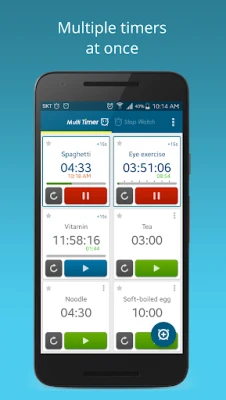
Effortlessly Manage Multiple Timers
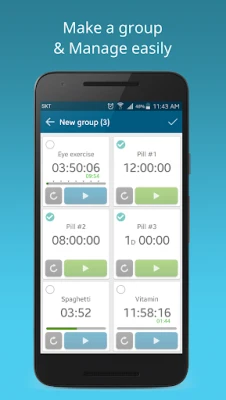
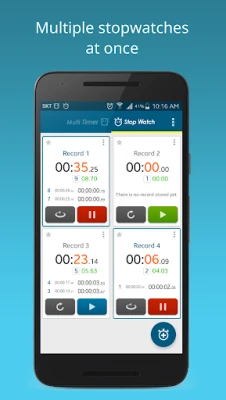
The Multi Timer App allows you to store and manage multiple timers simultaneously. Whether you're cooking a complex meal, timing your workout, or keeping track of study sessions, you can easily start your preferred timers with just one touch. This feature is particularly useful for those juggling various tasks, as it simplifies the process of time management.
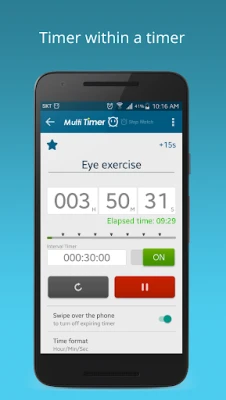
Timer Within a Timer: Stay on Track
One of the standout features of the Multi Timer App is the ability to set a timer within a timer. This functionality is perfect for presentations or meetings, where you need to keep track of time without losing focus. You can receive notifications at set intervals, ensuring you stay on schedule and meet your deadlines.
Unique Sounds for Each Timer
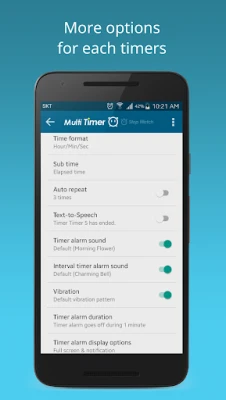
To enhance your user experience, the Multi Timer App allows you to assign distinct sounds to each timer. This means you can instantly recognize which timer has gone off without having to check your device. This feature is particularly beneficial in busy environments where multiple timers may be running simultaneously.
Text-to-Speech Functionality
When a timer alarm goes off, the Multi Timer App can speak to you, providing an auditory cue that is especially helpful when you're engaged in other activities. This text-to-speech feature ensures you never miss an important alert, allowing you to focus on your tasks without distraction.
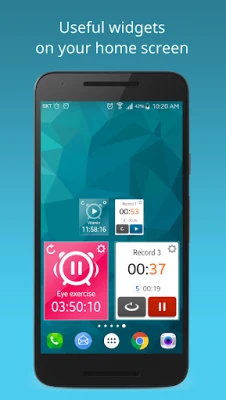
Customizable Widgets for Easy Access
The app offers beautiful and customizable timer widgets that can be adjusted in size and color to suit your preferences. These widgets provide quick access to your timers, making it easier to manage your time at a glance. With the Multi Timer App, you can personalize your experience to fit your style.
Store and Share Stopwatch Records
Never lose track of your stopwatch records again! The Multi Timer App allows you to store your records securely and share them whenever you need. This feature is particularly useful for athletes and students who want to track their progress over time and share their achievements with others.
Seamless Integration with Other Apps
Enhance your productivity by using the Multi Timer App's features in conjunction with other applications. By copying the internal link and saving it in another app, you can execute the multi-timer directly, streamlining your workflow and making time management even more efficient.
Compatibility Across All Devices
The Multi Timer App is designed to support all types of devices, ensuring that you can manage your time effectively, whether you're using a smartphone, tablet, or computer. This versatility makes it an essential tool for anyone looking to improve their time management skills.
Continuous Improvement Through User Feedback
The developers of the Multi Timer App are committed to enhancing the user experience by incorporating feedback and suggestions from users. Your input is invaluable in shaping the future of the app, and the team is always eager to hear your ideas for new features and improvements.
Unlock Premium Features for an Enhanced Experience
By opting for the premium version of the Multi Timer App, you can enjoy an ad-free experience and gain access to future features as they are released. This investment not only enhances your user experience but also supports the ongoing development of the app.
App Permissions Explained
To ensure the Multi Timer App functions optimally, it requires certain permissions:
- Notifications: Receive alerts when your timer or stopwatch starts.
- Music and Audio: Set music as your alarm sound.
- Bluetooth Connection: Listen to timer sounds through Bluetooth devices.
- Read Phone State: Allow the timer alarm to ring appropriately during phone calls.
Need Assistance? Contact Us!
If you encounter any issues with the app or have questions, please reach out to us via email at jeedoridori@gmail.com. We are here to help you make the most of your Multi Timer experience.
In conclusion, the Multi Timer App is an indispensable tool for anyone looking to enhance their productivity and time management skills. With its user-friendly features and continuous improvements, it stands out as a top choice for managing multiple tasks efficiently. Download the Multi Timer App today and take control of your time!
Rate the App
User Reviews















Popular Apps










Editor's Choice









