

Latest Version
4.9.0
March 10, 2026
Catfantom
Tools
Android
0
$1.99
org.catfantom.multitimer
Report a Problem
More About Multi Timer
Unlock the Power of Multi-Timer Applications: Your Ultimate Guide
In today's fast-paced world, managing time effectively is crucial, whether you're cooking, engaging in sports, or playing games. Multi-timer applications have emerged as indispensable tools that cater to various needs, offering a plethora of features designed to enhance your time management experience. This article delves into the remarkable functionalities of a top-tier multi-timer app, ensuring you make the most of your time.
Customizable Timers for Every Occasion
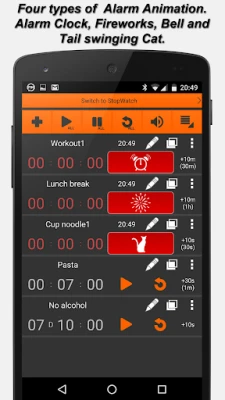
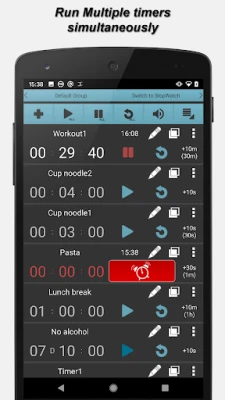
One of the standout features of a multi-timer application is its reusable timers. Each timer can be personalized with unique names, alarm sounds, durations, color labels, and even vibration settings. For a touch of whimsy, users can select alarm animations, including a delightful tail-swinging cat that adds a fun element to your reminders.
User-Friendly Interface for Seamless Navigation
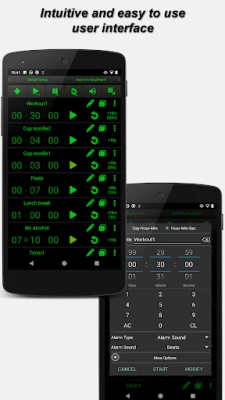
The application boasts an intuitive user interface designed for quick and easy navigation. Users can effortlessly set up timers without any steep learning curve, making it accessible for everyone, from tech-savvy individuals to those less familiar with technology.
Efficient Timer Grouping
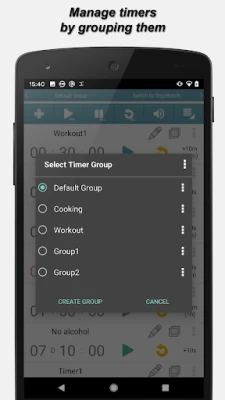
Organizing your timers is a breeze with the grouping feature. You can create up to 30 timer groups, each containing a maximum of 100 timers. This functionality is particularly useful for managing multiple tasks simultaneously, ensuring you never miss a beat.
Background Functionality for Uninterrupted Use
One of the most impressive aspects of this application is its ability to run in the background. Once you start a timer, the app remains active even if you reboot your phone. You can choose to receive notifications without bringing the app to the forefront, allowing you to continue with your activities uninterrupted.
Linking Timers for Enhanced Efficiency
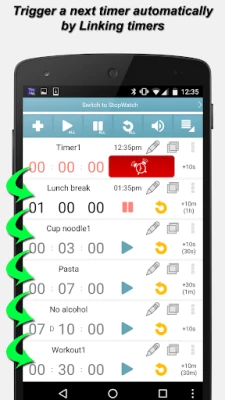
For those who juggle multiple tasks, the timer linkage feature is a game-changer. You can link timers so that one automatically starts when another finishes. This is particularly useful for cooking or workout routines, where timing is essential. Additionally, you can link entire groups of timers, streamlining your scheduling process.
Voice Alarms for Added Convenience
Each timer can be equipped with a Text to Speech (Voice Alarm) feature, allowing the app to read out the timer title, end time, and notes. This hands-free functionality is perfect for busy individuals who need reminders without having to check their devices constantly.
Aesthetic Customization with Color Themes
With 24 color themes available, users can personalize their experience further. You can change the colors of individual elements, including notification icons, ensuring that your timer app not only functions well but also looks great.
Super Customizable Settings
The app offers extensive customization options, allowing you to adjust font sizes, hide or show buttons, and modify notification settings. You can even choose whether the app should come to the front when an alarm goes off, providing a tailored experience that suits your preferences.
Smart Sorting Functions for Easy Management
Managing your timers is simplified with useful sorting functions. You can sort timers by remaining time, elapsed time, and more, either automatically or manually. This feature ensures that you can quickly find the timer you need, enhancing your overall efficiency.
Quick Timer Setup with Fixed Number Keypad
The fixed number keypad on the timer creation window allows for rapid entry of timer durations. This feature is particularly beneficial when you need to set multiple timers in a short amount of time.
Additional Features to Enhance Your Experience
- Auto-repeat timers (from 1 to infinite)
- Single stopwatch functionality
- Enable/disable timers as needed
- Individual timer notes for added context
- Dynamic parameters for flexible timer titles
- Four types of alarm animations: alarm clock, bell, fireworks, and the playful tail-swinging cat
- Display expected end time or remaining time in notifications
- Import/export timers and application settings
- Timer event history for tracking past activities
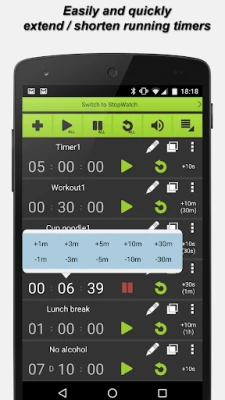
- Easy expansion of active timers through quick menus
- Cloud backup support for seamless recovery upon device changes
- Four different font and button sizes for accessibility
- Ad-free experience in the paid version
Conclusion: Elevate Your Time Management
Multi-timer applications are invaluable tools that can significantly enhance your time management skills. With their extensive features, including customizable timers, voice alarms, and efficient grouping, these apps cater to a wide range of needs. Whether you're cooking, exercising, or managing multiple tasks, a multi-timer app can help you stay organized and on track. Explore the possibilities and unlock the full potential of your time today!
If you encounter any alarm delays, it’s advisable to check your phone's battery saver settings, as these can often cause delays. For any issues or requests, feel free to reach out via email.
Rate the App
User Reviews















Popular Apps










Editor's Choice









