

Latest Version
153.07.01
July 14, 2026
MTools Tec
Tools
Android
0
Free
com.mtoolstec.mtoolsLite
Report a Problem
More About MTools BLE - BLE RFID Reader
Unlocking the Power of Mifare Classic Tools: A Comprehensive Guide
Mifare Classic Tools are essential for anyone working with Mifare technology, offering a suite of features that enhance the management and manipulation of Mifare cards. This article delves into the various functionalities of Mifare Classic Tools, providing insights into their capabilities and how they can streamline your operations.
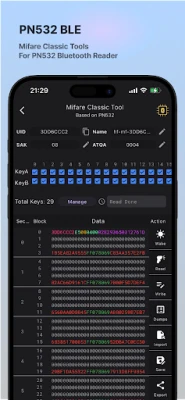
User-Friendly Mifare Dump Editor
The Mifare Dump Editor is designed with an intuitive user interface, making it easy for users to navigate through its features. This tool allows for:
- Full Dump Reading: Effortlessly read the complete data dump from Mifare cards, ensuring you have all the necessary information at your fingertips.
- Tag Formatter: Format tags quickly and efficiently, preparing them for new data or applications.
- Partial and Full Sector Writing: Write data to specific sectors or the entire card, providing flexibility in data management.
UID Changer: Customizing Your Mifare Experience
The UID Changer feature supports various generations of Mifare cards, including:
- Gen1A, Gen2, Gen3 & Gen4 Magic Card Support: Easily modify the UID of your Mifare cards across different generations.
- Mifare Ultralight: Tailor the UID for Ultralight cards, enhancing their functionality.
- Mifare DESFire: Change UIDs for DESFire cards, ensuring compatibility with your systems.
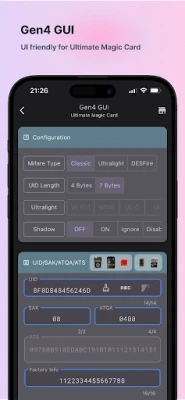
GEN4 GUI: Advanced Configuration Options
The GEN4 GUI offers advanced configuration settings for Mifare cards, including:
- Configuration for Mifare Classic, Ultralight, and DESFire: Seamlessly configure various card types to meet your specific needs.
- Shadow Mode Settings: Utilize shadow mode for enhanced security and functionality.
- UID/SAK/ATQA/ATS Management: Manage essential card parameters with ease.
- Password Protection: Implement password security to safeguard your data.
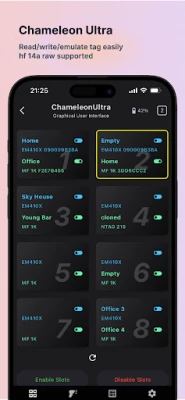
ChameleonUltra: Versatile Slot Management
The ChameleonUltra tool is a powerful asset for managing Mifare cards, featuring:
- Slot Manager: Organize and manage multiple slots for efficient card handling.
- Quick Reading & Simulating: Read and simulate card data swiftly, enhancing productivity.
- Slot Dump: Create dumps of your slots for backup and analysis.
- Button Settings: Customize button functionalities for a personalized experience.
- Mifare Classic Settings: Adjust settings specific to Mifare Classic cards.
- Mfkey32: Utilize Mfkey32 for advanced key management.
- Firmware Upgrade: Keep your device updated with the latest firmware.
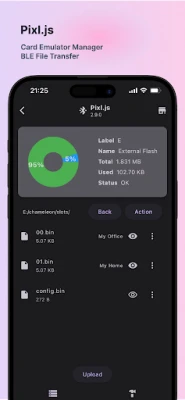
Pixl.js: Streamlined File Management
Pixl.js enhances file management capabilities with features such as:
- BLE File Transfer: Transfer files via Bluetooth Low Energy for quick and efficient data handling.
- Dump Uploader: Upload dumps easily for further processing.
- Slot Name Editor: Rename slots for better organization and identification.
- Firmware Upgrade: Ensure your system runs smoothly with regular firmware updates.
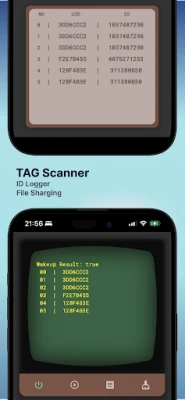
Tag Scanner: Efficient Tag Management
The Tag Scanner tool simplifies tag management with features like:
- ID Logger: Keep track of tag IDs for better inventory management.
- Tag ID Sharing: Share tag IDs effortlessly with team members or systems.
Mifare Dump: Comprehensive Data Handling
Mifare Dump offers robust data handling capabilities, including:
- Importing by BIN, MCT, or JSON: Import data in various formats for flexibility.
- Share Dump as BIN, MCT, or JSON: Easily share your dumps in the format that suits your needs.
- Dump to Keys: Convert dumps into keys for enhanced security and access control.
Mifare Keys: Secure Key Management
Manage your Mifare keys effectively with features such as:
- Public Keys: Access public keys for general use.
- Private Keys by User: Maintain user-specific private keys for enhanced security.
- History Keys by Card: Track key history for each card for better management.
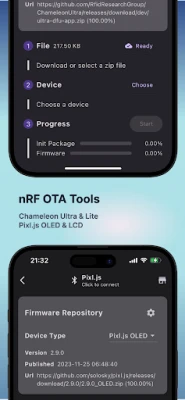
OTA Tool: Simplifying Firmware Upgrades
The OTA Tool streamlines the firmware upgrade process with:
- Firmware Repository: Access a comprehensive repository of firmware updates.
- File Selectable: Choose specific files for upgrading, ensuring you only update what’s necessary.
- Upgrading Process: Follow a straightforward upgrading process for hassle-free updates.
Conclusion
Mifare Classic Tools provide a powerful suite of functionalities that enhance the management and manipulation of Mifare cards. From user-friendly interfaces to advanced configuration options, these tools are essential for anyone looking to optimize their Mifare operations. By leveraging these features, users can ensure efficient data handling, secure key management, and seamless firmware upgrades, ultimately leading to improved productivity and security.
Rate the App
User Reviews















Popular Apps










Editor's Choice









