
Latest Version
9.9.13581
February 25, 2026
jumobiledo
Tools
Android
1
Free
com.ljmobile.move.app
Report a Problem
More About Move app to SD card
Ultimate Guide to Managing Your Apps: Move, Sort, and Optimize
In today's digital age, managing your mobile applications efficiently is crucial for optimal device performance. This guide will explore various features that allow you to move apps to your SD card or internal storage, sort them effectively, and access detailed information about each application. Whether you're looking to free up space or organize your apps better, this article covers everything you need to know.
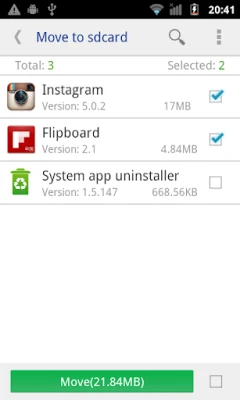
Move Apps to SD Card for Enhanced Storage
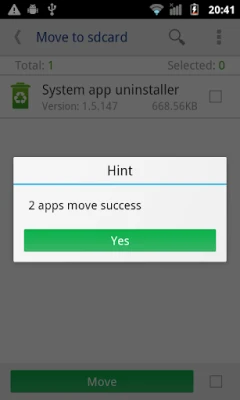
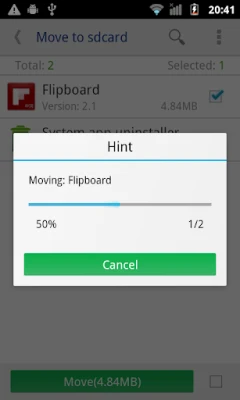
One of the most significant advantages of modern smartphones is the ability to expand storage using an SD card. Moving apps to your SD card can free up valuable internal storage space, allowing your device to run more smoothly. With the right tools, you can easily transfer applications to your SD card, ensuring that your device remains clutter-free.
Transfer Apps to Internal Storage
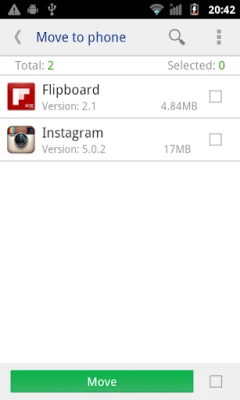
In some cases, you may need to move apps back to your phone's internal storage. This feature is particularly useful for applications that require more resources or for those that you use frequently. By managing your app locations effectively, you can optimize your device's performance and ensure that your most-used applications are readily accessible.
Sort Apps by Various Criteria
Organizing your apps can significantly enhance your user experience. With the ability to sort applications by various criteria such as:
- Movable: Identify which apps can be transferred to your SD card.
- Name: Arrange apps alphabetically for easy navigation.
- Size: Sort apps based on their storage footprint to manage space effectively.
- Install Time: View apps based on when they were installed, helping you keep track of new additions.
This sorting capability allows you to manage your applications more efficiently, ensuring that you can quickly find what you need.
Customizable App Display Options
For a more personalized experience, users can customize the information displayed in their app list. Options include:
- Install Time: See when each app was installed.
- Package Name: View the unique identifier for each application.
- APK Path: Access the file path for the APK, making it easier to manage installations.
These customizable features allow users to tailor their app management experience to their specific needs.
Access Detailed App Information
Understanding the specifics of each application can help you make informed decisions about what to keep or remove. Users can view essential details such as:
- Size: Know how much space each app occupies.
- Install Time: Track when you added the app to your device.
- Package: Identify the app's package name for troubleshooting or management.
- APK Path: Locate the installation file for easy access.
This detailed information empowers users to manage their apps more effectively, ensuring optimal device performance.
Open Apps with Ease
With a simple tap, you can open any application directly from your management tool. This feature streamlines your workflow, allowing you to access your favorite apps without navigating through multiple menus.
Search for Apps in the Market
Finding new applications that suit your needs is easier than ever. With a built-in search feature, you can quickly look for apps in the market by entering keywords related to the app you desire. This functionality helps you discover new tools and utilities that can enhance your mobile experience.
Web Search by APK Name, Package Name, or App Name
If you need more information about a specific app, you can search the web using the APK name, package name, or app name. This feature is particularly useful for troubleshooting or finding alternative applications that may better suit your needs.
Root Permission for Advanced App Management
For users who have granted root permission to their devices, the app management capabilities expand significantly. With root access, you can:
- Move Multiple Apps at Once: Transfer several applications to your SD card or internal storage with a single click, saving you time and effort.
- Access Almost All Installed Apps: Rooting your device allows you to manage nearly all applications, including system apps that are typically restricted.
This advanced level of control can greatly enhance your device's performance and storage management.
Troubleshooting: Understanding SD Card Limitations
It's essential to understand the limitations that may arise when managing your apps. If you encounter the message "SD card shares the same disk with OS," it indicates that your Android operating system has set the default SD card and system partition on the same disk. In this case, moving apps from the system to the default SD card is not possible, as they reside on the same storage medium.
To resolve this issue, consider using a dedicated SD card for app storage or exploring other storage management options to optimize your device's performance.
Conclusion
Managing your mobile applications effectively is vital for maintaining optimal device performance. By utilizing features that allow you to move apps to your SD card or internal storage, sort them by various criteria, and access detailed information, you can enhance your user experience significantly. Whether you are a casual user or a tech enthusiast, mastering these app management techniques will ensure that your device remains efficient and organized.
Rate the App
User Reviews















Popular Apps










Editor's Choice









