

Latest Version
7.6.0 - App Store Build - Release
January 31, 2026
Field2Base
Tools
Android
0
Free
com.field2base.mobileforms
Report a Problem
More About Mobile Forms
Transform Your Mobile Workforce with Field2Base Mobile Forms™
In today's fast-paced business environment, having a mobile workforce is essential. However, if your team is still relying on outdated paper forms or cumbersome email processes, you may be facing significant challenges. Incomplete job information, illegible handwriting, and delays in processing can hinder productivity and efficiency. Fortunately, Field2Base Mobile Forms™ offers a comprehensive solution to streamline your operations.
Why Choose Field2Base Mobile Forms™?
Field2Base Mobile Forms™ revolutionizes the way your mobile workforce operates. Here are some of the key benefits:
Seamless Transition from Paper to Digital
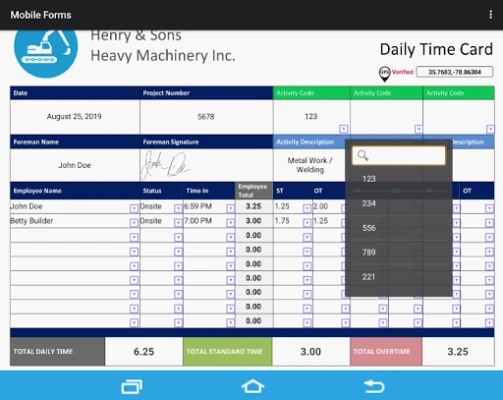
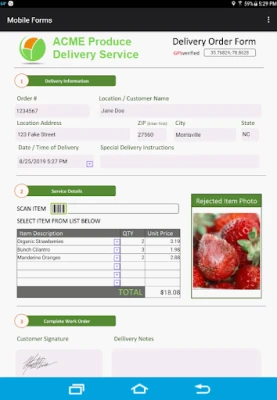
With Field2Base, you can effortlessly convert your existing paper forms into dynamic electronic forms. Maintain the familiar look and feel of your current documents or design entirely new forms tailored to your specific needs.
Enhanced Features for Improved Data Collection
Field2Base Mobile Forms™ allows you to enrich your forms with advanced media options. Capture essential data through:
- Photos and videos
- Barcode scanning
- GPS coordinates
- Signature capture
- Drop-down menus
- Date and time stamps
- Automated calculations
Process Payments on the Go
Field2Base enables you to capture and process credit card payments directly in the field, making transactions seamless and efficient.
Integrated Training and Business Logic
Ensure that your forms are always complete and accurate by embedding training videos and business logic directly into your forms. This feature helps guide your workforce, reducing errors and enhancing compliance.
Efficient Form Management
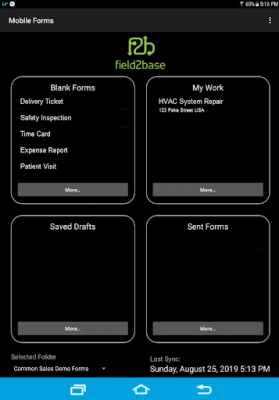
Field2Base Mobile Forms™ simplifies form management with features such as:
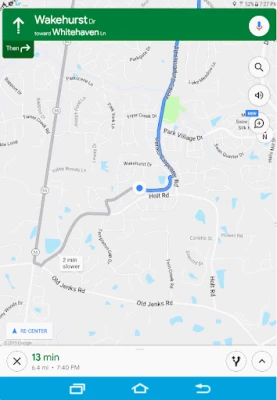
- Completing new forms or accessing work orders with turn-by-turn directions
- Saving drafts to revisit later
- Viewing previously submitted forms
- Using the "Quick Copy" feature to start new forms based on past submissions
Reliable Performance Anywhere
Whether your team is connected to the internet or working offline, Field2Base Mobile Forms™ ensures uninterrupted access to essential tools and data. This flexibility is crucial for teams operating in remote or challenging environments.
Enterprise-Grade Data Security
Data security is a top priority for any organization. Field2Base Mobile Forms™ offers enterprise-grade security measures to protect your sensitive information, giving you peace of mind as you manage your mobile workforce.
Free Version vs. Paid Version
Field2Base Mobile Forms™ offers a free version that allows users to fill out and send sample forms and work orders to their registered email. This is a great way to explore the platform's capabilities before committing to a subscription.
For full access to all features, including advanced functionalities, a monthly paid subscription is required. To learn more about pricing and additional product details, visit our website at Field2Base.
Explore Our Terms of Service
To understand the terms governing the use of Field2Base Mobile Forms™, please review our Terms of Service.
Conclusion
In conclusion, if you are looking to enhance the efficiency and effectiveness of your mobile workforce, Field2Base Mobile Forms™ is the solution you need. By transitioning from paper to digital forms, you can improve data accuracy, streamline processes, and empower your team to work more effectively in the field. Don't let outdated methods hold you back—embrace the future of mobile data collection today!
Rate the App
User Reviews















Popular Apps










Editor's Choice









